# WebAssembly (Wasm)
WebAssembly is a way to run applications in programming languages other than JavaScript as web pages. Essentially, Wasm is just a virtual machine that runs on all modern browsers, but whereas in the past you were required to use JavaScript to run code in a web page, Wasm makes it possible to run code in browsers with programming languages other than JavaScript.
The WebAssembly Virtual Machine, or Wasm for short, is proven to be faster than any alternative virtual machine because of technology peculiarities. The use of WebAssembly enables Gear’s smart contracts to compile directly into machine code and run at near-native speeds. Higher speeds means lower transaction costs and higher efficiency.
All Gear programs and smart-contract are run as WebAssembly programs. This means for example, that developers can bring their applications to the web and achieve full performance with the apps’ full set of capabilities - that they’d typically have when running native on Windows or Mac - in a web browser. The developers won’t actually have to write the Wasm code directly either. Instead, they’d use Wasm as a compilation target for programs written in other languages.
The main problem that Wasm solves is the inability to use programming languages other than JavaScript on the web. Although JavaScript is a great programming language, it wasn’t designed to be super fast in large applications. What’s game changing about Wasm is that it brings the performance of native applications, written in other programming languages, to the web in a way that's completely secure.
Wasm should give significant speed increases in two main areas. First, it should significantly increase application start up speed. In fact, applications that are already using Wasm have been able to cut application start up time in half, and as more optimizations are made, it will only continue to increase startup speed further. This will allow huge applications to load up very, very quickly. Secondly, Wasm enables significant benefits in throughput too, which means that once code is compiled, it will run much faster - making applications more efficient and responsive which will significantly improve user experience.
WebAssembly has the following advantages:
* Wasm is extremely fast, efficient and portable. Code can be executed at near-native speed across different platforms.
* Wasm is also readable and debuggable. Although WebAssembly is a low-level language, it does have a human-readable text format that allows code to be written, viewed and debugged by hand.
* It’s also extremely secure as it’s run in a safe, sandboxed environment and like other web code, it will enforce the browsers same-origin and permissionless security policies.
Wasm format allows Gear Protocol’s developers write applications in Rust today along with C#/C++, Go, and Javascript in the future.
# Actor Model
One of the key and distinguished features of the Gear Protocol is the **Actor model** for message-passing communications.
Actor model framework enables asynchronous messaging and parallel computation which drastically increases the achievable speed and allows building more complex dApps in an easier way. Asynchronous format of dApps written on the Gear Protocol makes them cross-chain compatible by default.
In concurrent computing systems, “message-passing communication” means that programs communicate by exchanging messages. This has its advantages over “shared memory communication” as message passing is easier to understand than shared memory concurrency as it’s more robust and has better performance characteristics.
The principle of the Actor model approach is that programs never share any state and just exchange messages between each other. With the Actor model, a system consists of simultaneously functioning objects that communicate with each other exclusively by messaging.
While an ordinary Actor model does not guarantee message ordering, the Gear Protocol provides some additional guarantees that the order of messages between two particular programs is preserved.
Actors are isolated from each other and do not share memory. They have a state and the only way to change it is by receiving a message.
The Actor model guarantees high scalability and high fault tolerance. As applications become more computationally intensive over time in Web3, the Actor model will naturally allow advancements in CPU technology to support this continued scale.
Actor [#actor]
An Actor in the Actor model is an atomic computational unit that can send and receive messages. With Gear, any instance in the Gear Protocol is an Actor - a program (smart contract) or a user that sends messages to a program. Every Actor has an internal private state, also users have a mailbox. Communication is asynchronous, messages are popped out from the mailbox and allocated to message processing streams where they’re then processed in cycles.
When an actor receives and processes a message, the response can be the following:
* Send a message to another actor
* Create another actor
* Change its own internal state
Actors are independent, they never share any state and just exchange messages with each other.
Using the Actor model approach provides a way to implement Actor-based concurrency inside smart contract logic. It can utilize various language constructs for asynchronous programming (Futures and async-await in Rust).
Async/await support [#asyncawait-support]
Unlike classes, Actors allow only one task to access their mutable state at a time, which makes it safe for code in multiple tasks to interact with the same instance of an actor.
Asynchronous functions significantly streamline concurrency management, but they do not handle the possibility of deadlocks or state corruption. To avoid deadlocks or state corruption, async functions should avoid calling functions that may block their thread. To achieve it, they use an await expression.
Currently, the lack of normal support of async/await patterns in the typical smart contracts code brings a lot of problems for smart contract developers. Actually, achieving better control in a smart contract program flow is actually more or less possible by adding handmade functions (like in Solidity smart contracts). But the problem with many functions in a contract is that one can easily get confused - which function can be called at which stage in the contract's lifetime. It brings unnecessary complexity for developers writing smart contracts using domain specific languages.
Gear natively provides arbitrary async/await syntax for any programs. It greatly simplifies development and testing and reduces the likelihood of errors in smart contract development. The Gear Protocol's API also allows synchronous messages by simply not using await expressions if the logic of the program requires it.
# Technology Aspect
Gear Protocol, built on [Substrate](/docs/vara-network/about/technology/substrate), facilitates swift dApp development. It is the most developer-friendly way to implement programs and smart contracts with arbitrary logic and of any complexity.
Vara benefits from Gear Protocol's unique tech stack that includes the Actor Model, Persistent Memory and the WebAssembly virtual machine (Wasm).
Actor Model [#actor-model]
In the [Actor Model](/docs/vara-network/about/technology/actor-model) of communication, programs and users are known as "actors." Actors maintain their state privacy and communicate through messages, enhancing network security. All communications are asynchronous but logically guaranteed to be handled, which increases the achievable network speed and allows the building of more sophisticated dApps.
Persistent Memory [#persistent-memory]
The [Persistent Memory](/docs/vara-network/about/technology/persist-memory) concept entails that programs do not rely on shared storage; instead, their complete state is consistently stored within their respective memory spaces. Clever and effective memory virtualization techniques allow tracking memory access and ensuring that only required pages are persisted and loaded when needed. It removes many complexities, streamlining the development process while mapping running programs and their states to more closely resemble real-life operating system primitives.
Wasm [#wasm]
[WebAssembly](/docs/vara-network/about/technology/WASM) allows the running of any bytecode in a sandboxed environment. Smart contracts in Vara are run as Wasm programs (Actors). Since Wasm can be compiled from a variety of common programming languages, it considerably lowers the barrier to entry for developers arriving from the Web2 space. Enabling native speed for deterministic cross-platform computations, Wasm is Web3 development unlocked.
Network Upgrade [#network-upgrade]
Like all software systems, blockchains require periodic updates for security patches and other code changes. In the early days, blockchains had to implement forks to make updates, causing instability and price fluctuations. Coordinating updates within a decentralized community proved challenging.
Vara, built on the Substrate blockchain development framework, offers a solution with forkless runtime upgrades. Substrate enables the deployment of enhanced runtime capabilities, introducing breaking changes without a hard fork. This is possible because the runtime definition is a component of a Substrate chain's state, allowing network participants to update it through an extrinsic.
Gear Capabilities [#gear-capabilities]
Gear Protocol offers a versatile platform for building next-generation Web3 applications. Gear's true strength lies in its broader capabilities:
* **Sovereign Layer-1 Network** tailored to developer's specific needs, escaping the limitations of pre-defined protocols, enabling complete control over governance, consensus mechanisms, and fee structures.
* **Scalable Layer-2 Solutions** seamlessly integrating with popular Layer-1 networks (like Ethereum), offloading computationally intensive tasks, significantly reducing on-chain costs and boosting transaction throughput.
* **Parallel Processing Powerhouse** - Gear scales naturally with hardware advancements, thanks to its unique parallel processing architecture. Run demanding applications on standard computers, ensuring cost-effectiveness and accessibility.
* **Modular Microservices Mastery** - allows to deploy and manage individual microservices on single nodes or custom networks, optimize resource allocation, simplify maintenance, and achieve fine-grained control over the application's functionality.
* Unleash the potential of **Zero-Knowledge Proofs** (ZKPs) with Gear's high-performance infrastructure. Develop privacy-preserving applications, including ZKML (Zero-Knowledge Machine Learning), without sacrificing scalability or performance.
* **Familiar Development Environment** - leverages developers existing skillset supporting widely adopted programming languages like Rust, C, and C++, allowing developers to seamlessly transition to the Gear ecosystem without mastering new complexities.
* **Collaborative Community** - becoming a part of a thriving developer community enables anyone access a wealth of resources and support, including a growing library of pre-built programs and smart contracts examples, tools, and documentation. Contribute to the development of a vibrant and collaborative ecosystem.
* Potential integration with other Substrate-based networks. Substrate framework simplifies the creation of custom blockchains for specific applications. Substrate provides extensive functionality out-of-the-box and allows one to focus on creating a custom engine on top of the protocol. The majority of developers and inspirers of the Gear Protocol were directly involved in creating the Substrate technology.
Anyone with a standard computer can run a [Gear node](/docs/vara-network/node) today and always.
For additional details, refer to the [Gear Whitepaper](https://whitepaper.gear.foundation).
# Persistent Memory
Another distinguished feature of the Gear Protocol is the Persistent memory approach. It is what makes development easier, removes a lot of complexity and makes protocol memory management match real-life hardware and operating systems.
Programs running in Gear Networks don’t use storage but rather their full state is persisted which ensures much less API surface for blockchain context. It avoids domain-specific language features as well as allows using much more complex language constructs — persisted boxed closures, futures compositors, etc.
The Gear Protocol uses clever memory virtualization techniques (despite vanilla Wasm does not), memory allocation and deallocation are first-class syscalls of the protocol. Memory access is also tracked and only required pages are loaded/stored. That allows heap-allocated stack frames of smart contracts stored in the blockchain’s state (typically found in futures and their compositors) to be seamlessly persisted and invoked when needed, preserving their state upon request.
Program code is stored as an immutable Wasm blob. Each program has a fixed amount of memory which persists between message-handling (so-called static area).
Gear instance holds individual memory space per program and guarantees its persistence. A program can read and write only within its own memory space and has no access to the memory space of other programs. Individual memory space is reserved for a program during its initialization and does not require an additional fee (it is included in the program's initialization fee).
A program can allocate the required amount of memory in blocks of 64KB. Each memory block allocation requires a gas fee. Each page (64KB) is stored separately on the distributed database backend, but at the run time, Gear node constructs continuous runtime memory and allows programs to run on it without reloads.
Memory parallelism [#memory-parallelism]
Individual isolated memory space per program allows parallelization of message processing on a Gear node. Number of parallel processing streams equals the number of CPU cores. Each stream processes messages intended for a defined set of programs. It relates to messages sent from other programs or from outside (user’s transactions).
For example, given a message queue containing messages targeted to 100 different programs, Gear node runs on a network where 2 threads of processing are configured. Gear engine uses a runtime-defined number of streams (equal to number of CPU cores on a typical validator machine), divides total amount of targeted programs to number of streams and creates a message pool for each stream (50 programs per stream).
Programs are distributed to separate streams and each message appears in a stream where its targeted program is defined. So, all messages addressed to a particular program appear in a single processing stream.
In each cycle a targeted program can have more than one message and one stream processes messages for plenty of programs. The result of message processing is a set of new messages from each stream that is added to the message queue, then the cycle repeats. The resultant messages generated during message processing are usually sent to another address (return to origin or to the next program).
# State transition
Each system follows the rules according to which the state of the system evolves. As the network processes new input data, the state is advanced according to state transition rules. This input data is packed in granular pieces of information called transactions.
Gear nodes maintain and synchronize a transaction pool which contains all those new transactions. When any node (validator or not) receives a transaction, the node propagates the transaction to all connected nodes. For advanced reading how the transaction pool operates, refer to [Substrate Documentation](https://substrate.dev/docs/en/knowledgebase/learn-substrate/tx-pool).
When a Gear validator node comes to produce a new block, some (or all) transactions from the pool are merged into a block and the network undergoes a state transition via this block. Transactions that were not taken in the last block remain in the pool until the next block is produced.
A Gear Network supports the following types of transactions:
1. **Upload a program** - user uploads new program(s) - smart-contracts
2. **Upload a code** - user uploads a code to create programs from it later
3. **Create a program** - program or user creates a program from the previously uploaded code
4. **Send a message** - program or user fills the message queue
5. **Send a reply** - similar to the message but can be sent only as a reply to the received message
6. **Claim a value from mailbox** - user requests to transfer value associated with the message in his mailbox
7. **Dequeue messages** - validators (block producers) dequeue multiple messages, running associated programs
8. **Balance transfers** - Gear engine performs user-program-validator balance transfers
Message processing is performed in the reserved space of the block construction/import time. It is guaranteed that message processing will be executed in every block, and at least at some particular rate determined by current instance settings.
Upload a program [#upload-a-program]
Designated authorities (or any user for public implementation) of Gear network can propose a new program saved to the state. For public networks, a balance associated with a program is also provided. This new balance then constitutes the initial balance (Existential Deposit).
Upload a code [#upload-a-code]
One can upload a Wasm code without initialization. This code cannot be executed as a program but it is saved to the storage and can be used for creating new programs from it. Both users and programs can create programs from uploaded code.
Create a program [#create-a-program]
Both users and programs can create new programs from the uploaded code. The code can be reused many times to produce several programs.
Send a message [#send-a-message]
End-users interact with programs via sending messages to a Gear Network. Messages sent to a Gear Network fill up the global message queue. This queue can be viewed as a runtime-driven transaction queue but with the guarantee that any message accepted into it will eventually be processed. Putting a message in the queue is not free and therefore a message is guaranteed to be dispatched.
Programs also exchange messages with each other. The result of the received message can be another message (reply) addressed to another program or a user or a designated behavior to be used for the next message it receives. A program can also send a message the execution result of which will be a creation of another program.
Send a reply [#send-a-reply]
The reply is similar to the message described above with the only difference that the reply can be sent only as a response to the received message. Users can send the reply to the message contained in their mailboxes.
Claim a value from mailbox [#claim-a-value-from-mailbox]
After receiving a message with an associated value, the user has to claim this value to transfer it from the message to the user. Unclaimed value is to be returned to the sender after the message leaves the mailbox after its gas limit exhausts.
Dequeue messages [#dequeue-messages]
Validators can choose which messages to dequeue when it's their turn to produce the next block. It eliminates the need of each particular validator to maintain the full memory state. Dequeuing occurs only at the end of each block. During dequeuing, new messages can be generated. They can also be processed in this phase, but also can stay in the queue for the next block (and another validator).
Balance transfers [#balance-transfers]
Regular balance transfers can be performed in two ways. The first way is to use correspondent extrinsics (e.g. `transfer`, `setBalance`, etc.) from the Substrate `Balances` pallet. The second way is to send a message from one user to another with associated value.
Messages, blocks and events lifecycle [#messages-blocks-and-events-lifecycle]
The picture below illustrates the eternal lifecycle of Gear machinery. As the actor model for communications dictates, nothing is shared, there are only messages. Messages with destination "system" end up in the event log to be inspected in the user space.
# Gear Network State
As any blockchain system, Gear maintains distributed state. Runtime code compiled to WebAssembly becomes part of the blockchain’s storage state.
Gear ensures one of the defining features - **forkless runtime upgrades**. The state is also guaranteed to be finalized if a finality gadget is used.
Storage state consists of the following components:
* **Programs and memory** (includes program’s code and private memory)
* **Message queue** (global message queue of the network)
* **Accounts** (network accounts and their balances)
Programs [#programs]
Programs are first-class citizens in the Gear network state.
Program code is stored as an immutable Wasm blob. Each program has a fixed amount of memory which persists between message-handling (so-called static area).
Programs can allocate more memory from the memory pool provided by a Gear instance. A particular program can read and write only within exclusively allocated to its memory.
Memory [#memory]
Gear instance holds individual memory space per program and guarantees it's persistence. A program can read and write only within its own memory space and has no access to the memory space of other programs. Individual memory space is reserved for a program during its initialization and does not require an additional fee (included in the program initialization fee).
A program can allocate the required amount of memory in blocks of 64KB. Each memory block allocation requires a gas fee. Each page (64KB) is stored separately on the distributed database backend, but at the run time, Gear node constructs continuous runtime memory and allows programs to run on it without reloads.
Message queue [#message-queue]
Gear instance holds a global message queue. Using Gear node, users can send transactions with one or several messages to a particular program(s). This fills up the message queue. During block construction, messages are dequeued and routed to the particular program.
Accounts [#accounts]
For a public network, protection against DOS attacks always requires gas/fee for transaction processing. Gear provides a balance module that allows to store user and program balances and pay a transaction fee.
In general, a particular Gear network instance can be defined as both permissioned and permissionless, public blockchain. In the permissioned scenario, no balance module is required.
# Vara.eth
Welcome to Vara.eth [#welcome-to-varaeth]
Vara.eth brings **high-performance computation** directly to Ethereum. Build apps that were previously impossible on-chain — with parallel execution, 2 GB memory per program, and users who never pay gas.
Where do you want to start? [#where-do-you-want-to-start]
**Modern development runs on AI agents.** Whether you're shipping a production dApp or prototyping an idea, tell Claude Code, Codex, or Cursor what you need — [Vara.eth Agent Skills](/docs/vara-eth/setup/agent-skills) walk the agent through Sails contracts, `ethexe` deployment, ABI, and frontend with verified, documentation-backed patterns. **Available right now.**
Deploy your first program in 5 minutes → [Quick Start](/docs/vara-eth/build/quickstart)
I'm new here [#im-new-here]
Start with **[What is Vara.eth?](/docs/vara-eth/start-here/what-is-vara-eth)** — understand the big picture in 3 minutes.
I want to build [#i-want-to-build]
Jump to **[Pick Your Path](/docs/vara-eth/start-here/pick-your-path)** — choose your developer journey based on what you want to create.
Why should I care? [#why-should-i-care]
Read **[Why It Matters](/docs/vara-eth/start-here/why-it-matters)** — see what becomes possible: reverse gas, pre-confirmations, parallel execution.
***
**Vara.eth is proven live on Ethereum — start building today.** The TestNet and MainNet campaigns ran the full stack end to end. [One of Us](https://github.com/gear-foundation/one-of-us) drew 931 members — one click each, no gas paid by users; [Robo Miner](https://github.com/gear-foundation/robo-miner) put AI agents into a live on-chain arena. Both are open source and work as reference applications.
Those campaigns are complete, and the Gear-operated public endpoints (Ethereum RPC, Beacon, and the Vara.eth validator network) are no longer served. Everything else is unchanged — the Router and wVARA contracts stay deployed and verifiable on Ethereum Mainnet and Hoodi, and the whole stack is open source. Point `ethexe` at any Ethereum RPC provider, or [run your own node](/docs/vara-eth/setup/local-node), and reproduce the entire flow. You can also build with [Agent Skills](/docs/vara-eth/setup/agent-skills).
# Overview
Welcome to Vara Network’s documentation portal. This is the primary source of information for everyone who is looking for detailed information about Vara. Here you will find guides and developer's documentation that will enable you to dive deeper into developing programs and smart contracts on the Gear Protocol and running them on Vara in a decentralized manner.
This Wiki outlines foundational information, provides general technology overviews, and highlights key advantages of Vara’s technology. It includes guidance on implementing and running your programs, setting up a Vara node, and becoming a nominator or validator. Additionally, it offers full API details and examples.
Subscribe to the [@GearVaraDev](https://t.me/GearVaraDev) Telegram channel to get the latest releases and updates directly from the development team.
What is the Vara Network? [#what-is-the-vara-network]
**[Vara Network](https://vara.network/)** is a stand-alone layer-1 decentralized network built and running on top of **[Gear Protocol](https://gear-tech.io/)**.
Alongside other blockchains that offer fast and inexpensive transactions, Vara possesses several unique features: a simple yet powerful framework for writing programs based on the Actor model, automation through deferred messages, gasless and signless transactions, built-in actors to extend program capabilities, and more. For more detailed information on these features, read the next article - [Distinctive Features](/docs/vara-network/about/features).
Many developers choose Vara for its ease of implementing arbitrary and advanced logic for their web3 projects. Web3 projects are particularly inspired by the ability to implement web2-like scenarios, automate interactions with users and between programs, and create an enhanced user experience that is unattainable on other blockchain platforms due to the specifics of their technology.
The fast and scalable Vara Network, which is non-fork upgradable, provides an optimal platform for next-gen gaming, financial-based applications, and various experimental features, among others. Vara accommodates a wide range of modern use cases, making it an ideal environment for running diverse applications.
Vara Network employs an inclusive and reliable Nominated Proof-of-Stake (NPoS) mechanism to select validators for its consensus protocol. This mechanism selects validators based on their stakes and the funds nominated by other token holders. Running a node or supporting the network as a nominator is incentivized. This approach fosters a more democratic and decentralized process, reducing the risk of centralization, where only the wealthiest entities could become validators.
The vast majority of tokens are held by the community. Vara empowers its community to steer the network's evolution through its on-chain governance mechanism. To ensure decentralization, longevity, and flexibility, Vara adopts the widely accepted OpenGov framework as its native governance model. This framework enables any VARA token holder to participate in Vara’s decentralized governance, influencing future updates or modifications to the network.
The primary features of the Vara Network include:
* The most advanced platform for developing and running decentralized applications.
* Fast and low transaction cost truly decentralized L1.
* Secure, efficient, and scalable environment for new features and optimizations.
* A robust [NPoS](/docs/vara-network/staking) mechanism for network security and decentralization.
* [Governance](/docs/vara-network/governance) by community members - token holders.
* A stable and upgradable network, facilitated by Substrate.
* A well-thought-out [token economy](/docs/vara-network/tokenomics) that ensures the long-term sustainability of the network and benefits for its community.
Vara is currently in the **BETA phase**. While the network is live, it is not guaranteed to be entirely bug-free.
However, thanks to **fork-less upgrades**, the network will evolve continuously while ensuring all user data is preserved.
Built for the Agentic Era [#built-for-the-agentic-era]
**Modern software development runs on AI agents.** Whether you're shipping a production dApp or prototyping an idea, you describe what you need and the agent — Claude Code, Codex, Cursor — writes the code. Vara is built for this loop, with a complete, open-source skill pack you can use right now.
**[Vara Skills](/docs/vara-network/api/tooling/vara-skills)** gives the agent the exact APIs, real imports, and verified patterns for every step — spec, Sails contract, IDL, frontend, tests, and deployment. No hallucinated symbols, no broken builds. You describe the dApp; the agent ships it.
Agents don't stop at building. The **[Trading Skill](/docs/vara-network/api/tooling/trading-skill)** lets an agent trade VARA and other spot pairs on centralized exchanges — Gate.io and Coinbase — with guided onboarding, local-only keys, risk limits, and dry-run-first safety.
This is available **here and now**, not on a roadmap. For Vara.eth (Ethereum-anchored programs), see [Vara.eth Agent Skills](/docs/vara-eth/setup/agent-skills).
What is the Gear Protocol? [#what-is-the-gear-protocol]
The Gear Protocol is a [Substrate](https://substrate.io/)-based programming platform that enables anyone to develop and run dApps in Vara Network as well as other custom networks or environments powered by the Gear Protocol’s runtime and technology.
The Gear Protocol is the most developer-friendly and cost-effective way to implement and run programs and smart contracts with arbitrary logic and of any complexity. Gear programs run under [WebAssembly](https://webassembly.org/) VM and they can be compiled from many popular programming languages, such as Rust, C, C++ and many more.
The protocol ensures minimal, intuitive, and sufficient APIs for implementing programs and running them on multiple environments that support Gear runtime without needing to rewrite them. From a technological standpoint, the Gear Protocol is distinguished by fundamentally new features that enable anyone to create asynchronous programs with a completely new and previously unattainable user experience. These features include the Actor model for communication, the persistent memory concept, and the WebAssembly execution environment. The protocol dictates the structure and behavior of actors as communicating entities.
The Gear Protocol assists with the transition to mass use of Web3 technologies by enabling the running of innovative dApps, microservices, middleware and open APIs.
All code, libraries, and tools are available on [GitHub](https://github.com/gear-tech/gear). Feel free to use the tools and libraries, log issues as you find them, or create pull requests for your bug-bears or features. As the Gear Protocol is developing and growing, contributions are more than welcome!
How to Start Developing on Vara Network? [#how-to-start-developing-on-vara-network]
1. Learn program development using the [developer documentation](/docs/developing/build).
2. Explore and try a batch of ready-made programs on [GitHub](https://github.com/gear-foundation).
How to engage with the Vara community [#how-to-engage-with-the-vara-community]
X (ex. Twitter) [#x-ex-twitter]
Follow Vara Network on X for regular updates: [@VaraNetwork](https://twitter.com/VaraNetwork)
Telegram [#telegram]
Join Vara's official Telegram channel: [@VaraNetwork\_Global](https://t.me/VaraNetwork_Global)
Discord [#discord]
General information, announcements, technical and non-technical conversation are found on the [Discord server](https://discord.gg/x8ZeSy6S6K).
Medium [#medium]
Get smart with Vara's regular articles on [Medium](https://medium.com/@VaraNetwork).
GitHub [#github]
dApp examples and developer tools are found on [Gear Foundation's GitHub](https://github.com/gear-foundation).
Gear Protocol's code, libraries, and tools are available on [Gear's GitHub](https://github.com/gear-tech/gear)
# Quick Start
This guide provides a general overview of running programs on the [Vara Network](https://vara.network/). It guides you through how to write a program, compile it to Wasm and deploy it to the network.
Prerequisites [#prerequisites]
System dependencies [#system-dependencies]
* **Linux:** install build tools according to your distribution.\
For Ubuntu:
```bash
sudo apt install -y binaryen build-essential clang cmake curl git jq libssl-dev pkg-config
```
* **macOS:** install Xcode Command Line Tools:
```bash
xcode-select --install
```
* **Windows:** install **Build Tools for Visual Studio**.\
Download: [https://visualstudio.microsoft.com/downloads/?q=build+tools](https://visualstudio.microsoft.com/downloads/?q=build+tools)
Rust toolchain [#rust-toolchain]
Install Rust using [Rustup](https://rustup.rs/):
```bash
curl --proto '=https' --tlsv1.2 -sSf https://sh.rustup.rs | sh
```
If you just installed Rust and see `command not found: rustup` or `cargo`, your terminal needs to reload the environment.
**Run this command to update your PATH:**
```bash
source "$HOME/.cargo/env"
```
Alternatively, simply restart your terminal (or VS Code) to apply the changes.
Wasm target [#wasm-target]
Add the Wasm target:
```bash
rustup target add wasm32v1-none
```
Starting from Gear **v1.8.0**, you must use the `wasm32v1-none` target to build programs for the Vara Network.
**Note:** The old `wasm32-unknown-unknown` target is now considered legacy and should only be used for older projects.
Creating your first Vara program [#creating-your-first-vara-program]
To get started, install the `sails-cli` tool using the following command:
```bash
cargo install sails-cli
```
After installation, you can create a new Vara project named `vara-app` by running:
```bash
cargo sails new vara-app
```
Your `vara-app` directory tree should look like this:
```
vara-app
│
├── app
│ └── src
│ └── lib.rs
│
├── client
│ └── ...
│
├── src
│ └── lib.rs
│
├── tests
│ └── gtest.rs
│
├── build.rs
│
├── Cargo.lock
│
├── Cargo.toml
│
└── README.md
```
In `Cargo.toml`, the essential libraries required for building your first project have been included, for example:
```rust title="vara-app/Cargo.toml"
[package]
name = "vara-app"
version = "0.1.0"
edition = "2024"
[dependencies]
sails-rs = "1.0.0"
vara-app-app = { version = "0.1.0", path = "app" }
[workspace]
resolver = "3"
members = ["app", "client"]
[workspace.package]
version = "0.1.0"
edition = "2024"
[build-dependencies]
sails-rs = { version = "1.0.0", features = ["build"] }
vara-app-app = { version = "0.1.0", path = "app" }
[dev-dependencies]
sails-rs = { version = "1.0.0", features = ["gtest", "gclient"] }
tokio = { version = "1.47.1", features = ["rt", "macros"] }
vara-app-app = { path = "app" }
vara-app-client = { path = "client" }
```
Let's move on to the main code:
This Rust code defines a simple program for the Vara Network, now updated with a new structure. The program consists of a `VaraAppProgram` struct with a method to instantiate it and another method to return a `VaraAppService` struct. The `VaraAppService` struct has a service method that returns the string *"Hello from VaraApp!"*. This example demonstrates the basic structure and functionality of a Vara program using the `sails_rs` library.
```rust title="vara-app/app/src/lib.rs"
#![no_std]
use sails_rs::prelude::*;
struct Service(());
impl Service {
pub fn new() -> Self {
Self(())
}
}
#[sails_rs::service]
impl Service {
// Service's method (command)
#[export]
pub fn do_something(&mut self) -> String {
"Hello from Service!".to_string()
}
}
#[derive(Default)]
pub struct Program(());
#[sails_rs::program]
impl Program {
// Program's constructor
pub fn new() -> Self {
Self(())
}
// Exposed service
pub fn service(&self) -> Service {
Service::new()
}
}
```
Build your program with a single command:
```bash
cargo build --release
```
After a successful build, you can execute your tests to verify that everything is functioning correctly:
```bash
cargo test --release
```
If everything has been executed successfully, your working directory should now contain a `target` directory structured as follows:
```
vara-app
├── ...
├── target
├── ...
└── wasm32-gear
└── release
├── vara_app.wasm <---- this is our built .wasm file
├── vara_app.opt.wasm <---- this is optimized .wasm file
└── vara_app.idl <---- this is our application interface .idl file
```
* `vara_app.wasm` is the output Wasm binary built from source files
* `vara_app.opt.wasm` is the optimized Wasm aimed to be uploaded to the blockchain\
(Optimization include reducing the file size and improving performance)
* `vara_app.idl` is the Interface Definition Language (IDL) file that describes the application's interface, defining the structure and methods callable on the `vara_app` program. It's essential for interacting with the application on the blockchain, specifying available functions and their inputs and outputs. This file is crucial for developers and clients to ensure they use the correct method signatures and data types when interacting with the deployed program.
Deploy your program to Vara Mainnet [#deploy-your-program-to-vara-mainnet]
Gear provides an application for developers (Gear Idea) that implements all of the possibilities of interaction with programs on Vara Network, available at [idea.gear-tech.io](https://idea.gear-tech.io).
Building a dApp used to mean an extra step - spin up on a testnet, then move everything to mainnet. That step is gone. Gear Idea hands every developer **100 free VARA per wallet, once**, so you can deploy, test and cover your first transactions directly on mainnet. Real network, real conditions, nothing to pay to start.
Create account [#create-account]
1. Download the Polkadot extension for your browser via [https://polkadot.js.org/extension/](https://polkadot.js.org/extension/). This extension manages accounts and allows the signing of transactions with those accounts. It is a secure tool that allows injecting your accounts into any Substrate-based dapp. It does not perform wallet functions, e.g send funds.
2. Once downloaded, click + button to create a new account:
3. Make sure you save your 12-word mnemonic seed securely.
4. Select the network that will be used for this account - choose "Allow to use on any chain". Provide any name to this account and password and click "Add the account with the generated seed" to complete account registration.
5. Go to **[idea.gear-tech.io](https://idea.gear-tech.io)**. You will be prompted to grant access to your account for the application, click "Yes, allow this application access".
6. Make sure you are connected to the `Vara Network Mainnet`. The network name is at the bottom left corner of the page.
7. You may switch the network by clicking on the network name.
8. Click the `Connect` button on the top-right to select an account that will be connected to Vara.
9. In accordance with the Actor model, programs are uploaded to a network via messages. Vara node charges a gas fee during message processing. Your account balance needs to have enough funds to upload a program to Vara Mainnet. If your wallet is new, claim the one-time developer grant of **100 VARA** - click the following button:
A notification about successful balance replenishment will appear after passing captcha at the bottom of the window. You can also see the current account balance next to the account name in the upper right corner. The grant is available once per wallet and is enough to deploy a program and cover your first transactions.
Upload program [#upload-program]
1. When your account balance is sufficient, click the Upload program button to open a popup window for uploading your new program.
2. In the popup, click the Select file button and navigate to the `.opt.wasm` file we have pointed to above
3. After uploading the `.opt.wasm` file, you need to upload the `IDL` file. Click the Select file button and navigate to the `.idl` file referenced earlier.
4. Specify the program name, click the Calculate Gas button to set the gas limit automatically, and then click the Submit button.
5. Sign the `gear.uploadProgram` transaction to Vara. It is recommended to set the checkbox `Remember my password for the next 15 minutes` for your convenience.
6. Once your program is uploaded, go to the `Programs` section, find your program, and select it.
7. Click on your program to see more information, such as `Metadata/Sails`, `Messages`, `Events`, and the `Vouchers` pane.
Send message to a program [#send-message-to-a-program]
1. Send your newly uploaded program a message to see how it responds! Click the Send message button.
2. Click the Calculate Gas button to set the gas limit automatically, then click the Send Message button.
3. Sign the `gear.sendMessage` transaction as it is shown in step 5 of the section **Upload Program**.
4. After your message has been successfully processed, you will see corresponding notifications:
You have just sent a `DoSomething` command to your program!
5. Go back to your program by either clicking the Cancel button or using the browser's back button.
6. In the message pane, you can view the corresponding response.
7. Click on the message response to see more information. The expected "**Hello from VaraApp!**" response can be seen in the `Payload`.
***
Further reading [#further-reading]
For more info about writing programs for Vara and the specifics behind the program implementation, refer to [this article](/docs/developing/build/introduction).
# Upload Program
Following the principles of Actor model for communication, uploading a program in the network is just one of the specific types of transactions that contain a Wasm file as a payload.
Uploading a new program (smart-contract) to the blockchain takes place by calling the custom extrinsic `gear.uploadProgram(code, salt, initPayload, gasLimit, value)`.
Where:
* `code: Bytes` - binary Wasm code
* `salt: Bytes` - the random data that is added to the hashing process to force their uniqueness
* `initPayload: Bytes`- the init message payload that will be processed by the init() function during program initialization
* `gasLimit: u64` - the amount of gas that users are willing to spend on processing the upload of a new program
* `value: u128` - the value that will be transferred to a balance of the newly created account for the program
Program Balance [#program-balance]
For each created program, amount of VARA equal to [existential deposit](https://docs.substrate.io/reference/glossary/#existential-deposit) (currently 1 VARA) is locked as a fixed deposit at the program's balance and cannot be used throughout the program's lifetime. This deposit can only be withdrawn upon the program's termination through the `gr_exit` function or program' initialization failure.
At the time of a program’s initialization, the protocol deducts the existential deposit amount from the initiator’s balance, establishing the program’s minimal balance. It is also possible to allocate more than the ED value during the program's initialization.
When a program is created by another program, the system verifies whether the initiating program has a sufficient balance to cover the required deposit.
Program upload events [#program-upload-events]
> Note: while extrinsics represent information from the outside world, events represent information from the chain. Extrinsics can trigger events.
The extrinsic that was called to upload a program triggers a series of events. Learn more about events [here](/docs/developing/api/events#events-types).
How to upload [#how-to-upload]
There are several ways to upload a program:
Upload via Gear Idea [#upload-via-gear-idea]
The easiest way to upload the program is to use the “Upload program” option in the Gear Idea portal - **[idea.gear-tech.io](https://idea.gear-tech.io)**.
Via Gear-JS library [#via-gear-js-library]
The Gear-JS library provides a simple and intuitive way to connect Vara Component APIs, including interaction with programs. More details: [Gear API](/docs/developing/api).
Via gear-program [#via-gear-program]
`gear-program` is the command line (CLI) utility for interacting with the blockchain network. Refer to [gear-program GitHub repo](https://github.com/gear-tech/gear-program) for details.
# Consistency and Reliability
One of the key features of the Gear Protocol is its use of the Actor model for message-passing communication. The Actor model framework enables asynchronous messaging and parallel computation, which drastically improves the achievable speed and scalability of dApps. In the Actor model, programs do not share state and instead communicate with each other through messages. If a program sends an asynchronous message to another program, it has to wait for a reply from the other program before it can proceed with the next operation.
When a program interacts with another program, the transaction becomes "distributed." A distributed transaction is a set of operations performed across multiple databases or, in the case of the Gear Protocol, across multiple actors with their own states. Distributed transactions must possess these properties:
* Atomicity - all data changes are treated as if they were a single operation. That is, either all of the modifications are made, or none of them are made;
* Consistency - this property implies that when a transaction begins and ends, the state of data is consistent.
For example, transactions on the Ethereum blockchain are atomic, meaning that if a transaction fails due to an error, all of its effects on the global state are rolled back as if the transaction never occurred. Many blockchain applications rely on the atomicity of transactions, but this can be a problem when building asynchronous applications using the programming paradigm used on Ethereum, as it may encounter the problem of not being able to recover program state after a failed transaction.
Consider a simple token exchange where a user wants to swap tokens A for tokens B in a liquidity pool. The swap program (hereinafter referred to as the 'contract') would send a message to the token A contract and a message to the token B contract. If one of these messages succeeds and the other fails for some reason, the state of the token A contract would be changed while the state of the token B contract would remain unchanged. This can cause inconsistencies in the state of the data and make it difficult to recover from failed transactions. As a result, it is important to consider different programming paradigms for implementing distributed transactions.
Let's look at different programming methods using the example of a token exchange.
Splitting a token swap transaction into 3 separate transactions [#splitting-a-token-swap-transaction-into-3-separate-transactions]
Consider the following situation: we have a liquidity pool of token A and token B, and also a user who wants to exchange his tokens A for tokens B.
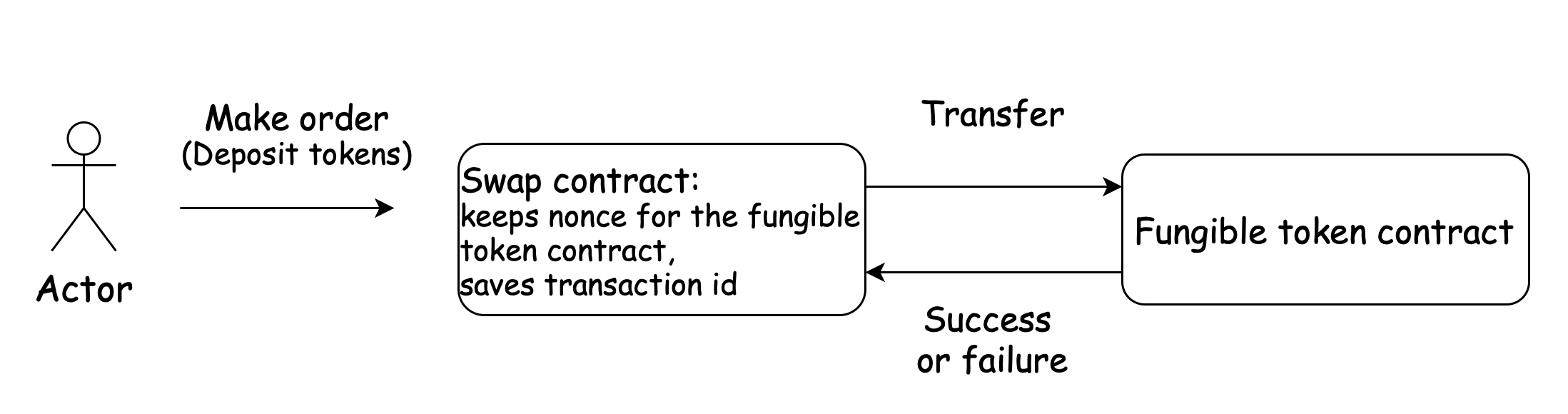
`Step 1` : A user sends a `MakeOrder` message to the swap contract. During that transaction the contract sends a message to the fungible token contract. The result of executing this message can be a success or a failure. The worst case scenario is having a lack of gas when processing a message in the token contract or in the subsequent execution of the swap contract. However, since the token contract supports idempotency, the user can simply restart the transaction and complete it.
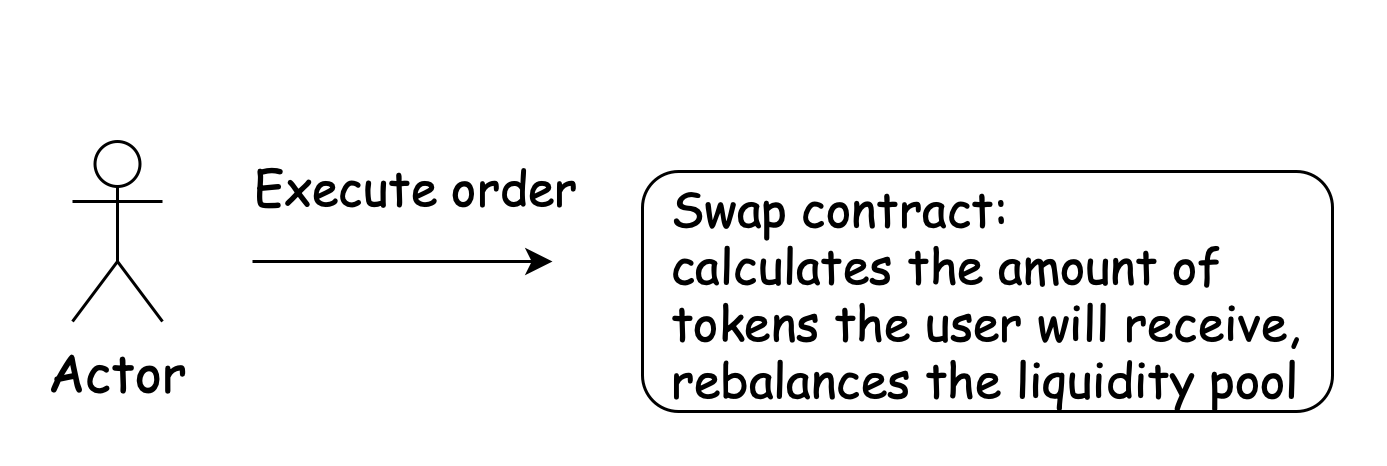
`Step 2`: A user sends an `ExecuteOrder` message to the swap contract. The swap contract just calculates the amount of tokens a user will receive and saves the new state of the liquidity poll.
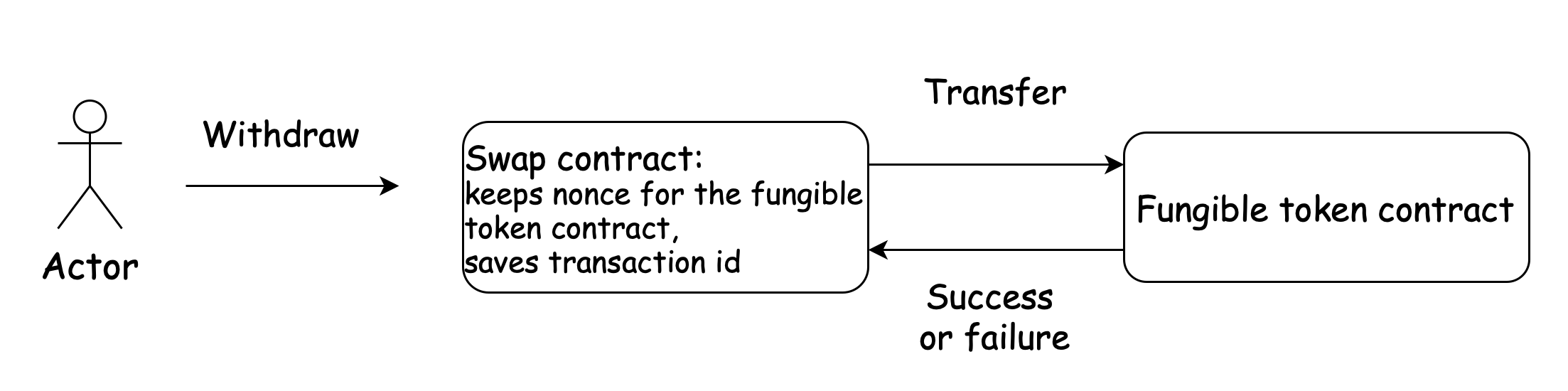
`Step 3`: A user sends a `Withdraw` message to the swap contract and receives tokens B. The situation here is the same as in the first step.
It is possible to execute a swap in one transaction. To resolve the problem of atomicity we can use the following patterns here:
* `2 PC - 2 Phase Commit protocol` (And also its extension - 3 phase commit protocol);
* `Saga Pattern`.
Two phase commit protocol [#two-phase-commit-protocol]
**Theory**:
Use a coordinator that sends messages to participants. The `two-phase commit protocol` has two parts: the `prepare` phase and the `commit` phase.
**Preparation phase:**
During the preparation phase, the coordinator and participants perform the following dialog:
* `Coordinator`:
The coordinator directs each participant database server to prepare to commit the transaction.
* `Participants`:
Every participant notifies the coordinator whether it can commit to its transaction branch.
* `Coordinator`:
The coordinator, based on the response from each participant, decides whether to commit or roll back the transaction. It decides to commit only if all participants indicate that they can commit to their transaction branches. If any participant indicates that it is not ready to commit to its transaction branch (or if it does not respond), the coordinator decides to end the global transaction.
**Commit phase:**
During the commit phase, the coordinator and participants perform the following dialog:
* `Coordinator`:
The coordinator writes the commit record or rollback record to the coordinator's logical log and then directs each participant to either commit or roll back the transaction.
* `Participants`:
If the coordinator issued a commit message, the participants commit the transaction by writing the commit record to the logical log and then sending a message to the coordinator acknowledging that the transaction was committed. If the coordinator issued a rollback message, the participants roll back the transaction but do not send an acknowledgment to the coordinator.
* `Coordinator`:
If the coordinator issues a message to commit the transaction, it waits to receive acknowledgment from each participant before it ends the global transaction. If the coordinator issued a message to roll back the transaction, it does not wait for acknowledgments from the participants.
In the context of a token swap contract example, one may utilize it as follows: The scenario involves an account seeking to swap their tokens (referred to as tokenA) for alternative tokens (tokenB) by leveraging the liquidity pool within the swap contract.
In that case the swap contract is a coordinator contract and tokens contracts are participants.
The swap contract makes the following steps:
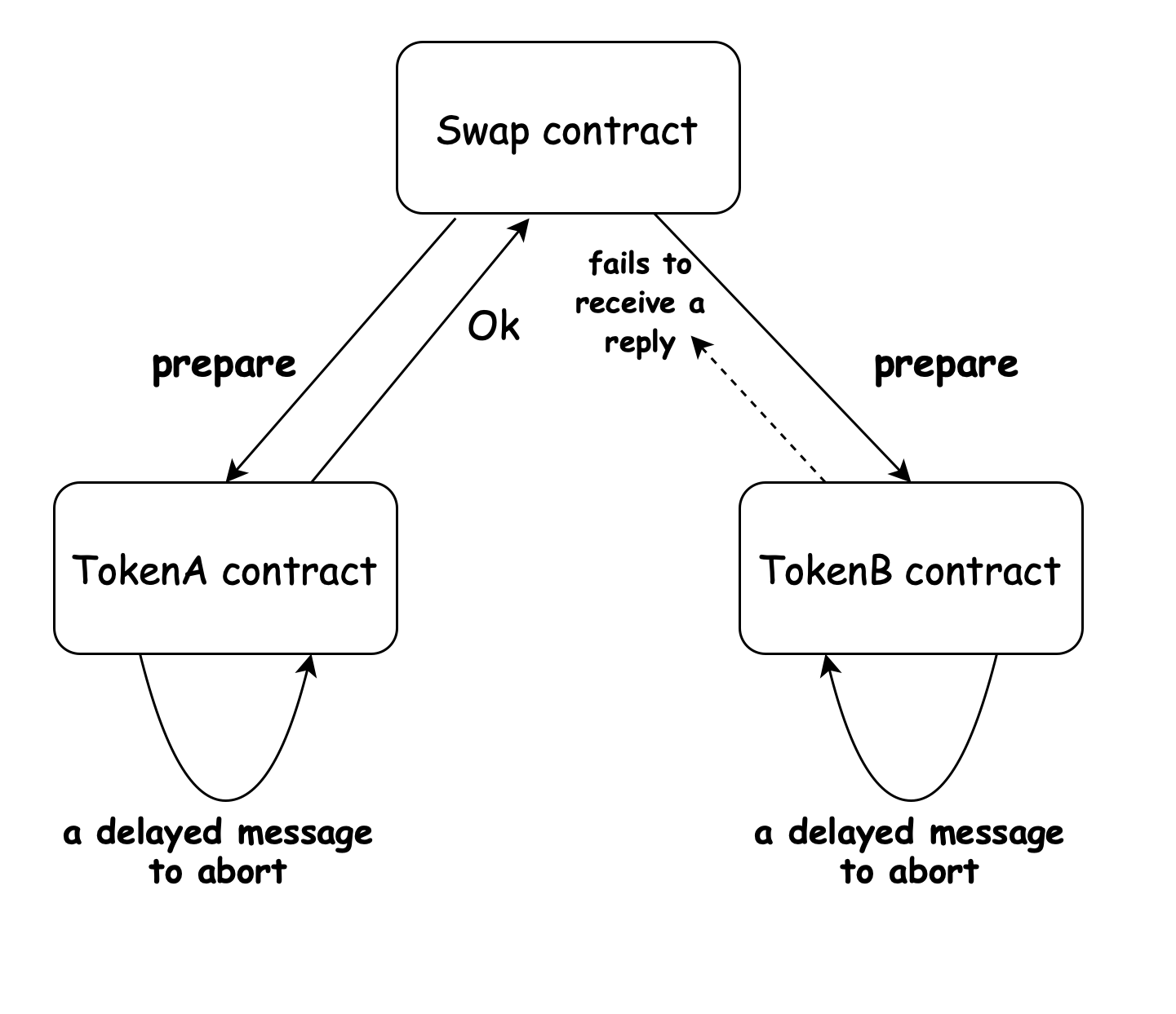
**Prepare phase**
* `Swap contract:`
Swap contract sends the messages to token contracts to prepare transfer tokens (Messages can be sent in parallel). In fact, token contracts must lock funds at this stage.
* `Token contract`:
Token contracts make all necessary checks, and in case of success, lock funds and reply to the swap contract that they are ready to make a transaction.
* `Swap contract`:
Swap contract handles the messages from the token contracts and decides whether to commit or abort the global transaction.
receives tokens B. The situation here is the same as in the first step.
**Commit phase**
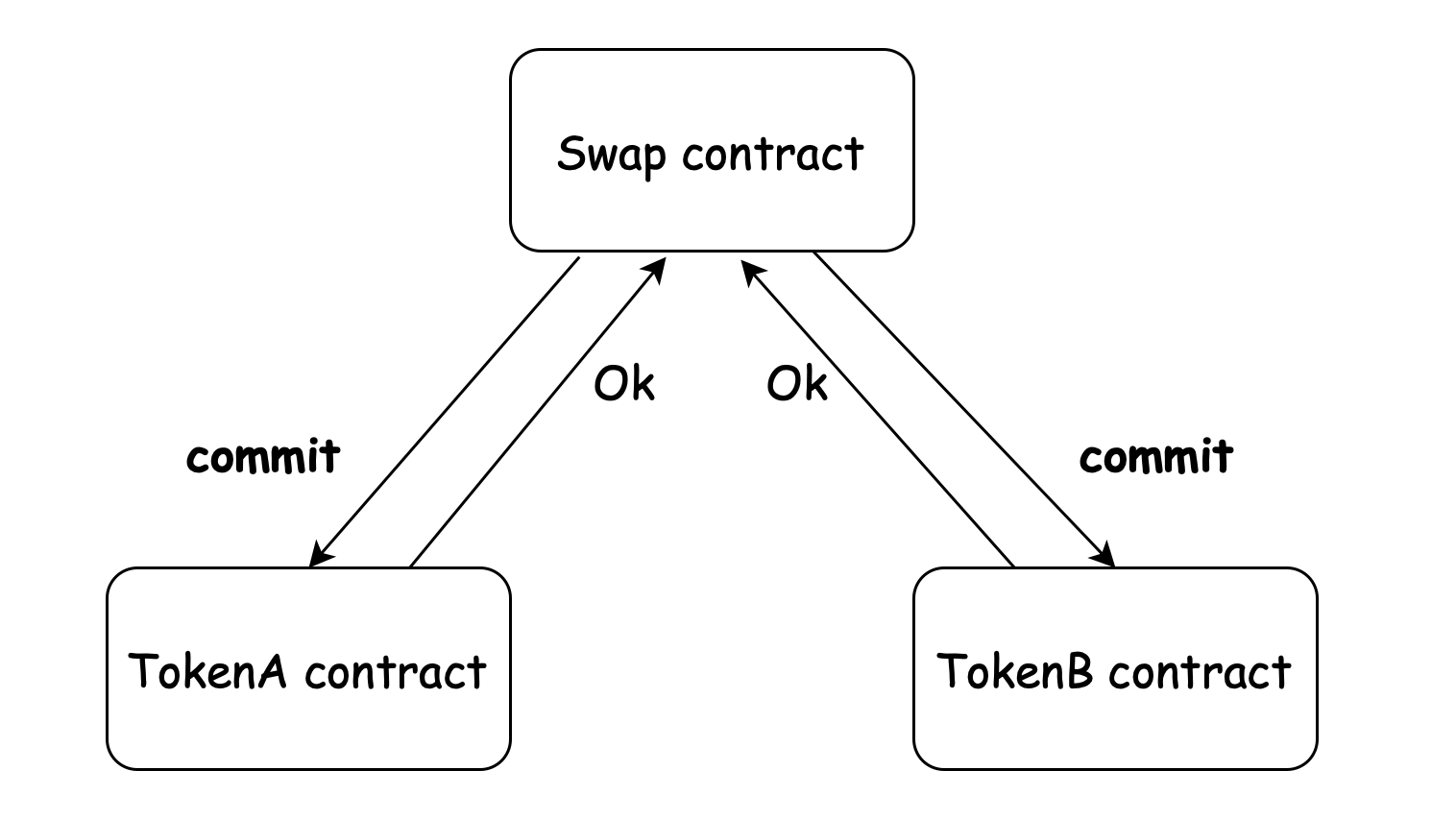
* `Swap contract`:
If token contracts confirm their readiness to execute the transaction, the swap contract sends them a message to commit the state. Otherwise, the swap contract tells them to abort the transaction.
* `Token contract`:
Token contracts finally change their state and send replies to the swap contract;
* \`Swap contracts:
Swap contract handles the messages from the token contracts and saves the result about transaction execution.
Of course, all that workflow handles the case when the gas runs out during the message execution.
`Pros:`
* Messages can be sent in parallel;
* If cases with a lack of gas are taken into account, then the data consistency is achieved.
`Cons:`
* The participants have to wait for the message from the coordinator, they can’t commit or abort themselves;
* The coordinator plays an important role: if it fails to send the message then all participants go to the blocked state (in our example: the funds in token contracts are blocked).
Three phase commit protocol. [#three-phase-commit-protocol]
**Theory**: It is similar to two-phase commit protocol but it tries to solve the problems with blocking the state of participants and to give the participants the opportunity to recover their states themselves.
**Prepare phase:**
The same steps of two phase commit protocol are followed here:
* `Coordinator`:
The coordinator sends a prepare message to all participants and waits for replies;
* `Participants`:
If the participants are ready to commit a transaction they send the ready message, otherwise they send no message to the coordinator.
* `Coordinator`:
Based on replies the coordinator decides either to go to the next state or not. If any of the participants respond with no message or if any of the participants fails to respond within a defined time, the coordinator sends an abort message to every participant. It is important to highlight the differences from two phase commit protocol:
* The coordinator limits the response time from the participant. This can be implemented by sending a message with an indicated amount of gas or indicated number of blocks the coordinator is ready to wait;
* If the coordinator fails at this state, then the participants are able to abort the transaction (i.e. unlock their state) using delayed messages. So, in that phase, the timeout cases abort.
**Prepare-to-commit phase:**
* `Coordinator`:
The coordinator sends a prepare-to-commit message to all participants and gets acknowledgements from everyone;
* `Participants`:
Participants: Receiving a prepare-to-commit message, a participant knows that the unanimous decision was to commit. As mentioned in the preparation phase, if a participant fails to receive this message in time, then it aborts. However, if a participant receives an abort message, then it can immediately abort the transaction.
The possible problem: the coordinator fails when sending a prepare-to-commit to participants. So some participants are in Phase 2, others are in Phase 1. It's a disaster because the first group will commit, the second group will abort in case of timeout. This phase must ensure that If one of the participants has received a precommit message, they can all commit. If the coordinator falls, any of the participants, being at the second stage, can become the coordinator itself and continue the transaction.
* `Coordinator`:
Having received acknowledgements from all the participants, the coordinator goes to the next phase.
The three-phase commit protocol accomplishes two things:
1. Enables use of a `recovery coordinator` (it can be a coordinator itself that starts a new transaction, or a participant). If a coordinator died, a recovery coordinator can query a participant.
* If the participant is found to be in phase 2, that means that every participant has completed phase 1 and voted on the outcome. The completion of phase 1 is guaranteed. It is possible that some participants may have received commit requests (phase 3). The recovery coordinator can safely resume at phase 2.
* If the participant was in phase 1, that means NO participant has started commits or aborts. The protocol can start at the beginning.
* If the participant was in phase 3, the coordinator can continue in phase 3 – and make sure everyone gets the commit/abort request
2. Every phase can now time out – there is no indefinite wait as in the two-phase commit protocol.
* `Phase 1`:
Participant aborts if it doesn’t hear from a coordinator in time;
Coordinator sends aborts to all if it doesn’t hear from any participant.
* `Phase 2`:
If a participant times out waiting for a coordinator, elect a new coordinator.
Back to the swap contract.
**Preparation phase**:
The following cases are possible:
* all token contracts receive the message;
* the swap contract fails to wait for response from any token contract
* the swap contract fails itself.
In the case of a fall, if a transaction isn't restarted, the swap contract will not move to the second phase and the token contracts will unlock their state using delayed messages.
**Pre-Commit phase**:
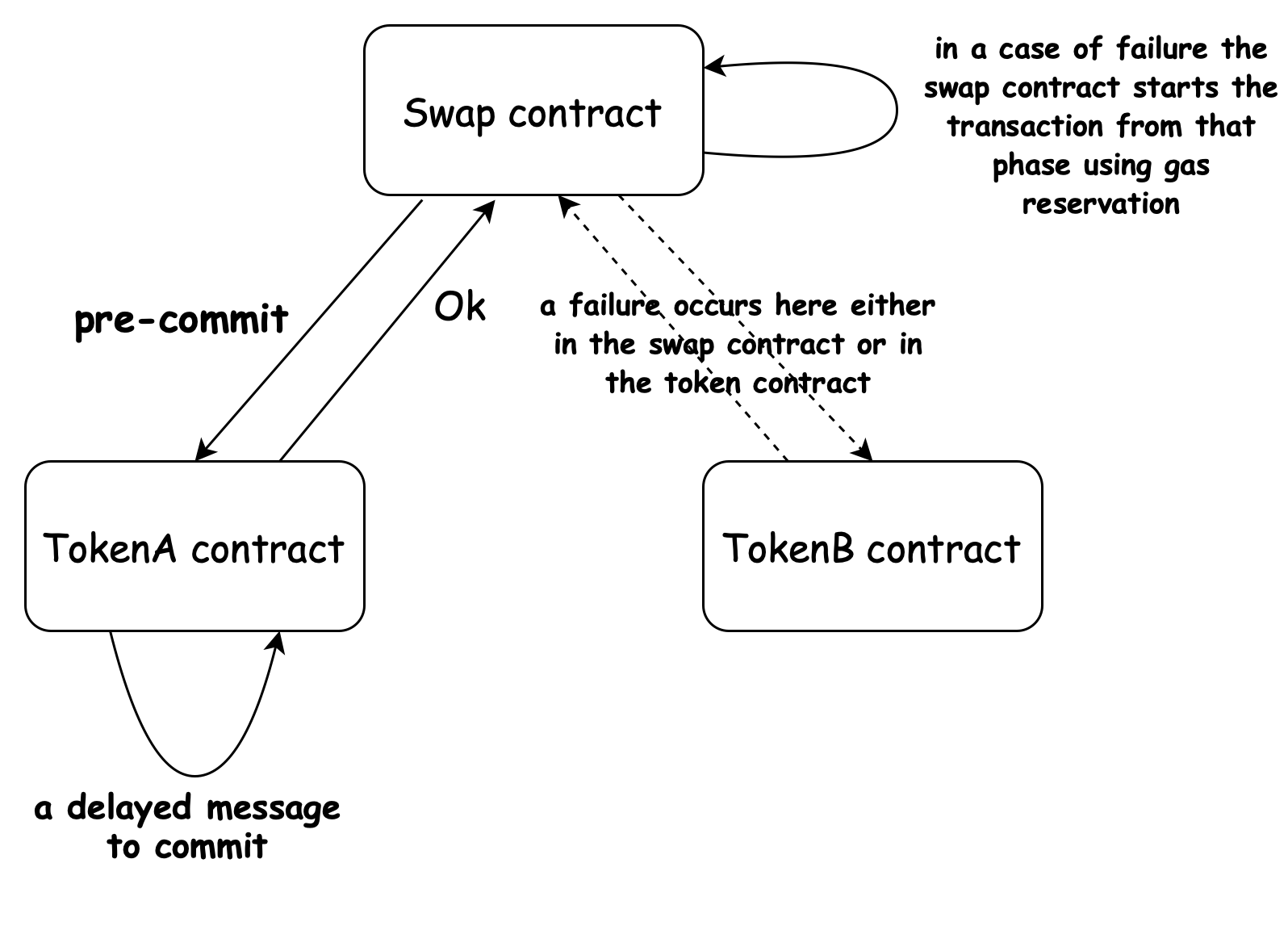
At this stage, there can be a failure in the swap contract or in the token contract only due to the lack of gas. To address this issue, gas reservation can be utilized as follows:
* The swap contract receives the information about error in its `handle_signal`;
* Using gas reservation (so, it’s necessary to care about gas reservations before), the swap contract sends a message to itself to restart the transaction from the second phase. (The same logic can also be used in the `preparation phase`).
**Commit phase**:
Like the previous stage, failure can occur solely due to the absence of gas. In this situation, it is not as critical, as all participants can commit to the process.
Saga pattern [#saga-pattern]
**Theory**:
A `saga` is a sequence of local transactions. Each local transaction updates the database and publishes a message or event to trigger the next local transaction in the saga. If a local transaction fails because it violates a business rule then the saga executes a series of compensating transactions that undo the changes that were made by the preceding local transactions. Thus, Saga consists of multiple steps whereas `2PC` acts like a single request.
There are two ways of coordination sagas:
* `Choreography` - each local transaction publishes domain events that trigger local transactions in other services;
* `Orchestration` - an orchestrator (object) tells the participants what local transactions to execute.
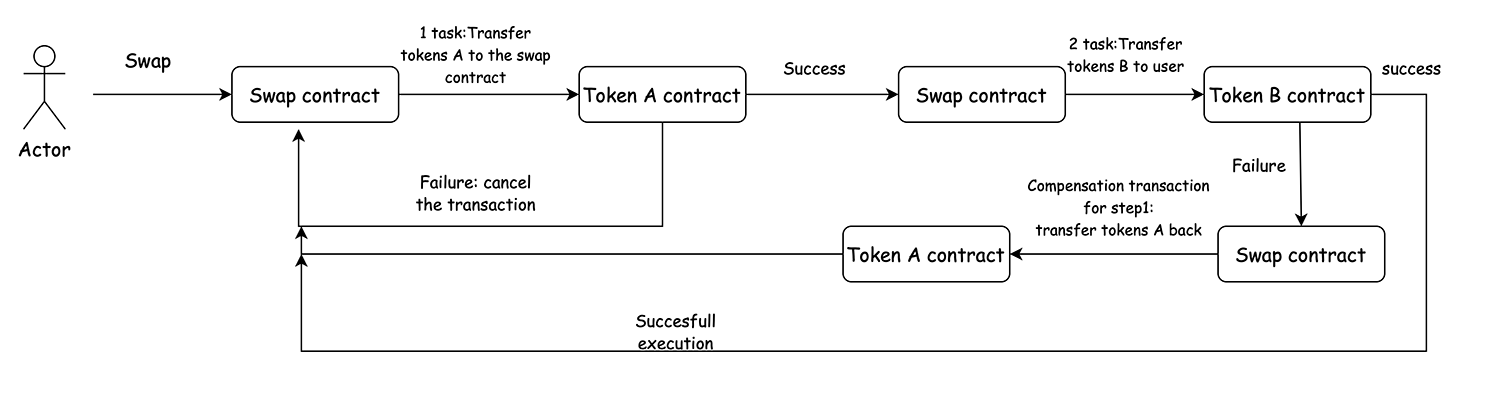
Consider the `orchestration based Saga`, where an orchestrator (swap contract) manages the entire operation from a central point.
The swap operation consists of the following steps:
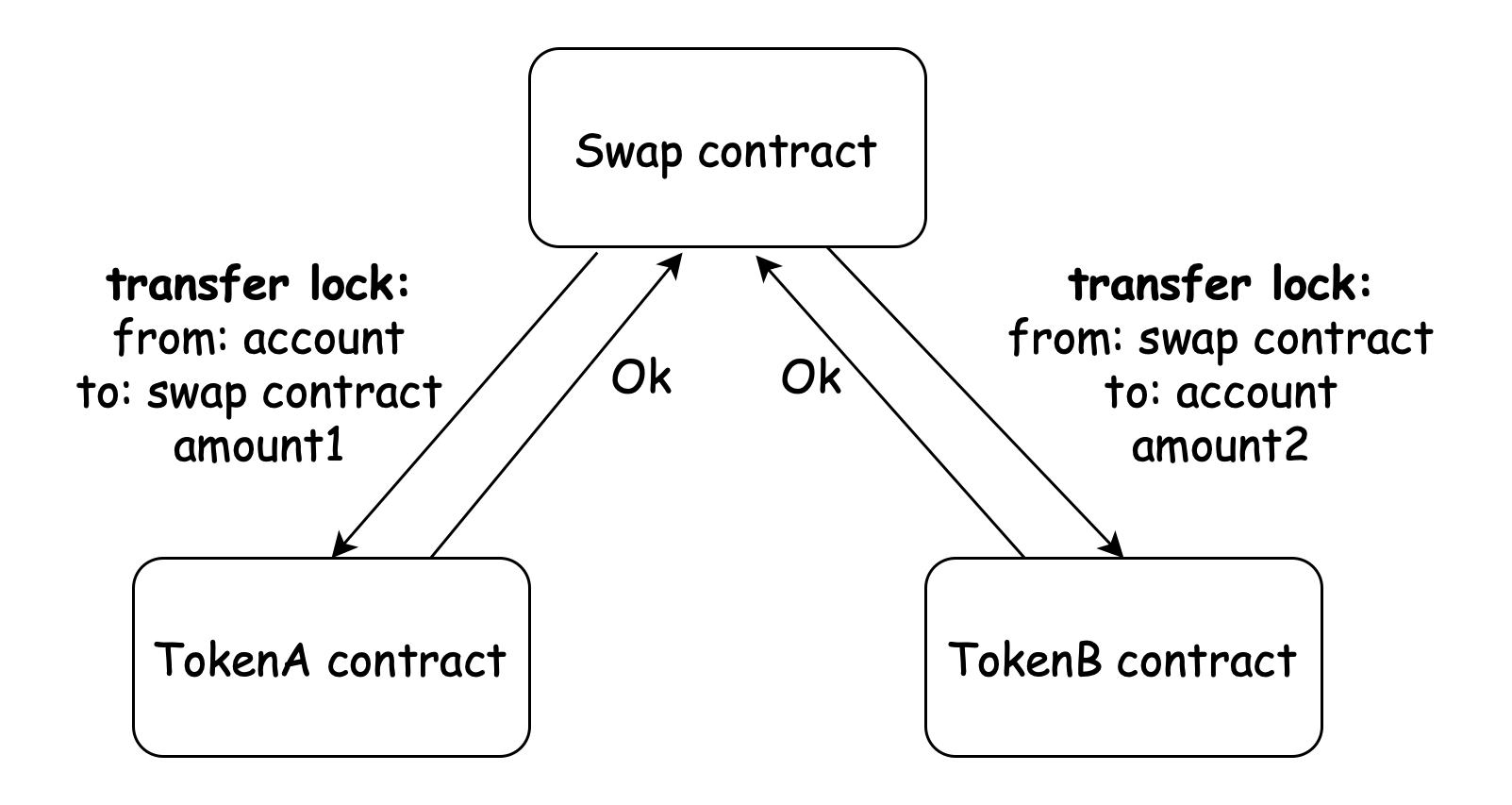
1. Swap contract receives a message to exchange tokens in the liquidity pool. So, it must transfer tokens A from the account to its address and then transfer tokens B to the user.
2. It creates the first task: transfer tokens from the user to the swap contract. It also creates a compensating transaction for the first task: transfer tokens from the swap contract back to the user. The second task is to transfer tokens from the swap contract to the user.
3. It starts executing the first task. If the execution fails, it cancels the transaction. If it’s successful, the swap contract executes the second task;
4. If the execution of the second task is successful, the transaction is completed. Otherwise, the swap contract executes the compensation transaction for the first task.
It is important to note that compensatory transactions should not fail due to any logical error. They can only fall due to lack of gas. If this happens, then it is needed to restart the transaction again or use the gas reservation. The `idempotency` of the token contract guarantees that the transaction will be completed to the end without any duplicate transactions.
# Overview
This Wiki, along with the [Vara Educational Hub](https://vara.network/education-hub), serves as a primary source of knowledge for getting started with writing programs using the Gear Protocol and uploading them to the Vara Network.
For a quick overview of writing and running programs on Vara, refer to [this guide](/docs/vara-network/quick-start). It walks through writing a program, compiling it to Wasm, and deploying it to the Vara Network within just 5 minutes.
Stay up to date with the latest releases and updates from the development team by subscribing to our Telegram channel: [@GearVaraDev](https://t.me/GearVaraDev).
Sails Library (High-Level Development) [#sails-library-high-level-development]
The [Sails library](/docs/developing/build/sails) is the recommended starting point for developing applications on the Vara
Network.
It eliminates the need to write low-level boilerplate code with `gstd`, enabling developers to concentrate on solving business problems.
Additionally, Sails provides developers with automatically generated client code in Rust or TypeScript, making it easier to interface with their deployed Vara applications.
Gear Library (Low-Level Development) [#gear-library-low-level-development]
Messages are the main interface for communications between Actors (users and programs). Each Vara program contains code for processing incoming messages. During message processing, programs can send messages to other programs and users, including replies to the initial message.
The Gear Protocol's library `gstd` provides necessary and sufficient custom functions and methods, including arbitrary async/await syntax for developing programs.
The next articles in this section cover various aspects of the Gear library, executable and state functions, data decoding/encoding, asynchronous programming, program testing, and more.
Vara Node [#vara-node]
Vara Node provides a runtime that assists program developers in implementation and testing (personal node) while also enabling participation in the Vara Network as validators.
Anyone can either compile a Vara node or download the prebuilt binary (nightly build). From a functional standpoint, it doesn't matter whether it was downloaded or built manually. The Node can be built, installed, and run on Linux, Mac, and Windows operating systems.
For detailed instructions on installing and running the Vara Node, as well as keeping it operational, backing up, restoring, and troubleshooting, refer to the guide [here](/docs/vara-network/node).
Gear-JS API [#gear-js-api]
The Gear-JS API provides a range of utilities, libraries, and tools that enable JavaScript applications to interact with programs running on the Vara Network via queries to a Vara Node.
The basic API is implemented on the Substrate layer and remains consistent across all Substrate-based networks. It enables connection to a local or remote node, getting node info, subscribing to events, etc. The main capabilities of the Gear-JS API include working with the program's metadata, calculating gas required for network operations, uploading programs to the network, sending a message or a reply to a program, reading a program's state, getting messages from the user's mailbox, and more.
To learn more about implementing a web application to interact with programs on the Vara Network, check out the [Gear-JS API](/docs/developing/api). Also, take a look at the [NFT frontend application](/docs/vara-network/examples/NFTs/nft-marketplace/nft-application) example, which describes how to implement a frontend application that interacts with the program on the blockchain.
Gear Idea [#gear-idea]
**[Gear Idea](https://idea.gear-tech.io/)** is a convenient tool that allows program developers to easily and swiftly upload programs to the Vara Network directly through their browser without additional configuration.
For development and testing purposes, Gear Idea can be connected to any supported Gear-based network, including a private network or a localhost Node.
This application encompasses all interactions with programs on Vara Network, such as uploading new programs, sending messages to contracts, and receiving responses. Gear Idea also facilitates account and balance management, observation of transaction events, working with various wallets, and more.
Program Examples [#program-examples]
For developers' convenience, the Gear Foundation provides numerous [examples](/docs/vara-network/examples) for various use cases. These examples serve as useful references for getting acquainted with writing programs on the Gear Protocol or as a foundation for developing custom dApps. They can be utilized as they are or modified to suit specific scenarios. The source code is available on [GitHub](https://github.com/gear-foundation).
# Introduction
What is a Vara program? [#what-is-a-vara-program]
A Vara program (sometimes referred to as a smart contract) is a piece of code compiled to Wasm, deployed to the blockchain, and can be executed by anyone who sends a message to it. The program can store data, receive and send messages, and perform any other actions allowed by the Gear Protocol.
Every program should have a set of exported functions that can be called by the Gear Protocol. These functions are called entry points. The Gear Protocol has a set of predefined entry points used to initialize the program, handle incoming messages, and process replies to previously sent messages.
However, it's impossible to implement any business logic without using imported functions that form the API for the program. The Gear Protocol has a set of predefined API functions that can be used by any program. These include low-level functions allowing developers to load incoming message payloads, send messages, and perform other actions. Additionally, there are higher-level libraries that enable convenient interaction with the Gear Protocol.
Predefined entry points (exported functions) [#predefined-entry-points-exported-functions]
handle() [#handle]
The central exported function of the Vara program is `handle()`. It is called every time the program receives an incoming message. Below is the Rust example code:
```rust
#[no_mangle]
extern "C" fn handle() {
// Execute this code during explicitly incoming message
}
```
This function is obligatory to be defined in the program. It establishes the main business logic of the program. For example:
* Checking the incoming message and performing actions based on the message type.
* Sending a message to another program.
* Sending a reply to the message that was received by the program.
init() [#init]
As with any other program intended to be executed in some environment, a Vara program has its lifecycle. It is initialized, receives messages, and can be terminated. By defining the optional `init()` function, one can perform actions during program initialization, such as storing data in the program's memory. The `init()` function is invoked only once at program initialization.
```rust
#[no_mangle]
extern "C" fn init() {
// Execute this code during program initialization
}
```
If there is no `init()` function in the program, the program will be initialized without any custom actions.
handle_reply() [#handle_reply]
The third most important function is `handle_reply()`. It is called when the program receives a reply to the message that was sent by the program. For example, you can check the reply and perform some actions depending on the reply type.
```rust
#[no_mangle]
extern "C" fn handle_reply() {
// Execute this code during handling reply on the previously sent message
}
```
There is no need to define the `handle_reply()` function if the program doesn't intend to receive replies. In this case, the program will ignore all incoming replies.
The reply message is similar to the ordinary message, but it has some differences:
* The reply message is sent to the user or program that has sent the original message. The destination of the reply message cannot be set explicitly.
* Only one reply message per execution can be sent. We get an error if we try to send more than one reply message.
* Even if the program execution is failed (for example, panic is called or the gas limit is exceeded), the reply message will be sent anyway.
* The reply message is processed in `handle_reply()` function instead of `handle()` function for the ordinary message. We have mentioned this above but it is worth underlining it again.
API functions (imported functions) [#api-functions-imported-functions]
There are a lot of imported functions that can be used by the Vara program. They are called API functions. These functions are provided by the runtime that executes the Gear program. The most convenient way to use these functions is to use the Gear standard library called [`gstd`](https://docs.rs/gstd/latest/gstd/). It is a set of high-level functions that are implemented on top of the low-level API functions.
More details about the Gear Protocol's standard library can be found in the [Gear Library](/docs/developing/build/gstd) section.
Basic stages of the Vara program lifecycle [#basic-stages-of-the-vara-program-lifecycle]
The typical lifecycle of a Vara program involves utilizing the Rust programming language for example. However, it's essential to note that the same principles apply to any other programming language that can be compiled into WebAssembly (Wasm).
1. Write the program code. [#1-write-the-program-code]
You can find the minimal example in the [Getting Started](/docs/vara-network/quick-start) section. It is a simple program that stores the counter, can increment and decrement it and returns the current value of the counter.
More advanced examples can be found in the Gear Foundation organization on GitHub: [https://github.com/gear-foundation](https://github.com/gear-foundation)
2. Test the program. [#2-test-the-program]
The Vara developer community recommends using the [`gtest`](https://docs.gear.rs/gtest/) crate for testing Vara programs as it enables program unit tests to be written and run in the local environment.
The more advanced way to test the program is to use the [`gclient`](https://docs.gear.rs/gclient/) crate that allows you to run the program in the blockchain network. It is useful when you need to test the program in a real environment.
You can find more details about testing in the [Program Testing](/docs/developing/build/testing) section.
3. Compile the program into Wasm. [#3-compile-the-program-into-wasm]
The Vara developer community recommends using the [`gear-wasm-builder`](https://docs.gear.rs/gear_wasm_builder/) crate in a custom build script `build.rs`.
Add it to the `[build-dependencies]` section in the `Cargo.toml` file:
```toml
[build-dependencies]
gear-wasm-builder = { git = "https://github.com/gear-tech/gear.git", tag = "v1.1.1", features = ["wasm-opt"] }
```
And add the following code to the `build.rs` file:
```rust
fn main() {
gear_wasm_builder::build();
}
```
The compiled Wasm files can be found in the `target/wasm32-unknown-unknown/release` directory.
4. Deploy the program to the blockchain. [#4-deploy-the-program-to-the-blockchain]
Program deployment is a process of storing the program's Wasm code on the blockchain and its initialization. The user pays a fee for the deployment transaction. The program is deployed to the blockchain only once. After that, it can be executed by anyone by sending a message to it.
If initialization fails (for example, the program panics in the `init()` function), the program is not deployed and the user gets an error.
{/* Also, it is important to underline that someone should pay rent for keeping the program in the blockchain after a free period that is equal to 5 million blocks (it is about 2 months for networks with 1 block per second production). It is possible to add funds for rent using the [`pay_program_rent`](https://docs.gear.rs/pallet_gear/pallet/struct.Pallet.html#method.pay_program_rent) extrinsic (by the user) or with the [`gstd::exec::pay_program_rent`](https://docs.gear.rs/gstd/exec/fn.pay_program_rent.html) API function (by the program). If the rent is not paid, the program state changes to pause, its persistent memory is removed from the storage and the program can't be executed. The program can be resumed by uploading its memory pages to the blockchain and paying the rent. */}
More details about the program deployment can be found in the [Upload Program](/docs/developing/build/deploy) section.
5. Execute the program. [#5-execute-the-program]
The program can be executed by sending a message to it. The message can be sent by the user or by another program. The user pays a fee for the message execution. The program can send a reply to the message. The reply is sent to the user or program that has sent the original message.
6. Terminate the program. [#6-terminate-the-program]
The program can be terminated by calling the [`gstd::exec::exit`](https://docs.rs/gstd/latest/gstd/exec/fn.exit.html) function. Also, the program is paused if the rent is not paid.
The program can't be executed after termination.
Program key features [#program-key-features]
Vara programs have a lot of features that make them unique. Let's explore the most important of them.
State function [#state-function]
Vara programs can store the state in persistent memory. Anyone can read this memory from the blockchain.
To make state reading more convenient, Vara programs can define the `state()` function.
```rust
#[no_mangle]
extern "C" fn state() {
msg::reply(any_encodable_data, 0).expect("Failed to share state");
}
```
This function is stored in the blockchain in the same Wasm blob with `handle()` and `init()` functions. But unlike them, it is not executed using extrinsic and doesn't affect the blockchain state. It can be executed for free by any node with a fully synchronized blockchain state. There is a dedicated [`read_state`](https://docs.gear.rs/pallet_gear_rpc/trait.GearApiServer.html#tymethod.read_state) RPC call for this.
The data returned by the `state()` function can be converted to any convenient representation by using a state-conversion program. This is a separate program compiled into Wasm and dedicated to being executed on the off-chain runner. It should contain a set of meta-functions that accept the data returned by the `state()` function and return the data in a convenient format. There is a dedicated [`read_state_using_wasm`](https://docs.gear.rs/pallet_gear_rpc/trait.GearApiServer.html#tymethod.read_state_using_wasm) RPC call for reading the program state using the state-conversion program.
More details about state functions can be found in the [State Functions](/docs/developing/build/gstd/state) section.
Asynchronous programming [#asynchronous-programming]
In some cases, it is more convenient to express some concepts in an asynchronous programming style. For example, when you need to wait for a reply from another program or wait for a certain time.
Under the hood, the `async`/`await` syntax is a kind of syntactic sugar that generates a state machine around [`gstd::exec::wait`](https://docs.rs/gstd/latest/gstd/exec/fn.wait.html) and [`gstd::exec::wake`](https://docs.rs/gstd/latest/gstd/exec/fn.wake.html) functions. The state machine is stored in the program's persistent memory.
Note that in case of using async functions, you are to declare the `async main()` function with `#[async_main]` attribute instead of the `handle()` function:
```rust
#[gstd::async_main]
async fn main() {
// Async code here
}
```
The initialization function can also be declared as an async function:
```rust
#[gstd::async_init]
async fn init() {
// Async init code here
}
```
More details about asynchronous programming can be found in the [Asynchronous Programming](/docs/developing/build/gstd/async-programing) section.
Creating programs from programs [#creating-programs-from-programs]
Both users and programs are actors in terms of the Gear programming model. Therefore, any actor can create a new program and deploy it to the blockchain.
The only prerequisite is that the code of the program should be stored in the blockchain. This can be done by using the [`upload_code`](https://docs.gear.rs/pallet_gear/pallet/struct.Pallet.html#method.upload_code) extrinsic that returns an identifier of the uploaded code. The code can be uploaded only once, then it can be used for creating multiple programs.
There are several helper functions for creating programs from programs in the [`gstd::prog`](https://docs.rs/gstd/latest/gstd/prog/index.html) module.
More details about creating programs from programs can be found in the [Create Program](/docs/developing/build/gstd/create) section.
Gas reservation [#gas-reservation]
Vara programs use gas for measuring the complexity of the program execution. The user pays a fee for the gas used by the program. Some part of the gas limit may be reserved during the current execution to be spent later. This gas reserving mechanism can be used to shift the burden of paying for program execution from one user to another. Also, it makes it possible to run some deferred actions using delayed messages described below.
You can find more details about gas reservation in the [Gas Reservation](/docs/developing/build/gstd/gas-reservation) section.
Delayed messages [#delayed-messages]
Vara's programs can send messages to other actors during the current execution and after some time. This mechanism can be used to implement deferred actions.
Use functions with `*_delayed` suffix from [`gstd::msg`](https://docs.rs/gstd/latest/gstd/msg/index.html) module to send a delayed message to a program or user. The message will be sent after the specified number of blocks.
More details about delayed messages can be found in the [Delayed Messages](/docs/developing/build/gstd/delayed-messages) section.
System signals [#system-signals]
Sometimes the system that executes the program should communicate with it in some manner. For example, the program should be notified when the rent is not paid. This can be done by using system signals.
The `handle_signal()` function should be declared in the program to handle system signals. It is executed when the program receives a system signal.
```rust
#[no_mangle]
extern "C" fn handle_signal() {
// Handle system signal here
}
```
You can find more details about system signals in the [System Signals](/docs/developing/build/gstd/system-signals) section.
Reply deposit [#reply-deposit]
Usually, the reply sender pays a gas fee for the reply message execution. However, sometimes it is more convenient to shift this burden to the program that receives the reply. This can be done by using the reply deposit mechanism.
The reply deposit is a part of the gas limit reserved during the current execution to be spent later. The reserved gas can be used to pay for the reply message execution. To do this, the program should call the [`gstd::exec::reply_deposit`](https://docs.rs/gstd/latest/gstd/exec/fn.reply_deposit.html) function. This function provides a gas deposit from the current message to handle the reply message on the given message ID. This message ID should be sent within the execution. Once the destination actor or system sends a reply to it, the gas limit is ignored; if the program provides a deposit, only it will be used for the execution of `handle_reply`.
More details about reply deposit can be found in the [Reply Deposit](/docs/developing/build/gstd/reply-deposit) section.
# Program Rent
Vara Network utilizes a rent-based program management system. When developers upload a program to the network, an expiration date is assigned. The expiration period is measured in blocks.
After the expiration date, the program is automatically removed from storage unless the owner chooses to extend its life by paying rent. The owner must indicate the number of additional blocks they want to pay for and provide the rent in utility tokens to keep the program active beyond its initial expiration date.
The current initial rent period is **5,000,000 blocks**, which is approximately **173 days** on the Vara Network.
*Note: This value is a network parameter and may be adjusted via governance.*
After uploading a program, a similar event can be observed:
`gear.ProgramChanged`
```json
{
"id": "0xde76e4cf663ff825d94944d6f060204e83fbb5e24f8dfdbbdc25842df4f4135d",
"change": {
"Active": {
"expiration": "12,834,248"
}
}
}
```
How to Extend the Rent of the Program [#how-to-extend-the-rent-of-the-program]
To extend the rent period of a program, call the special extrinsic `gear.payProgramRent(programId, blockCount)`. [See more](/docs/developing/api/program-rent)
Restoring a Deleted Program [#restoring-a-deleted-program]
Since the blockchain stores all states for the entire history, it is possible to restore the program's state to the previous block before it was deleted.
Reasons for Using the Program Rent System on Vara [#reasons-for-using-the-program-rent-system-on-vara]
* Optimization and efficient resource usage
* Stimulating utility token usage
# Testing with gclient
`gclient` is intended to be used as a tool for testing Vara programs with a real blockchain network. It allows sending extrinsics and RPCs by connecting to the network. `gclient` is recommended for end-to-end testing to ensure the program works as expected in the real blockchain world.
It is essential to note that testing with `gclient` requires a running node as the second part of the test suite. `gclient` interacts with the node over the WebSocket protocol. Depending on the testing purpose, `gclient` can communicate with either a local or a remote node. Using a **local node in developer mode** is the best choice for initial debugging and continuous integration.
Testing with `gclient` is slower than `gtest` and produces more build artifacts, making it better suited as the final step in quality control. However, `gclient` provides the most accurate test results.
Import gclient Library [#import-gclient-library]
To use the `gclient` library, import it into the `Cargo.toml` file in the `[dev-dependencies]` block. Also, add some external crates that are used together with `gclient`:
```toml
[package]
name = "first-gear-app"
version = "0.1.0"
authors = ["Your Name"]
edition = "2021"
[dependencies]
gstd = { git = "https://github.com/gear-tech/gear.git", tag = "v1.1.1", features = ["debug"] }
[build-dependencies]
gear-wasm-builder = { git = "https://github.com/gear-tech/gear.git", tag = "v1.1.1" }
[dev-dependencies]
gclient = { git = "https://github.com/gear-tech/gear.git", tag = "v1.1.1" }
tokio = { version = "1", features = ["full"] }
```
Running the Node [#running-the-node]
The best way is to download the latest node binary for your operating system from [https://get.gear.rs](https://get.gear.rs). Then unpack the package and run the node. Here and below, the node is assumed to be running in developer mode.
Terminal:
```bash
curl https://get.gear.rs/gear-v1.1.1-x86_64-unknown-linux-gnu.tar.xz | tar xJ
```
or
**Linux x86-64**: [gear-v1.1.1-x86\_64-unknown-linux-gnu.tar.xz](https://get.gear.rs/gear-v1.1.1-x86_64-unknown-linux-gnu.tar.xz)
You can try to run the node:
```
❯ ./gear --version
gear 1.1.1-33ee05d5aab
```
Terminal:
```bash
curl https://get.gear.rs/gear-v1.1.1-aarch64-apple-darwin.tar.xz | tar xJ
```
or
**macOS ARM**: [gear-v1.1.1-aarch64-apple-darwin.tar.xz](https://get.gear.rs/gear-v1.1.1-aarch64-apple-darwin.tar.xz)
You can try to run the node:
```
❯ ./gear --version
gear 1.1.1-33ee05d5aab
```
Terminal:
```bash
curl https://get.gear.rs/gear-v1.1.1-x86_64-apple-darwin.tar.xz | tar xJ
```
or
**macOS x86-64**: [gear-v1.1.1-x86\_64-apple-darwin.tar.xz](https://get.gear.rs/gear-v1.1.1-x86_64-apple-darwin.tar.xz)
You can try to run the node:
```
❯ ./gear --version
gear 1.1.1-33ee05d5aab
```
Terminal:
```bash
curl -O https://get.gear.rs/gear-v1.1.1-x86_64-pc-windows-msvc.zip
```
or
**Windows x86-64**: [gear-v1.1.1-x86\_64-pc-windows-msvc.zip](https://get.gear.rs/gear-v1.1.1-x86_64-pc-windows-msvc.zip)
Unzip the downloaded package then you can try to run the node:
```
❯ gear.exe --version
gear 1.1.1-33ee05d5aab
```
Open the second terminal window and run tests using `cargo` as described in the [previous section](/docs/developing/build/testing#building-a-program-in-test-mode).
Simple Example [#simple-example]
Add an end-to-end test to the `first-gear-app` introduced in the [Getting Started](/docs/vara-network/quick-start#creating-your-first-vara-program) section.
Add the `tests` directory next to the `src` directory and create the `end2end.rs` file in it.
```
└── first-gear-app
├── Cargo.toml
├── src
│ └── lib.rs
└── tests
└── end2end.rs
```
`end2end.rs`:
```rust
use gclient::{EventProcessor, GearApi, Result};
const WASM_PATH: &str = "./target/wasm32-unknown-unknown/release/first_gear_app.opt.wasm";
#[tokio::test]
#[ignore]
async fn test_example() -> Result<()> {
// Create API instance
let api = GearApi::dev().await?;
// Subscribe to events
let mut listener = api.subscribe().await?;
// Check that blocks are still running
assert!(listener.blocks_running().await?);
// Calculate gas amount needed for initialization
let gas_info = api
.calculate_upload_gas(
None,
gclient::code_from_os(WASM_PATH)?,
vec![],
0,
true,
)
.await?;
// Upload and init the program
let (message_id, program_id, _hash) = api
.upload_program_bytes_by_path(
WASM_PATH,
gclient::now_micros().to_le_bytes(),
vec![],
gas_info.min_limit,
0,
)
.await?;
assert!(listener.message_processed(message_id).await?.succeed());
let payload = b"PING".to_vec();
// Calculate gas amount needed for handling the message
let gas_info = api
.calculate_handle_gas(None, program_id, payload.clone(), 0, true)
.await?;
// Send the PING message
let (message_id, _hash) = api
.send_message_bytes(program_id, payload, gas_info.min_limit, 0)
.await?;
assert!(listener.message_processed(message_id).await?.succeed());
Ok(())
}
```
Run the following command and wait for all tests to be green:
```shell
cargo test --release -- --include-ignored
```
It is recommended to mark tests with `gclient` with the `#[ignore]` attribute to separate their slow execution from the rest. To execute ignored tests with Cargo, add the `--include-ignored` flag after a double dash (`--`) as shown above.
More Details About gclient [#more-details-about-gclient]
Please refer to the [`gclient` docs](https://docs.gear.rs/gclient/) for more information about its capabilities and use cases.
# Testing with gtest
`gtest` simulates a real network by providing mockups of the user, program, balances, mailbox, etc. Since it does not include parts of the actual blockchain, it is fast and lightweight. However, as a model of the blockchain network, `gtest` cannot be a complete reflection of the actual network.
`gtest` is excellent for unit and integration testing and is also helpful for debugging Vara program logic. Running tests based on `gtest` only requires the Rust compiler, making its use in continuous integration predictable and robust.
Import gtest Library [#import-gtest-library]
To use the `gtest` library, import it into the `Cargo.toml` file in the `[dev-dependencies]` block to fetch and compile it for tests only:
```toml
[package]
name = "first-gear-app"
version = "0.1.0"
authors = ["Your Name"]
edition = "2021"
[dependencies]
gstd = { git = "https://github.com/gear-tech/gear.git", tag = "v1.1.1" }
[build-dependencies]
gear-wasm-builder = { git = "https://github.com/gear-tech/gear.git", tag = "v1.1.1" }
[dev-dependencies]
gtest = { git = "https://github.com/gear-tech/gear.git", tag = "v1.1.1" }
```
gtest Capabilities [#gtest-capabilities]
* Initialization of the common environment for running programs:
```rust
// This emulates node's and chain's behavior.
// By default, sets:
// - current block equals 0
// - current timestamp equals UNIX timestamp of your system.
// - minimal message id equal 0x010000..
// - minimal program id equal 0x010000..
let sys = System::new();
```
* Program initialization:
```rust
// Initialization of program structure from file.
// Takes as arguments reference to the related `System` and the path to wasm binary relative to the root of the crate where the test was written.
// Sets free program id from the related `System` to this program. For this case it equals 0x010000..
// Next program initialized without id specification will have id 0x020000.. and so on.
let _ = Program::from_file(
&sys,
"./target/wasm32-unknown-unknown/release/demo_ping.wasm",
);
// Also, use the `Program::current()` function to load the current program.
let _ = Program::current(&sys);
// Check the id of the program by calling `id()` function.
// It returns `ProgramId` type value.
let ping_pong_id = ping_pong.id();
// Manually specify the id of the program using `from_file_with_id` constructor.
let _ = ProgramBuilder::from_file("./target/wasm32-unknown-unknown/release/demo_ping.wasm")
.with_id(105)
.build(&sys);
```
* Getting the program from the system:
```rust
// Retrieve the object from the system by id.
let _ = sys.get_program(105);
```
* Initialization of styled `env_logger`:
```rust
// Initialization of styled `env_logger` to print logs (only from `gwasm` by default) into stdout.
// To specify printed logs, set the env variable `RUST_LOG`:
// `RUST_LOG="target_1=logging_level,target_2=logging_level" cargo test`
// Vara programs use `gwasm` target with `debug` logging level
sys.init_logger();
```
* Sending messages:
```rust
// To send a message to the program, call `send()` or `send_bytes()` (or `send_with_value` and `send_bytes_with_value` if you need to send a message with attached funds).
// Both methods require the sender id as the first argument and the payload as the second.
// The first method requires payload to be CODEC Encodable, while the second requires payload to implement `AsRef<[u8]>`.
// First message to the initialized program structure is always the init message.
let res = program.send_bytes(100001, "INIT MESSAGE");
```
* Processing the result of the program execution:
```rust
// Sending functions return `RunResult` structure containing the final result of the processing message and others created during execution.
// It has 4 main functions:
// Returns the reference to the Vec produced to users messages.
assert!(res.log().is_empty());
// Returns bool indicating if there was panic during the execution of the main message.
assert!(!res.main_failed());
// Returns bool indicating if there was panic during the execution of the created messages during the main execution.
assert!(!res.others_failed());
// Returns bool indicating if logs contain a given log.
assert!(!res.contains(&Log::builder()));
// Build a log for assertion using `Log` structure with its builders.
// All fields are optional. Assertions with Logs from core are made on the Some(..) fields.
// Constructor for success log.
let _ = Log::builder();
// Constructor for error reply log. Note that error reply never contains payload.
let _ = Log::error_builder();
// Send a new message after the program has been initialized.
let res = ping_pong.send_bytes(100001, "PING");
// Other fields are set optionally by `dest()`, `source()`, `payload()`, `payload_bytes()`.
// The logic for `payload()` and `payload_bytes()` is the same as for `send()` and `send_bytes()`.
let log = Log::builder()
.source(ping_pong_id)
.dest(100001)
.payload_bytes("PONG");
assert!(res.contains(&log));
let wrong_log = Log::builder().source(100001);
assert!(!res.contains(&wrong_log));
// Log also has `From` implementations from (ID, T) and from (ID, ID, T),
// where ID: Into, T: AsRef<[u8]>.
// Examples:
let x = Log::builder().dest(5).payload_bytes("A");
let x_from: Log = (5, "A").into();
assert_eq!(x, x_from);
let y = Log::builder().dest(5).source(15).payload_bytes("A");
let y_from: Log = (15, 5, "A").into();
assert_eq!(y, y_from);
assert!(!res.contains(&(ping_pong_id, ping_pong_id, "PONG")));
assert!(res.contains(&(1, 100001, "PONG")));
```
* Spending blocks:
```rust
// Control time in the system by spending blocks.
// It adds the amount of blocks passed as arguments to the current block of the system.
// Note that 1 block in Vara network is 1 sec duration.
sys.spend_blocks(150);
```
{/* - Reading the program state:
```rust
// Read the program state using `meta_state()` or `meta_state_with_bytes()`.
// These methods require the payload as the input argument.
// The first method requires payload to be CODEC Encodable, while the second requires payload to implement `AsRef<[u8]>`.
// Example:
#[derive(Encode, Decode, TypeInfo)]
pub struct ContractState {
a: u128,
b: u128,
}
pub enum State {
A,
B,
}
pub enum StateReply {
A(u128),
B(u128),
}
#[no_mangle]
unsafe extern "C" fn meta_state() -> *mut [i32; 2] {
let query: State = msg::load().expect("Unable to decode `State`");
let encoded = match query {
State::A => StateReply::A(STATE.a),
State::B => StateReply::B(STATE.b),
}.encode();
gstd::util::to_leak_ptr(encoded)
}
// Send a query from gtest:
let reply: StateReply = self
.meta_state(&State::A)
.expect("Meta_state failed");
let expected_reply = StateReply::A(10);
assert_eq!(reply,expected_reply);
// If `meta_state` function doesn't require input payloads, use `meta_state_empty` or `meta_state_empty_with_bytes` functions without any arguments.
``` */}
* Balance:
```rust
// To send a message with value, mint balance for the message sender:
let user_id = 42;
sys.mint_to(user_id, 5000);
assert_eq!(sys.balance_of(user_id), 5000);
// To give the balance to the program, use the `mint` method:
let prog = Program::current(&sys);
prog.mint(1000);
assert_eq!(prog.balance(), 1000);
```
# Program Testing
Basics [#basics]
Vara uses the standard testing mechanism for Rust programs: building and running testing executables using `cargo`.
Following the basic concepts and testing methods described in the [Rustbook](https://doc.rust-lang.org/book/ch11-00-testing.html), tests can be organized into two main categories: **unit tests** and **integration tests**.
**Unit tests** enable testing of each unit of code in isolation from the rest of the code. This helps quickly identify where the code works as expected and where it does not. Unit tests should be placed in the `src` directory in each file containing the code they test.
Even when code units work correctly, it is crucial to test if several library parts work together correctly. For **integration tests**, a separate `tests` directory is required at the top level of the project directory, next to `src`. Multiple test files can be created in this directory, and `cargo` will compile each file as an individual crate.
How to Test a Program [#how-to-test-a-program]
There are at least two ways to test and debug Vara programs.
The first is off-chain testing using the low-level [`gtest`](https://docs.gear.rs/gtest/) crate. This approach is recommended for unit and integration tests.
The second is on-chain testing with the higher-level [`gclient`](https://docs.gear.rs/gclient/) crate, which is well-suited for end-to-end testing.
Although `gclient` is oriented towards end-to-end testing, tests can be written as unit or integration tests in Rust. It is recommended to use an integration-like approach with separate test files in the `tests` directory when utilizing the `gclient` crate.
Building a Program in Test Mode [#building-a-program-in-test-mode]
First, ensure a compiled Wasm file of the program to be tested. Refer to [Getting Started](/docs/vara-network/quick-start) for additional details.
1. Usually, the following command is used for the regular compilation of Vara programs:
```bash
cd ~/gear/contracts/first-gear-app/
cargo build --release
```
The nightly compiler is required if some unstable features have been used:
```bash
cargo +nightly build --release
```
2. The minimal command for running tests is:
```bash
cargo test
```
The nightly compiler is required if the program uses unstable Rust features, and the compiler will prompt to enable `nightly` if necessary:
```bash
cargo +nightly test
```
Build tests in release mode to run faster:
```bash
cargo test --release
```
Dig Deeper [#dig-deeper]
The following sections outline testing a Vara program using both the `gtest` and `gclient` crates.
# Keystore Manager
Command-line tools for developers remain an expansive subject. While these may not appeal to non-technical, modern browser users, command-line tools continue to play a pivotal role universally. This prevalence is partly because developing and maintaining user interfaces is time-consuming.
For the [Vara Network](https://vara.network), the command-line tool, [`gcli`](https://crates.io/crates/gcli), has provided comprehensive functionality for interacting with the network. However, to simplify and manage growth, the keystore component has been separated and developed into a standalone, lightweight keyring implementation.
[`Gring`](https://crates.io/crates/gring) is this command-line keyring implementation, designed specifically for managing Vara Network keypairs.
```text
$ gring
Gear keyring
Usage: gring [OPTIONS]
Commands:
add Imports a keystore file generated by polakdot-js extension
new Generate a new key
list List all keys in keyring [aliases: l]
use Use the provided key as primary key
sign Sign a message
verify Verify a message
help Print this message or the help of the given subcommand(s)
Options:
-v, --verbose... The verbosity level
-h, --help Print help
```
Keyring 101 [#keyring-101]
> A keyring shares similarities with a blockchain wallet, offering greater flexibility.
For blockchain wallet browser extensions, the initial step involves creating an account, remembering, and securely saving the passphrase to avoid future loss. Subsequently, the wallet generates additional keypairs from the root account upon request.
A critical point often overlooked is the loss of the passphrase for the root account results in the loss of all keypairs within the wallet. In contrast, keyrings operate differently; each keypair in a keyring possesses its own passphrase. Losing one keypair does not compromise the security of others.
| | Keyring | Wallet |
| --------------------- | ------- | ------ |
| Multiple Keypairs | Yes | Yes |
| Standalone Passphrase | Yes | No |
**Keyring** aligns with the basic concept of browser extension blockchain wallets but is more straightforward and flexible. Keyring's primary function is to generate and store keypairs on disk, encrypting and decrypting them with cryptography.
Keystore 101 [#keystore-101]
> A **keyring** is a ring of **keystores**, analogous to how a blockchain comprises a series of blocks.
A keystore secures the private keys of keypairs through encryption. For `gring`, adherence to the encryption standard of the **Polkadot-JS wallet** is maintained, facilitating the sharing of keystore files between the two systems.
How it works [#how-it-works]
This chapter delves into the technical specifics of `gring`, illustrated with examples.
Encrypt keypair into keystore [#encrypt-keypair-into-keystore]
```bash
$ gring new -p password my-first-wallet
```
This command creates a keystore named `my-first-keystore` using the passphrase `password`. Delving into the details, the gring program performs the following actions:
1. Generates a random \[schnorrkel]\[[https://github.com/w3f/schnorrkel](https://github.com/w3f/schnorrkel)] keypair.
2. Encodes the keypair into a specific byte format termed **keypair-info**.
```text
Keypair Info: [PAIR_HEADER, SECRET_KEY, DIVIDER, PUBLIC_KEY]
```
3. Encrypt the `passphrase` with \[scrypt]\[[https://en.wikipedia.org/wiki/Scrypt](https://en.wikipedia.org/wiki/Scrypt)] to get a password for the secret box.
4. Pack the `keypair-info` in \[NaCl Secretbox]\[[https://en.wikipedia.org/wiki/NaCl\_(software)](https://en.wikipedia.org/wiki/NaCl_\(software\))] with the passwored from `3.`
After all, the encrypted keypair will be like:
| slot | 1 | 2 | 3 |
| ----- | ------------- | ------------ | -------------------------------------------------------- |
| bytes | scrypt config | random nonce | secret box (keypaire-info, nonce, encrypted\_passphrase) |
Generally, developers include additional information about the keypair in the keystore file, rather than just the raw encoded data, to enhance human readability. In **Polkadot-js** or **`gring`**, this is accomplished as follows:
```json
{
"encoded": ""
"encoding": {
"content": ["pkcs8", "sr25519"],
"ty": ["scrypt", "xsalsa20-poly1305"],
"version": "3"
},
"address": "",
"meta": {
"name": ""
}
}
```
Decrypt Keypair from Keystore [#decrypt-keypair-from-keystore]
This section describes the inverse process of section `1.` It becomes straightforward when the correct passphrase and corresponding keystore file are available, particularly the `encoded` field in your `keystore.json`.
1. Decode the `encoded` field using `base64` to retrieve the **secret box**.
2. Extract the first 32 bytes of the encoded data, which represent the scrypt configuration.
3. Use the scrypt configuration and your passphrase to derive the **secret box** `password`.
4. Decode the `nonce` from the subsequent encoded data.
5. Unlock the secret box using the correct `nonce` and `password`.
This completes the process. Polkadot-JS adopts a similar approach, allowing keystore files to be shared with gring.
And more ... [#and-more-]
Within the Substrate ecosystem, there was no existing tool fulfilling this need, prompting the development of `gring`. `gring` serves as a command within `gcli`, sharing keystore paths. Ideally, `gring` can be utilized to manage Vara keys, and `gcli` can be used for interactions with the Vara network using stored keypairs.
# Connect Account
In general, sending messages to programs, including uploading them on-chain, requires a connected Vara account with enough tokens for gas fees.
To start using the IDEA portal, click the `Connect` button at the top right, select a wallet, and choose an account. If you don't have an account yet, refer to the next article.
You can easily switch between your accounts and supported wallets via the currently connected account button.
Get free VARA [#get-free-vara]
Every developer gets a one-time grant of **100 VARA** per wallet, directly on Vara Mainnet. Click the `Get Balance` button, solve the captcha, and the tokens will appear in your balance. That is enough to deploy a program, test it and cover your first transactions - real network, real conditions, nothing to pay to start.
Transfer balance [#transfer-balance]
The `Transfer Balance` option allows you to transfer VARA tokens from the currently connected account to any other specified account. Specify the account address in Vara or HEX format, the amount of tokens, and sign the transaction.
# Gear IDEA Overview
The Gear IDEA portal is a convenient tool designed to familiarize users with the Gear platform. It offers program and smart contract developers the easiest and fastest way to work with their programs on Vara Network directly in their browser without additional configuration.
This application supports all interactions with programs on the network, including uploading programs and codes, reading program states, sending messages, and more. Additionally, it allows managing accounts, balances, events, vouchers, and more.
You can start experimenting right now at **[https://idea.gear-tech.io/](https://idea.gear-tech.io/)**.
IDEA components and microservices [#idea-components-and-microservices]
[frontend](https://github.com/gear-tech/gear-js/tree/main/idea/frontend)
React application that provides the user interface for working with programs running on Vara network.
[indexer](https://github.com/gear-tech/gear-js/tree/master/idea/indexer)
Microservice is responsible for blockchain indexing and storing information about programs and their messages as well as for storing programs metadata.
[test-balance](https://github.com/gear-tech/gear-js/tree/main/idea/test-balance)
Microservice distributes the one-time 100 VARA developer grant.
[api-gateway](https://github.com/gear-tech/gear-js/tree/main/idea/api-gateway)
Microservice provides any interaction between `indexer` / `test-balance` services and an external user
# UI Overview
Network Switcher [#network-switcher]
Use the `Network Switcher` to select Vara Mainnet (selected by default). The portal can also connect to your locally launched developer node.
Programs [#programs]
The `Programs` view is the default view of the Idea portal. The list of programs is displayed as tiles where you can instantly perform basic operations: send a message to a program, read its state, or issue a [voucher](/docs/developing/api/vouchers) for a specified account(s) to enable interaction with the program without worrying about gas fees.
Each program's tile contains its name, network address, status, and the date it was uploaded and initialized. Click on the program's name to access additional details.
Upload Program [#upload-program]
This option allows you to upload a program to the network.
Select program's .wasm and .meta files, click the `Calculate gas` and `Upload program` buttons. You will be prompted to sign the transaction of the program initialization.
Navigate to a program and click the `Read State` button to get accces to the program's storage data.
Codes [#codes]
The `Codes` view lists not yet initialized programs. These are WASM binaries you can upload on-chain without initialization, meaning you can create (initialize) a new active program from this code later as many times as needed.
The list is organized as code tiles where you can instantly create a new initialized program in the network and find all programs previously created from this code. Click on the code's name to access additional details.
Upload Code [#upload-code]
This option allows you to upload your program without program's initialization in the network.
It can be used to initialize one or several instances of an identical program later.
Messages [#messages]
All communications between actors in the Vara network can be found in the `Messages` view. It shows each message ID, date, and the direction of the message in relation to the program - `to` or `from` the particular program. Click on the message's name to access additional details about the message.
Send Message [#send-message]
This option allows you to send a message to a program.
Copy destination program's address where to send a message and provide necessary details in the Payload section, click the “Calculate gas” and “Send message” buttons. You will be prompted to sign the transaction for the message sending. Navigate to necessary messages using search by program id, message id or applying filters.
Explorer [#explorer]
The `Explorer` view allows you to get details about recent network events, search by block hash or block number, or apply filters by event types. Events are shown for the current user session only.
Mailbox [#mailbox]
[`Mailbox`](/docs/developing/build/gstd/mailbox) contains messages sent from programs to the currently connected account.
Vouchers [#vouchers]
The list of issued vouchers and their properties is available in the `Vouchers` view. It shows the voucher status, amount of tokens available in the voucher, issue date, ID, and the account address to which the voucher was issued.
You can issue a new voucher via the `Create Voucher` button, search by voucher ID, or apply filters by voucher status or beneficiary.
# Client Generation
TypeScript client libraries are generated by the **Sails CLI** (`sails-cli`) using the `cargo sails client-js` command. It reads a Sails IDL file and produces a strongly typed `.ts` client that mirrors the program's services, functions, queries, and events — ensuring consistency between client and on-chain programs.
Installation [#installation]
`cargo sails client-js` ships as part of `sails-cli`. Install it via Cargo:
```bash
cargo install sails-cli
```
Or install a prebuilt binary with `cargo-binstall`:
```bash
cargo binstall sails-cli
```
Generating a TypeScript Client Library Using an IDL File [#generating-a-typescript-client-library-using-an-idl-file]
To generate a TypeScript client library, run:
```bash
cargo sails client-js path/to/sails.idl path/to/out/lib.ts
```
The output path is positional and optional. When omitted, the IDL filename is reused with the extension swapped from `.idl` to `.ts`:
```bash
# Produces path/to/sails.ts next to the IDL file.
cargo sails client-js path/to/sails.idl
```
The command always produces a single TypeScript file containing the `Program` class plus its type definitions — no scaffolded project, no auxiliary files.
Using the Generated Library [#using-the-generated-library]
Creating an Instance [#creating-an-instance]
First, connect to the chain using `@gear-js/api`:
```javascript
import { GearApi } from '@gear-js/api';
const api = await GearApi.create();
```
For further details, refer to the [Gear-JS](/docs/developing/api) API section. Next, import the `Program` class from the generated file and create an instance:
```javascript
import { Program } from './lib';
const program = new Program(api);
// If the program is already deployed, provide its ID
const programId = '0x...';
const program = new Program(api, programId);
```
The `Program` class includes all the functions defined in the IDL file.
Methods of the Program Class [#methods-of-the-program-class]
The `Program` class contains several types of methods:
* Query methods
* Message methods
* Constructor methods
* Event subscription methods
Query Methods [#query-methods]
Query methods are used to query the program's state. These methods accept the required arguments for the function call and return the result. Additionally, they accept optional parameters: `originAddress` (the caller's account address, defaulting to a zero address if not provided), `value` (an optional amount of tokens for function execution), and `atBlock` (to query the program state at a specific block).
```javascript
const alice = '0xd43593c715fdd31c61141abd04a99fd6822c8558854ccde39a5684e7a56da27d';
const result = await program.serviceName.queryFnName(arg1, arg2, alice);
console.log(result);
```
Message Methods [#message-methods]
Message methods are used to send messages to the program. These methods accept the required arguments for sending the message and return a [Transaction Builder](/docs/developing/sails-js/transaction-builder), which contains methods for building and sending the transaction.
```javascript
const transaction = program.serviceName.functionName(arg1, arg2);
// ## Set the account sending the message
// Using a KeyringPair instance
import { Keyring } from '@polkadot/api';
const keyring = new Keyring({ type: 'sr25519' });
const pair = keyring.addFromUri('//Alice');
transaction.withAccount(pair);
// Or using an address and signer options (common in frontend applications with connected wallets)
import { web3FromSource, web3Accounts } from '@polkadot/extension-dapp';
const allAccounts = await web3Accounts();
const account = allAccounts[0];
const injector = await web3FromSource(account.meta.source);
transaction.withAccount(account.address, { signer: injector.signer });
// ## Set the value of the message
transaction.withValue(BigInt(10 * 1e12)); // 10 VARA
// ## Calculate gas
// Optionally, you can provide two arguments:
// The first argument, `allowOtherPanics`, either allows or forbids panics in other programs (default: false).
// The second argument, `increaseGas`, is the percentage to increase the gas limit (default: 0).
await transaction.calculateGas();
// Alternatively, use `withGas` to set the gas limit manually:
transaction.withGas(100000n);
// ## Send the transaction
// `signAndSend` returns the message ID, block hash, and a `response` function for retrieving the program's response.
const { msgId, blockHash, response } = await transaction.signAndSend();
const result = await response();
console.log(result);
```
Constructor Methods [#constructor-methods]
Constructor methods, postfixed with `CtorFromCode` and `CtorFromCodeId` in the `Program` class, are used to deploy the program on the chain. These methods accept either the Wasm code bytes or the code ID and return a [Transaction Builder](/docs/developing/sails-js/transaction-builder) just like message methods.
```javascript
const code = fs.readFileSync('path/to/program.wasm');
// Or use the fetch function to retrieve the code in frontend environments
const transaction = program.newCtorFromCode(code);
// The same methods as message methods can be used to build and send the transaction.
```
Event Subscription Methods [#event-subscription-methods]
Event subscription methods allow subscribing to specific events emitted by the program.
```javascript
program.subscribeToSomeEvent((data) => {
console.log(data);
});
```
{/* ## React Hooks
Generating the library with the `--with-hooks` flag creates custom React hooks that simplify interaction with a `sails-js` program. These hooks are wrappers around the generic hooks provided by the `@gear-js/react-hooks` library. They are generated based on the `Program` class in `lib.ts`, tailored to the specific types and names derived from it.
Refer to the `@gear-js/react-hooks` [README](https://github.com/gear-tech/gear-js/tree/main/utils/gear-hooks#sails) on GitHub for more details on these hooks.
### `useProgram`
Initializes the program with the provided parameters.
```jsx
import { useProgram } from './hooks';
const { data: program } = useProgram({ id: '0x...' });
```
### `useSend` for `serviceName` and `functionName` Transaction
Sends a transaction to a specified service and function.
```jsx
import { useProgram, useSendAdminMintTransaction } from './hooks';
const { data: program } = useProgram({ id: '0x...' });
const { sendTransaction } = useSendAdminMintTransaction({ program });
```
### `usePrepare` for `serviceName` and `functionName` Transaction
Prepares a transaction for a specified service and function.
```jsx
import { useProgram, usePrepareAdminMintTransaction } from './hooks';
const { data: program } = useProgram({ id: '0x...' });
const { prepareTransaction } = usePrepareAdminMintTransaction({ program });
```
### `use` for `serviceName` and `functionName` Query
Queries a specified service and function.
```jsx
import { useProgram, useErc20BalanceOfQuery } from './hooks';
const { data: program } = useProgram({ id: '0x...' });
const { data } = useErc20BalanceOfQuery({ program, args: ['0x...'] });
```
### `use` for `serviceName` and `functionName` Event
Subscribes to events from a specified service and event.
```jsx
import { useProgram, useAdminMintedEvent } from './hooks';
const { data: program } = useProgram({ id: '0x...' });
const { data } = useAdminMintedEvent({ program, onData: (value) => console.log(value) });
``` */}
Example: The Demo Project [#example-the-demo-project]
The following example demonstrates how the generated `lib.ts` can be used in conjunction with `@gear-js/api` to upload a WASM binary of an application to the chain, create and submit a service command to the deployed application, and receive its response. This example is part of the Sails GitHub repository and can be viewed [here](https://github.com/gear-tech/sails/tree/master/js/example). Although the project includes multiple services, this example focuses on interacting with the `pingPong` service. The relevant portion of the IDL looks like this:
```rust
service PingPong {
Ping : (input: str) -> result (str, str);
};
```
The script first initializes the `GearApi` and creates a keyring to retrieve Alice’s account using the `@polkadot/api` library, which is used for signing transactions. It then reads the compiled WASM application and deploys it to the network using `newCtorFromCode` from the generated `lib.ts`, which creates a `TransactionBuilder` for constructing the deployment transaction. After deployment, the script interacts with the program by invoking the `ping` function from the `pingPong` service, constructing and sending a new transaction. Finally, the program's reply is awaited and logged to the console.
```jsx
import { GearApi } from '@gear-js/api';
import { Keyring } from '@polkadot/api';
import { Program } from './lib.js';
import { readFileSync } from 'fs';
const main = async () => {
const api = await GearApi.create();
const keyring = new Keyring({ type: 'sr25519', ss58Format: 137 });
const alice = keyring.addFromUri('//Alice');
const program = new Program(api);
// Deploy the program
const code = readFileSync('../../target/wasm32-unknown-unknown/release/demo.opt.wasm');
const ctorBuilder = await program.newCtorFromCode(code, null, null).withAccount(alice).calculateGas();
const { blockHash, msgId, txHash } = await ctorBuilder.signAndSend();
console.log(
`\nProgram deployed. \n\tprogram id ${program.programId}, \n\tblock hash: ${blockHash}, \n\ttx hash: ${txHash}, \n\tinit message id: ${msgId}`,
);
// Call the program
const pingBuilder = await program.pingPong.ping('ping').withAccount(alice).calculateGas();
const { blockHash: blockHashPing, msgId: msgIdPing, txHash: txHashPing, response } = await pingBuilder.signAndSend();
console.log(
`\nPing message sent. \n\tBlock hash: ${blockHashPing}, \n\ttx hash: ${txHashPing}, \n\tmessage id: ${msgIdPing}`,
);
const reply = await response();
console.log(`\nProgram replied: \n\t${JSON.stringify(reply)}`);
};
main()
.then(() => process.exit(0))
.catch((error) => {
console.log(error);
process.exit(1);
});
```
# Sails-JS
The Sails-JS library is a powerful tool designed to help developers interact with their [Sails](/docs/developing/build/sails/) applications on Vara Network. It facilitates seamless communication between your TypeScript projects and on-chain programs by providing two primary methods for generating client libraries from a Sails IDL (Interface Definition Language), while relying on the [Gear-JS API](/docs/developing/api) library for low-level communication with Vara nodes and network interactions:
1. **Parsing IDL with the Sails Class**
Use the `.parseIdl` method of the `Sails` class to parse a string containing the IDL description of your Sails application during runtime. This method instantiates a corresponding `Sails` object, which you can use to interact directly with your deployed application. This approach offers maximal control over the interaction with your application.
*Why Choose This Method?*
* **Fine-Grained Control**: Developers may want to manage low-level operations or handle side effects of the library's abstractions themselves. Using the raw `Sails` object gives you the flexibility to customize interactions as needed. Parsing the IDL at runtime can be also be advantageous if you need to work with multiple IDL files.
2. **Generating Client Libraries with `cargo sails client-js`**
The Sails CLI (`sails-cli`) provides the `cargo sails client-js` command, which generates a TypeScript client library from a given IDL file. The tool produces a single `.ts` file you can import into your TypeScript project. This generated library provides strongly typed classes and methods corresponding to your application's services, functions, queries, and events, making it easier and faster to interact with your deployed application.
*Why Choose This Method?*
* **Ease of Use**: The auto-generated client library simplifies the development process, allowing you to get started quickly without worrying about low-level details.
* **Improved Developer Experience**: By providing abstractions over complex operations, it enables you to focus on building features rather than managing underlying mechanisms.
Installation [#installation]
The `sails-js` library requires the `@gear-js/api` and `@polkadot/api` packages to be installed. To install `sails-js` using npm, run the following command:
npm
pnpm
yarn
bun
```bash
npm install sails-js
```
```bash
pnpm add sails-js
```
```bash
yarn add sails-js
```
```bash
bun add sails-js
```
Getting Started [#getting-started]
To begin using `sails-js`, choose the method that best fits your development workflow:
* **Maximum Control with Dynamic Interaction**
If you need fine-grained control over low-level operations or wish to handle side effects yourself, consider using the `.parseIdl` method to work with the raw `Sails` object. This approach is suitable for developers who require customization beyond what the generated client library offers. Refer to the [Overview](/docs/developing/sails-js/overview) section, which explains how to use the `Sails` class and its methods.
* **Quick Start with Generated Client Library**
If you prefer a faster setup and a straightforward way to interact with your application, the generated client library is an excellent starting point. It abstracts away many complexities, making it ideal for developers who want to focus on application logic. See the [Client Generation](/docs/developing/sails-js/client-generation) section for guidance on using `cargo sails client-js` and integrating the generated `.ts` file into your project.
**The Sails-JS code is available on [GitHub](https://github.com/gear-tech/sails).**
# Library Overview
The `sails-js` library workflow begins by creating a `Sails` object through parsing a provided IDL description. This process maps the interface defined by the IDL to corresponding objects in the `Sails` instance, including:
* Constructors
* Services
* Functions (referred to as Commands in the Sails framework)
* Queries
* Events
The library also offers methods for decoding information from payloads and encoding data to be sent to a program via transactions. The `TransactionBuilder` class facilitates the building and sending of these transactions to the blockchain. For further details, refer to the [Transaction Builder](/docs/developing/sails-js/transaction-builder) section.
Parsing an IDL Description [#parsing-an-idl-description]
```javascript
import { Sails } from 'vara-network-wiki/content/docs/developing/sails-js/index.mdx';
import { SailsIdlParser } from 'sails-js-parser';
const parser = await SailsIdlParser.new();
const sails = new Sails(parser);
const idl = '';
sails.parseIdl(idl);
```
The `sails` object now contains all the constructors, services, functions, and events available in the IDL file.
To send messages, create programs, and subscribe to events using `Sails`, you need to connect to the chain using `@gear-js/api` and set the `GearApi` instance using the `setApi` method. For further details, refer to the [Gear-JS](/docs/developing/api) API section.
```javascript
import { GearApi } from '@gear-js/api';
const api = await GearApi.create();
sails.setApi(api);
```
The Sails Class [#the-sails-class]
Constructors [#constructors]
The `sails.ctors` property contains an object with all the constructors available in the IDL file. The keys are the constructor names, and each value is an object with the following properties:
```javascript
{
args: Array<{ name: string, type: string }>, // Array of arguments with their names and SCALE codec types
encodePayload: (...args: any) => HexString, // Function to encode the payload
decodePayload: (bytes: HexString) => any, // Function to decode the payload
fromCode: (
code: Uint8Array | Buffer,
...args: unknown[]
) => TransactionBuilder, // Function to create a transaction builder to deploy the program using code bytes
fromCodeId: (
codeId: string,
...args: unknown[]
) => TransactionBuilder // Function to create a transaction builder to deploy the program using a code ID
}
```
To get a constructor object, use `sails.ctors.ConstructorName`.
The `fromCode` and `fromCodeId` methods return an instance of the `TransactionBuilder` class, which can be used to build and send the transaction to the chain.
Services [#services]
The `sails.services` property contains an object with all the services available in the IDL file. The keys are the service names, and each value is an object with the following properties:
```javascript
{
functions: Record, // Object with all the functions available in the service
queries: Record, // Object with all the queries available in the service
events: Record, // Object with all the events available in the service
}
```
To get a service object, use `sails.services.ServiceName`.
Functions [#functions]
The `sails.services.ServiceName.functions` property contains an object with all the functions from the IDL file that can be used to send messages to the program. The keys are the function names, and each value can be used either as a function that accepts arguments and returns an instance of the `TransactionBuilder` class, or as an object with the following properties:
```javascript
{
args: Array<{ name: string, type: string }>, // Array of arguments with their names and SCALE codec types
returnType: any, // SCALE codec definition of the return type
encodePayload: (...args: any) => Uint8Array, // Function to encode the payload
decodePayload: (bytes: Uint8Array) => any, // Function to decode the payload
decodeResult: (result: Uint8Array) => any // Function to decode the result
}
```
It's necessary to provide a program ID so that the function can be called. You can set the program ID using the `.setProgramId` method of the `Sails` class:
```javascript
sails.setProgramId('0x...');
```
To create a transaction for a function call, you can do the following:
```javascript
const transaction = sails.services.ServiceName.functions.FunctionName(arg1, arg2);
```
Queries [#queries]
The `sails.services.ServiceName.queries` property contains an object with all the queries from the IDL file that can be used to read the program state. The keys are the query names. The values include the same properties as described in the [Functions](/docs/developing/sails-js/overview#functions) section above. Note that the query function returns the result of the query, not a transaction builder.
*The query function accepts three additional arguments beyond those specified in the IDL:*
* **`originAddress`**: The address of the account that is calling the function.
* **`value`**: *(Optional, default is `0`)* The amount of tokens sent with the function call.
* **`atBlock`**: *(Optional)* The block at which the query is executed.
**Example:**
```javascript
const alice = 'kGkLEU3e3XXkJp2WK4eNpVmSab5xUNL9QtmLPh8QfCL2EgotW';
// functionArg1, functionArg2 are the arguments of the query function from the IDL file
const result = await sails.services.ServiceName.queries.QueryName(
alice,
null,
null,
functionArg1,
functionArg2
);
console.log(result);
```
In this example, `alice` is the origin address, and `functionArg1`, `functionArg2` are the arguments specific to the query function as defined in your IDL file. The `null` values indicate that the optional `value` and `atBlock` parameters are not being specified.
Events [#events]
The `sails.services.ServiceName.events` property contains an object with all the events available in the IDL file. The keys are the event names, and each value is an object with the following properties:
```javascript
{
type: any, // SCALE codec definition of the event
is: (event: UserMessageSent) => bool, // Function to check if the event is of the specific type
decode: (data: Uint8Array) => any, // Function to decode the event data
subscribe: (callback: (data: any) => void | Promise) => void // Function to subscribe to the event
}
```
To subscribe to an event, use the `subscribe` method of the event object:
```javascript
sails.services.ServiceName.events.EventName.subscribe((data) => {
console.log(data);
});
```
This will call the provided callback function whenever the event occurs, with `data` containing the decoded event data.
Get Function Name and Decode Bytes [#get-function-name-and-decode-bytes]
You can extract service and function names from payload bytes and decode messages using the following methods:
* Use the `getServiceNamePrefix` function to get the service name from the payload bytes.
* Use the `getFnNamePrefix` method to get the function or event name from the payload bytes.
* Use the `sails.services.ServiceName.functions.FunctionName.decodePayload` method to decode the payload bytes of the sent message.
* Use the `sails.services.ServiceName.functions.FunctionName.decodeResult` method to decode the result bytes of the received message.
**Example:**
```javascript
import { getServiceNamePrefix, getFnNamePrefix } from 'vara-network-wiki/content/docs/developing/sails-js/index.mdx';
const payloadOfSentMessage = '0x';
const serviceName = getServiceNamePrefix(payloadOfSentMessage);
const functionName = getFnNamePrefix(payloadOfSentMessage);
console.log(
sails.services[serviceName].functions[functionName].decodeResult(payloadOfSentMessage)
);
const payloadOfReceivedMessage = '0x';
console.log(
sails.services[serviceName].functions[functionName].decodePayload(payloadOfReceivedMessage)
);
```
**Note:** Ensure that you use `sails.services[serviceName]` when accessing services.
Encode and Decode Constructors and Events [#encode-and-decode-constructors-and-events]
You can use the same approach to encode and decode bytes of constructors or events:
```javascript
// Encoding and decoding constructor payloads
sails.ctors.ConstructorName.encodePayload(arg1, arg2);
sails.ctors.ConstructorName.decodePayload('');
// Decoding event data
sails.events.EventName.decode('');
```
Encode Payload [#encode-payload]
Use the `sails.services.ServiceName.functions.FunctionName.encodePayload` method to encode the payload for a specific function. The bytes returned by this method can be used to send a message to the program.
**Example:**
```javascript
const payload = sails.services.ServiceName.functions.FunctionName.encodePayload(arg1, arg2);
```
In this example, `arg1` and `arg2` are the arguments required by the function as defined in your IDL file. The encoded `payload` can then be sent in a transaction to the program.
# React Hooks
The [`@gear-js/react-hooks`](/docs/developing/api/tooling/react-hooks) library provides React hook abstractions over `sails-js` and its [generated program library](/docs/developing/sails-js/client-generation). This significantly simplifies the development of front-end applications built with Sails.
[TanStack Query](https://tanstack.com/query) is used as the async state manager to handle queries and mutations, making it easier to manage asynchronous operations like fetching data (queries) and performing create/update/delete operations (mutations) against the defined program library. Therefore, most hooks' parameters and return values correspond to the library's conventions.
Hooks [#hooks]
useSails [#usesails]
The `useSails` hook returns a `Sails` instance as described in the [Library Overview](/docs/developing/sails-js/overview#the-sails-class) section, based on the provided `programId` and IDL description of the deployed application.
**Example:**
```js
import { useSails } from '@gear-js/react-hooks';
const programId = '0x...';
const idl = '...';
const { data } = useSails({
programId,
idl,
});
console.log(data);
```
useProgram [#useprogram]
The `useProgram` hook returns a `Program` instance as described in the [Client Generation](/docs/developing/sails-js/client-generation#methods-of-the-program-class) section using a generated library (`lib.ts`) and the `id` of a deployed application.
**Example:**
```js
import { useProgram } from '@gear-js/react-hooks';
import { Program } from './lib';
const { data } = useProgram({
library: Program,
id: '0x...',
});
console.log(data);
```
useSendProgramTransaction [#usesendprogramtransaction]
The `useSendProgramTransaction` hook is used to call a `function` (also referred to as a [command](/docs/developing/build/sails/coreconcepts#service) in Sails) of a Sails `service` from the application deployed at `id`. It returns a mutation to sign and send a transaction for this purpose.
> **Note:** The returned mutation callback is essentially a wrapper over the [`TransactionBuilder`](/docs/developing/sails-js/transaction-builder) in `sails-js` and its `signAndSend` method, which will be called upon mutation execution. The `useSendProgramTransaction` hook abstracts this process by internally specifying an account and a [`@gear-js/api`](/docs/developing/api) instance, making it a shortcut for this procedure.
**Example:**
```jsx
import { useProgram, useSendProgramTransaction } from '@gear-js/react-hooks';
import { Program } from './lib';
function SendTransaction() {
const { data: program } = useProgram({
library: Program,
id: '0x...',
});
const { sendTransactionAsync } = useSendProgramTransaction({
program,
serviceName: 'service',
functionName: 'function',
});
const handleClick = async () => {
const { response } = await sendTransactionAsync({
args: ['arg', 'anotherArg'],
account: { addressOrPair: '0x...' }, // Defaults to the connected account from the extension if not provided
value: 1000000n, // Defaults to 0 if not provided
gasLimit: 1000000000n, // Automatically calculated if not provided
voucherId: '0x...', // If not provided, the transaction will be sent without a voucher
awaitFinalization: false // Defaults to false. If not provided, the transaction will be processed at the `inBlock` status
});
console.log('response: ', response);
};
return (
);
}
export { SendTransaction };
```
useProgramQuery [#useprogramquery]
The `useProgramQuery` hook is used to call a `query` of a Sails `service` from the application deployed at `id`. It returns a query containing the program's current state.
**Example:**
```jsx
import { useProgram, useProgramQuery } from '@gear-js/react-hooks';
import { Program } from './lib';
function State() {
const { data: program } = useProgram({
library: Program,
id: '0x...',
});
const { data } = useProgramQuery({
program,
serviceName: 'service',
functionName: 'query',
args: ['arg', 'anotherArg'],
watch: false, // If true, initializes a subscription to the program's state changes in the Gear MessagesDispatched event. Can increase network traffic.
});
return
{JSON.stringify(data)}
;
}
```
useProgramEvent [#useprogramevent]
The `useProgramEvent` hook initializes a subscription to a specified program event.
**Example:**
The `useProgramEvent` hook below sets up a listener on the `event` function of the specified `service` and executes the `onData` callback with the new data whenever the event is triggered.
```jsx
import { useProgram, useProgramEvent } from '@gear-js/react-hooks';
import { Routing } from './pages';
import { Program } from './lib';
function App() {
const { data: program } = useProgram({
library: Program,
id: '0x...',
});
useProgramEvent({
program,
serviceName: 'service',
functionName: 'event',
onData: (data) => console.log(data),
});
return (
);
}
export { App };
```
Prepare Hooks [#prepare-hooks]
When performing long-running asynchronous work in response to a user transaction using [`useSendProgramTransaction`](/docs/developing/sails-js/react-hooks#usesendprogramtransaction)) hook, the user only receives feedback on the transaction status after transaction is complete. Prepare hooks can be used to eagerly obtain values before user interaction or to perform upfront validation before sending a transaction.
usePrepareProgramTransaction [#useprepareprogramtransaction]
The `usePrepareProgramTransaction` hook returns a mutation that retrieves the intermediate transaction state for a specified `function` and `service` of a deployed application at `id`.
This hook is useful for eagerly obtaining values such as `gasLimit`, `extrinsic`, and `transactionFee`, which are essential for providing a smoother user experience.
**Example:**
The example below shows how to obtain the `transactionFee` for a transaction, which can be used to validate or display the fee to the user before proceeding.
```jsx
import { useProgram, usePrepareProgramTransaction } from '@gear-js/react-hooks';
import { Program } from './lib';
function LogTransactionFeeButton() {
const { data: program } = useProgram({
library: Program,
id: '0x...',
});
const { data, prepareTransactionAsync } = usePrepareProgramTransaction({
program,
serviceName: 'service',
functionName: 'function',
});
const handleClick = async () => {
const { fee } = await prepareTransactionAsync({
args: ['arg', 'anotherArg'],
account: { addressOrPair: '0x...' },
value: 1000000n,
gasLimit: 1000000000n,
voucherId: '0x...',
});
console.log('fee: ', fee);
};
return (
);
}
export { LogTransactionFeeButton };
```
**Example:**
Using the hook in combination with [useSendProgramTransaction](/docs/developing/sails-js/react-hooks#usesendprogramtransaction):
```jsx
import { useProgram, usePrepareProgramTransaction, useSendProgramTransaction } from '@gear-js/react-hooks';
import { Program } from './lib';
function SendPreparedTransaction() {
const { data: program } = useProgram({
library: Program,
id: '0x...',
});
const { prepareTransactionAsync } = usePrepareProgramTransaction({
program,
serviceName: 'service',
functionName: 'function',
});
const { sendTransactionAsync } = useSendProgramTransaction({
program,
serviceName: 'service',
functionName: 'function',
});
const handleClick = async () => {
const { transaction, fee } = await prepareTransactionAsync({
args: ['arg', 'anotherArg'],
account: { addressOrPair: '0x...' },
value: 1000000n,
gasLimit: 1000000000n,
voucherId: '0x...',
});
console.log('fee: ', fee);
const { response } = await sendTransactionAsync({ transaction });
console.log('response: ', response);
};
return (
);
}
export { SendPreparedTransaction };
```
# Transaction Builder
The `TransactionBuilder` class is used to build and send transactions to the chain.
Use the `.programId` property to get the ID of the program that is used in the transaction.
Methods to Build and Send the Transaction [#methods-to-build-and-send-the-transaction]
withAccount [#withaccount]
The `withAccount` method sets the account that is sending the message. It accepts either a `KeyringPair` instance or an address with `signerOptions`.
**Example using a `KeyringPair` instance:**
```jsx
import { Keyring } from '@polkadot/api';
const keyring = new Keyring({ type: 'sr25519' });
const pair = keyring.addFromUri('//Alice');
// Set the account using the KeyringPair instance
transaction.withAccount(pair);
```
**Example using an address and signer options (commonly used on the frontend with a connected wallet):**
```jsx
// This case is mostly used on the frontend with a connected wallet.
import { web3FromSource, web3Accounts } from '@polkadot/extension-dapp';
// Retrieve all accounts from the wallet extension
const allAccounts = await web3Accounts();
const account = allAccounts[0];
// Get the injector for the account's source
const injector = await web3FromSource(account.meta.source);
// Set the account address and signer in the transaction
transaction.withAccount(account.address, { signer: injector.signer });
```
withValue [#withvalue]
The `withValue` method sets the value (amount) to be sent with the message.
**Example:**
```jsx
// Set the value to 10 VARA
transaction.withValue(BigInt(10 * 1e12));
```
calculateGas [#calculategas]
The `calculateGas` method calculates the gas limit of the transaction. Optionally, you can provide two arguments:
* The first argument, `allowOtherPanics`, determines whether panics in other programs are allowed to be triggered. It is set to `false` by default.
* The second argument, `increaseGas`, is the percentage to increase the gas limit. It is set to `0` by default.
**Example:**
```jsx
// Calculate gas limit with default options
await transaction.calculateGas();
// Calculate gas limit allowing other panics and increasing gas limit by 10%
await transaction.calculateGas(true, 10);
```
withGas [#withgas]
The `withGas` method manually sets the gas limit of the transaction. This can be used instead of the `calculateGas` method.
**Example:**
```jsx
// Set the gas limit manually
transaction.withGas(100_000_000_000n);
```
withVoucher [#withvoucher]
The `withVoucher` method sets the voucher ID to be used for the transaction.
**Example:**
```jsx
const voucherId = '0x...'; // Replace with actual voucher ID
transaction.withVoucher(voucherId);
```
transactionFee [#transactionfee]
The `transactionFee` method retrieves the transaction fee.
**Example:**
```jsx
const fee = await transaction.transactionFee();
console.log('Transaction fee:', fee.toString());
```
signAndSend [#signandsend]
The `signAndSend` method sends the transaction to the chain. This method returns an object containing:
* `msgId`: the ID of the sent message.
* `txHash`: the transaction hash.
* `blockHash`: the hash of the block in which the message is included.
* `isFinalized`: a function to check if the transaction is finalized.
* `response`: a function that can be used to get the response from the program.
The `response` function returns a promise with the response from the program. If an error occurs during message execution, the promise will be rejected with the error message.
**Example:**
```jsx
const { msgId, blockHash, txHash, response, isFinalized } = await transaction.signAndSend();
console.log('Message ID:', msgId);
console.log('Transaction hash:', txHash);
console.log('Block hash:', blockHash);
// Check if the transaction is finalized
const finalized = await isFinalized;
console.log('Is finalized:', finalized);
// Get the response from the program
try {
const result = await response();
console.log('Program response:', result);
} catch (error) {
console.error('Error executing message:', error);
}
```
# Program Basics
Program Basics [#program-basics]
Vara.eth programs are **Gear programs** that run on Ethereum. If you're familiar with [Gear Protocol](/docs/gear) or [Vara Network](/docs/vara-network), you already know how to build for Vara.eth.
This page covers the essentials. For detailed program development, see the [Sails Framework](/docs/developing/build/sails) and [Gear documentation](/docs/gear).
Vara.eth vs Standard Gear Programs [#varaeth-vs-standard-gear-programs]
The runtime, actor model, and WASM execution are identical. The only difference is the deployment target.
Project Setup [#project-setup]
Create a new program:
```bash
cargo sails new my-program
cd my-program
```
**Update `Cargo.toml`:**
```toml
[dependencies]
sails-rs = { version = "1.0.0", features = ["ethexe"] }
```
**The `ethexe` feature** enables Ethereum-specific functionality — event emission to L1, Mirror contract integration, and settlement flows.
Sails 1.0.0 re-exports the SCALE codec and scale-info traits through the `#[sails_type]` attribute, so user code defining custom types no longer needs direct dependencies on `parity-scale-codec` or `scale-info`.
→ [Sails Framework](/docs/developing/build/sails) | [Quick Start](/docs/vara-eth/build/quickstart)
Minimal Example [#minimal-example]
Here's a complete counter program:
```rust
#![no_std]
use sails_rs::prelude::*;
static mut COUNTER: i64 = 0;
#[derive(Default)]
pub struct CounterService;
#[service]
impl CounterService {
#[export]
pub fn increment(&mut self) -> i64 {
unsafe {
COUNTER += 1;
COUNTER
}
}
#[export]
pub fn get(&self) -> i64 {
unsafe { COUNTER }
}
}
#[derive(Default)]
pub struct CounterProgram;
#[program]
impl CounterProgram {
pub fn init() -> Self {
Self
}
pub fn counter(&self) -> CounterService {
CounterService
}
}
```
If your program uses custom structs or enums in messages or state,
annotate them with `#[sails_type]`. The attribute re-exports the SCALE
codec and scale-info traits with the correct paths — no manual `Encode`
/ `Decode` / `TypeInfo` derives or `#[codec(crate=...)]` boilerplate
needed.
```rust
use sails_rs::prelude::*;
#[sails_type]
pub struct MyData {
pub value: u64,
pub owner: ActorId,
}
```
Type Restrictions [#type-restrictions]
When you plan to generate a Solidity interface (`cargo sails sol`) and use "Read/Write as Proxy" on Etherscan, design your public API with Solidity-compatible types in mind.
**Safe baseline for ABI-facing methods:**
* Integers: `u8`, `u16`, `u32`, `u64`, `u128`, and signed counterparts
* `bool`
* `String`
* `Vec` (maps to dynamic `bytes`)
* Fixed-size byte arrays (`[u8; 32]` etc.)
* Structs composed only of supported fields
* Arrays/vectors of supported element types
**Types that commonly cause ABI friction:**
* Rust-specific collections (`HashMap`, `BTreeMap`, complex nested containers)
* Deeply nested enums/tuples and heavily generic public signatures
* Program-internal types exposed directly in ABI-facing methods
`ActorId` is 32 bytes, while Ethereum `address` is 20 bytes.
In Gear primitives, `ActorId::to_address_lossy()` converts to `H160` with potential loss of the first 12 bytes.
The reverse direction (`H160 -> ActorId`) is represented with zero-padding in the leading 12 bytes.
If a method is intended for Solidity wallets/contracts, prefer address-oriented parameters in the ABI-facing surface,
or document explicit conversion rules.
**Best practice:**
1. Keep your external API minimal and Solidity-friendly.
2. Run `cargo sails sol --idl-path ...` early.
3. Treat generator output as the source of truth: if a type generates awkward Solidity, simplify the Rust signature before deployment.
Reserved Words [#reserved-words]
When exposing methods through generated Solidity interfaces, avoid names that conflict with Solidity language keywords or EVM special function names.
**Avoid using as public method/service names:**
* Solidity keywords like `contract`, `library`, `interface`, `function`, `mapping`, `event`, `error`
* Special function names like `constructor`, `receive`, `fallback`
Even when compilation succeeds, naming your API too close to low-level Ethereum terms can make Etherscan proxy views
confusing. Prefer explicit domain names like `initCounter`, `joinMember`, `getProfile` instead of ambiguous names.
**Practical naming rules:**
* Use `snake_case` in Rust, let generated clients map naming as needed.
* Keep constructor/init semantics explicit (`init`, `init_`).
* Avoid reusing generic names that may look like transport/runtime internals (`send`, `call`, `execute`, `state`).
Program Lifecycle [#program-lifecycle]
```
Upload Code → Validate → Create Instance → Top Up → Initialize → Active → (Exit)
(blob) (executors) (Mirror deploy) (wVARA) (first msg) (processing)
```
Upload [#upload]
Developer uploads compiled WASM code to Ethereum as an [EIP-4844 blob](/docs/vara-eth/reference/glossary#blob-eip-4844) and calls `requestCodeValidation(codeId)` on the Router.
Validate [#validate]
Executors fetch the blob, verify the WASM is valid, and include a `CodeCommitment` in the next batch. If valid, the `codeId` is marked as approved.
Create Instance [#create-instance]
Anyone can deploy a program from a validated `codeId` by calling `createProgram(...)` on the Router. This deploys a Mirror contract on Ethereum.
The program's address is **deterministic**: `address = keccak256(codeId, salt)`.
Top Up [#top-up]
Fund the program's Executable Balance with wVARA. Without balance, the program cannot execute messages.
→ [Funding Executable Balance](/docs/vara-eth/interact/funding-executable-balance)
Initialize [#initialize]
The first message to a program triggers its constructor (`init`). Until initialization completes, the program cannot process regular messages.
Only the address that created the program can send the first message.
Active [#active]
The program processes messages from its queue in strict `(blockNumber, txIndex, logIndex)` order. Each processed message produces a `StateTransition` that gets committed to Ethereum via the Router.
Exit (Optional) [#exit-optional]
A program can terminate itself by calling `msg::exit()`. On exit:
* The program specifies an **inheritor address** where remaining balances are transferred
* Executable Balance and remaining program value are transferred to the inheritor
* The Mirror contract is marked as `exited` and stops accepting new messages
The inheritor can claim the transferred value via `Mirror.transferLockedValueToInheritor()`.
Program Identity [#program-identity]
Every program has two identifiers:
| Identifier | Format | Where Used |
| -------------- | --------------------------- | ---------------------------------------------------- |
| `ActorId` | 256-bit hash | Inside Vara.eth runtime, for inter-program messaging |
| Mirror Address | Ethereum address (20 bytes) | On Ethereum L1, for user interaction |
Both are derived deterministically from `(codeId, salt)`.
Execution Cost Model [#execution-cost-model]
Programs don't pay per-message. Instead, each program has an **Executable Balance** in wVARA:
1. Every program gets a small **free compute threshold** per message
2. Beyond the threshold, execution time is metered at a `wvaraPerSecond` rate
3. If the Executable Balance runs out, messages remain queued until the program is topped up
4. The consumed balance is distributed to validators as rewards
→ [Reverse Gas Model](/docs/vara-eth/economics/reverse-gas-model)
# Quick Start
Quick Start [#quick-start]
This guide takes you from zero to a deployed program on Vara.eth. You'll create a simple counter program, deploy it to Ethereum, and interact with it.
Rust toolchain, Sails CLI, and ethexe CLI installed. → [Tools Install](/docs/vara-eth/setup/tools-install)
1. Create a New Project [#1-create-a-new-project]
```bash
cargo sails new counter-app
cd counter-app
```
This scaffolds a new [Sails](/docs/developing/build/sails) program with the correct project structure.
2. Write Your Program [#2-write-your-program]
Open `app/src/lib.rs` and replace the contents with:
```rust title="app/src/lib.rs"
#![no_std]
use sails_rs::prelude::*;
// Program state
static mut COUNTER: i64 = 0;
// Service definition — your program's API
#[derive(Default)]
pub struct CounterService;
#[service]
impl CounterService {
/// Increment the counter and return the new value
#[export]
pub fn increment(&mut self) -> i64 {
unsafe {
COUNTER += 1;
COUNTER
}
}
/// Decrement the counter and return the new value
#[export]
pub fn decrement(&mut self) -> i64 {
unsafe {
COUNTER -= 1;
COUNTER
}
}
/// Read the current counter value
#[export]
pub fn get(&self) -> i64 {
unsafe { COUNTER }
}
}
// Program entry point
#[derive(Default)]
pub struct CounterProgram;
#[program]
impl CounterProgram {
/// Constructor — called once when the program is initialized
pub fn init() -> Self {
Self
}
/// Expose the CounterService
pub fn counter(&self) -> CounterService {
CounterService
}
}
```
In Vara.eth's actor model, each program processes messages sequentially (single-threaded execution per program), so
this simple `static mut` counter example does not have concurrent access. For production contracts and richer state,
prefer structured state patterns in Sails services.
Update `Cargo.toml` to enable ethexe support:
```toml title="Cargo.toml"
[package]
name = "counter-app"
version = "0.1.0"
edition = "2024"
[dependencies]
sails-rs = { version = "1.0.0", features = ["ethexe"] }
```
3. Build [#3-build]
```bash
cargo build --release
```
This produces two artifacts in `target/wasm32-gear/release/`:
* `counter_app.opt.wasm` — the compiled WASM binary
* `counter_app.idl` — the [Interface Definition Language](/docs/developing/build/sails/idl) file describing your program's API
4. Deploy [#4-deploy]
The `gear-tech.io` RPC endpoints below were operated by Gear for the launch campaigns and are no longer served. Substitute any Ethereum RPC provider for the chain you target — the Router addresses are unchanged and still deployed — or run a [full local stack](/docs/vara-eth/setup/local-node) and use your local RPC URL and Router address.
Set up your environment:
```bash
# Insert your private key (testnet wallet only!)
ethexe key insert
# Set variables for convenience
export RPC="wss://hoodi-reth-rpc.gear-tech.io/ws"
export ROUTER="0xE549b0AfEdA978271FF7E712232B9F7f39A0b060"
export SENDER=""
```
```bash
# Insert your private key
ethexe key insert
# Set variables for convenience
export RPC="wss://mainnet-reth-rpc.gear-tech.io/ws"
export ROUTER="0x9C13FE9242dfe2ba2Cd446480A9308279aA74cb6"
export SENDER=""
```
For the latest network addresses, always check [Contract Addresses](/docs/vara-eth/reference/contract-addresses).
Upload the WASM code [#upload-the-wasm-code]
```bash
ethexe tx upload target/wasm32-gear/release/counter_app.opt.wasm \
--watch \
--ethereum-rpc "$RPC" \
--ethereum-router "$ROUTER" \
--sender "$SENDER"
```
This uploads your WASM as an [EIP-4844 blob](/docs/vara-eth/reference/glossary#blob-eip-4844) and requests code validation. Wait for the `CODE_ID` to appear in the output.
```bash
export CODE_ID="0x..." # Copy from output
```
Create a program instance [#create-a-program-instance]
```bash
ethexe tx create "$CODE_ID" \
--salt 0x0000000000000000000000000000000000000000000000000000000000000001 \
--ethereum-rpc "$RPC" \
--ethereum-router "$ROUTER" \
--sender "$SENDER"
```
This deploys a Mirror contract on Ethereum representing your program. The output contains your `PROGRAM_ID` (Mirror address).
```bash
export PROGRAM_ID="0x..." # Copy from output
```
The `--salt` parameter makes the Mirror address deterministic. Use different salts to deploy multiple instances of the
same code. Address is computed as `CREATE2(Router, keccak256(codeId, salt))`.
Fund the program [#fund-the-program]
Your program needs wVARA to pay for execution. Use the `executableBalanceTopUp` function on the Mirror contract via Etherscan, the SDK, or CLI.
→ [Funding Executable Balance](/docs/vara-eth/interact/funding-executable-balance)
Initialize the program [#initialize-the-program]
Send the first message to trigger the constructor:
```bash
ethexe tx send-message "$PROGRAM_ID" "0x..." 0 \
--ethereum-rpc "$RPC" \
--ethereum-router "$ROUTER" \
--sender "$SENDER"
```
5. Interact with Your Program [#5-interact-with-your-program]
Once initialized, anyone can send messages to your program. The Mirror contract on Ethereum accepts standard transactions.
**Interact via:**
* **Etherscan** — If you deployed with an ABI interface, methods appear under "Write as Proxy"
* **CLI** — Use `ethexe tx send-message`
* **SDK** — Use [sails-js](/docs/developing/sails-js) or `@vara-eth/api` from your frontend
Read state [#read-state]
```bash
ethexe tx query "$PROGRAM_ID" \
--ethereum-rpc "$RPC" \
--ethereum-router "$ROUTER" \
--sender "$SENDER"
```
What Just Happened? [#what-just-happened]
You completed the core lifecycle:
1. Build and upload code
2. Create Mirror instance
3. Fund executable balance
4. Initialize and interact
Your program is now live on Ethereum via its Mirror address.
→ Full lifecycle details: [Program Basics](/docs/vara-eth/build/program-basics)\
→ API/design structure: [Sails Workflow](/docs/vara-eth/build/sails-workflow)
# Sails Workflow
Sails Workflow [#sails-workflow]
[Sails](https://github.com/gear-tech/sails) is the developer framework for building Vara.eth programs. It provides Rust macros for defining services and interfaces, generates IDL files for interoperability, and produces client bindings for TypeScript and Solidity.
For the full Sails reference, see the [Sails Library documentation](/docs/developing/build/sails).
Why Sails? [#why-sails]
Without Sails, you'd manually encode/decode messages in SCALE format, write ABI interfaces by hand, and build your own client libraries. Sails automates all of this:
**`#[service]`** — Define your program's API with typed methods\
**`#[program]`** — Wire services into a program entry point\
**IDL generation** — Automatic [Interface Definition Language](/docs/developing/build/sails/idl) from your Rust code\
**ABI generation** — Solidity interface for Etherscan and Ethereum tooling\
**Client bindings** — TypeScript ([sails-js](/docs/developing/sails-js)) and Rust clients generated from IDL
Services & Routes [#services--routes]
A **service** is a logical grouping of related methods. A **program** exposes one or more services via named routes.
→ [Sails Routing](/docs/developing/build/sails/routing)
Mutable vs Read-Only Methods [#mutable-vs-read-only-methods]
**Methods taking `&mut self`** — Modify program state, called via transactions (messages)\
**Methods taking `&self`** — Read-only queries, called via RPC without submitting a transaction
Example: Multi-Service Program [#example-multi-service-program]
```rust
#[derive(Default)]
pub struct TokenService;
#[service]
impl TokenService {
#[export]
pub fn transfer(&mut self, to: ActorId, amount: u128) -> bool {
// Transfer logic — modifies state
true
}
#[export]
pub fn balance_of(&self, owner: ActorId) -> u128 {
// Read-only — no transaction needed
0
}
}
#[derive(Default)]
pub struct AdminService;
#[service]
impl AdminService {
#[export]
pub fn set_config(&mut self, key: String, value: String) {
// Admin-only state modification
}
}
#[derive(Default)]
pub struct MyProgram;
#[program]
impl MyProgram {
pub fn init() -> Self { Self }
// Two services exposed via named routes
pub fn token(&self) -> TokenService { TokenService }
pub fn admin(&self) -> AdminService { AdminService }
}
```
IDL — Interface Definition Language [#idl--interface-definition-language]
When you build a Sails program, the compiler generates an `.idl` file alongside the WASM. The IDL is the **source of truth** for your program's interface — it describes every service, method, type, and event.
→ [IDL Specification](/docs/developing/build/sails/idl)
**The IDL is used by:**
1. **[sails-js](/docs/developing/sails-js)** — to generate TypeScript client bindings
2. **Sails CLI** — to generate a Solidity ABI interface
3. Explorer/debug tooling — to display methods and inspect interactions during development
Events [#events]
Programs can emit [events](/docs/developing/build/sails/events) that are delivered as native Ethereum logs through the Mirror contract.
How Events Reach Ethereum [#how-events-reach-ethereum]
1. The program emits an event frame to a reserved address (`ETH_EVENT_ADDR`)
2. Executors include the frame in the `StateTransition`
3. The Mirror contract parses the frame and re-emits it as a native EVM log (`log1..log4`)
4. Ethereum indexers (The Graph, custom indexers) can subscribe to these logs normally
This gives you a **1:1 mapping** of program events to Ethereum logs — no custom decoders needed.
Type Generation [#type-generation]
From the IDL, you can generate strongly typed clients for any platform.
TypeScript (sails-js) [#typescript-sails-js]
```bash
cargo sails client-js ./my_program.idl ./src/lib.ts
```
→ [sails-js Client Generation](/docs/developing/sails-js/client-generation)
Solidity ABI [#solidity-abi]
```bash
cargo sails sol --idl-path ./my_program.idl
```
When you deploy with `createProgramWithAbiInterface(...)`, the generated ABI attaches to the Mirror proxy. This means:
* **Etherscan** shows your methods under "Write as Proxy" / "Read as Proxy"
* **MetaMask** can call your program like any Ethereum contract
* **Hardhat/Foundry** can interact with your program using standard tooling
Rust Client [#rust-client]
For backend services or inter-program communication, Sails also generates Rust client types from the IDL.
Development Flow [#development-flow]
```
Write Rust → Build → IDL generated → Generate clients → Deploy
(#[service]) (cargo) (.idl file) (TS / Solidity) (ethexe CLI)
```
1. Define services with `#[service]` and wire them in `#[program]`
2. `cargo build --release` produces `.opt.wasm` + `.idl`
3. Generate client bindings from the IDL
4. Deploy using `ethexe` CLI (or project deployment scripts)
5. Interact from frontend ([sails-js](/docs/developing/sails-js)), Solidity, or CLI
Key Files [#key-files]
| File | Purpose |
| ---------------- | --------------------------------------------------- |
| `app/src/lib.rs` | Program logic (services, state, events) |
| `build.rs` | Build configuration |
| `Cargo.toml` | Dependencies with `sails-rs` and `ethexe` feature |
| `*.opt.wasm` | Compiled WASM binary (deploy this) |
| `*.idl` | Generated interface definition (share with clients) |
# Testing & Debugging
Testing & Debugging [#testing--debugging]
Before deploying on-chain, test your programs locally. This page covers unit testing, integration testing patterns, and common debugging techniques.
Unit Tests [#unit-tests]
Sails programs are standard Rust code, so you can use `#[cfg(test)]` modules and `cargo test` for basic logic testing.
```bash
cargo test
```
Unit tests run natively (not in WASM), so they don't test the full Gear runtime behavior. Use them for business logic
validation.
Example Unit Test [#example-unit-test]
```rust
#[cfg(test)]
mod tests {
use super::*;
use sails_rs::gstd::services::Service;
#[test]
fn test_increment() {
let mut service = CounterService.expose(0);
let result = service.increment();
assert_eq!(result, 1);
}
#[test]
fn test_decrement_from_zero() {
let mut service = CounterService.expose(0);
let result = service.decrement();
assert_eq!(result, -1);
}
}
```
Integration Tests with gtest [#integration-tests-with-gtest]
For integration tests that simulate the Gear runtime, use the [gtest framework](/docs/developing/build/testing-gtest). This allows you to test your program's message handling, state transitions, and inter-program communication without deploying to a real network.
```rust
use gtest::{Program, System};
#[test]
fn test_counter_program() {
let system = System::new();
system.init_logger();
let program = Program::from_file(
&system,
"target/wasm32-gear/release/counter_app.opt.wasm",
);
// Initialize the program
let result = program.send_bytes(42, b"init");
assert!(!result.main_failed());
// Send increment message
let result = program.send_bytes(42, b"Counter/Increment");
assert!(!result.main_failed());
}
```
→ [gtest Framework](/docs/developing/build/testing-gtest)
Integration Tests with gclient [#integration-tests-with-gclient]
For full end-to-end tests that interact with a local Vara node, use the [gclient testing framework](/docs/developing/build/testing-gclient). This spins up a local node and lets you deploy and interact with your program in a realistic environment.
→ [gclient Framework](/docs/developing/build/testing-gclient)
Local Development Loop [#local-development-loop]
```
Edit code → cargo test → cargo build --release → Deploy to your node → Test via CLI/SDK
```
**Tips for fast iteration:**
1. Test business logic with `cargo test` first — it's instant
2. Build WASM only when you need to deploy: `cargo build --release`
3. Use the same `salt` when redeploying to keep the same Mirror address during development
4. Monitor executor logs for detailed error messages
Common Debugging Patterns [#common-debugging-patterns]
Check Build Output [#check-build-output]
Make sure your build produces both artifacts:
```bash
ls target/wasm32-gear/release/*.opt.wasm
ls target/wasm32-gear/release/*.idl
```
Verify Code Validation [#verify-code-validation]
After uploading, check that your code was validated by looking for the `CodeGotValidated` event on the Router contract via Etherscan. If the event shows `valid: false`, check your WASM module. If no event yet, wait for the next executor batch (\~12 seconds).
Debug Message Failures [#debug-message-failures]
If your program doesn't respond to messages:
1. **Check Executable Balance** — Most common issue. Verify top-ups/events on explorer or use `@vara-eth/api` executable balance query
2. **Check initialization** — The first message must come from the program creator
3. **Check payload encoding** — Regenerate client bindings from the latest IDL
4. **Check events on Etherscan** — Look for `MessageQueueingRequested` events on the Mirror
Common Errors [#common-errors]
| Error | Cause | Fix |
| ---------------------- | ------------------------- | --------------------------------------------------- |
| Code validation failed | Invalid WASM module | Check `cargo build` output for errors |
| Message not processed | Zero Executable Balance | Call `executableBalanceTopUp` on Mirror |
| Init failed | Wrong initializer address | Only the program creator can send the first message |
| Payload decode error | Mismatched types | Regenerate client from latest IDL |
| Program not found | Wrong Mirror address | Verify `PROGRAM_ID` from `createProgram` output |
Logging [#logging]
Within your program, you can use `gstd::debug!` for debug output (visible in executor logs during local testing).
Debug output is stripped in production builds. It's only available during local development and testing.
→ [Errors & Troubleshooting](/docs/vara-eth/reference/errors-troubleshooting)
# Create Program Instance
Create Program Instance [#create-program-instance]
Once your code is validated, you can create one or more program instances from it. Each instance gets its own Mirror contract on Ethereum, its own state, and its own Executable Balance.
Creation Methods [#creation-methods]
CLI [#cli]
**Without ABI:**
```bash
ethexe tx create "$CODE_ID" \
--ethereum-rpc "$RPC" \
--ethereum-router "$ROUTER" \
--sender "$SENDER"
```
**With ABI:**
```bash
# First deploy ABI interface contract, then:
ethexe tx create-with-abi "$CODE_ID" "$ABI_INTERFACE_ADDRESS" \
--salt 0x0000000000000000000000000000000000000000000000000000000000000000 \
--initializer "$SENDER" \
--ethereum-rpc "$RPC" \
--ethereum-router "$ROUTER" \
--sender "$SENDER"
```
TypeScript SDK [#typescript-sdk]
**Without ABI:**
```typescript
import { EthereumClient } from '@vara-eth/api';
const client = new EthereumClient(publicClient, ROUTER_ADDRESS, signer);
await client.waitForInitialization();
const tx = await client.router.createProgram(codeId);
await tx.sendAndWaitForReceipt();
```
**With ABI:**
```typescript
const tx = await client.router.createProgramWithAbiInterface(
codeId,
abiInterfaceAddress, // Deployed ABI interface contract address
);
await tx.sendAndWaitForReceipt();
```
Why Deploy With ABI? [#why-deploy-with-abi]
Deploying with ABI attaches a Solidity interface to your Mirror contract:
**Without ABI:**\
Only base Mirror methods visible — `sendMessage`, `sendReply`, `executableBalanceTopUp`, `claimValue`
**With ABI:**\
Your custom methods appear on Etherscan under "Write as Proxy" / "Read as Proxy" with decoded parameter names and types
**Benefits:**
* Etherscan shows your custom methods
* MetaMask can call methods directly
* Hardhat/Foundry can interact as a standard contract
* Other Solidity contracts can call your program with typed interfaces
Generating ABI from IDL [#generating-abi-from-idl]
If your program is built with [Sails](/docs/developing/build/sails), generate a Solidity interface from the IDL:
```bash
cargo sails sol --idl-path ./target/wasm32-gear/release/my_program.idl
```
This produces `MyProgram.sol` with:
* Solidity interface matching your Sails services
* ABI contract definition
* Callback definitions for handling replies
**Deploy the ABI contract** to Ethereum (via Foundry, Hardhat, or any tool), then use its address when creating your program.
→ [Solidity Integration](/docs/vara-eth/integrate/solidity-integration)
Salt & Deterministic Addressing [#salt--deterministic-addressing]
The program's address is computed deterministically:
```
Mirror Address = CREATE2(Router, keccak256(codeId, salt))
ActorId = keccak256(codeId, salt)
```
**This means:**
* Same code + same salt = same address (across deployments)
* Different salt = different address (multiple instances of same code)
* You can predict the address before deploying
→ [EIP-1167 Minimal Proxy](/docs/vara-eth/reference/glossary#eip-1167-minimal-proxy)
What Gets Deployed [#what-gets-deployed]
When you call `createProgram`, the Router:
1. Verifies the `codeId` is in `Validated` state
2. Computes the deterministic address from `(codeId, salt)`
3. Deploys a `MirrorProxy` contract at that address (EIP-1167 minimal proxy)
4. Calls `Mirror.initialize(...)` on the new proxy
5. Emits `ProgramCreated(actorId, codeId)` event
After Creation [#after-creation]
The program exists on Ethereum but is **not yet initialized**. You need to:
1. **Fund it** — Top up the Executable Balance with wVARA
2. **Initialize it** — Send the first message (constructor call)
```
createProgram → Fund (wVARA) → Initialize (first message) → Active
```
**Example initialization command:**
```bash
ethexe tx send-message "$PROGRAM_ID" "0x..." 0 \
--ethereum-rpc "$RPC" \
--ethereum-router "$ROUTER" \
--sender "$SENDER"
```
→ [Funding Executable Balance](/docs/vara-eth/interact/funding-executable-balance) | [Initialization](/docs/vara-eth/interact/initialization)
Multiple Instances [#multiple-instances]
You can deploy many instances from the same `CODE_ID` using different salts. Each instance has independent state, balance, and lifecycle.
**Use cases:**
* Multi-tenant applications (one instance per user/organization)
* Testing different configurations of the same program
* Deploying sharded versions for horizontal scaling
# Upload & Validation
Upload & Validation [#upload--validation]
The `gear-tech.io` and `vara.network` URLs in the examples below were operated by Gear for the launch campaigns and are no longer served. Swap the Ethereum RPC for any Hoodi or Mainnet provider, and the Vara.eth RPC for [your own node](/docs/vara-eth/setup/local-node) — see [Network Endpoints](/docs/vara-eth/reference/network-endpoints). The code itself is unchanged.
Deploying a Vara.eth program starts with uploading your compiled WASM code to Ethereum and having it validated by the executor network.
What Gets Uploaded [#what-gets-uploaded]
Your compiled `.opt.wasm` file is uploaded to Ethereum as an **EIP-4844 blob** — a special data type designed for large payloads.
**Why blobs:**
* Significantly cheaper than calldata storage
* WASM code is the canonical source for executors
* Blob data is pruned after \~18 days, but archive nodes retain it permanently
→ [EIP-4844 Blob](/docs/vara-eth/reference/glossary#blob-eip-4844)
Upload Methods [#upload-methods]
CLI [#cli]
```bash
ethexe tx upload target/wasm32-gear/release/my_program.opt.wasm \
--watch \
--ethereum-rpc "wss://hoodi-reth-rpc.gear-tech.io/ws" \
--ethereum-router "0xE549b0AfEdA978271FF7E712232B9F7f39A0b060" \
--sender "$SENDER"
```
```bash
ethexe tx upload target/wasm32-gear/release/my_program.opt.wasm \
--watch \
--ethereum-rpc "wss://mainnet-reth-rpc.gear-tech.io/ws" \
--ethereum-router "0x9C13FE9242dfe2ba2Cd446480A9308279aA74cb6" \
--sender "$SENDER"
```
Use `ethexe` CLI as the default and documented upload path.
TypeScript upload flow can be used as an optional alternative if your `@vara-eth/api` version explicitly exposes the
upload helpers you need.
What Happens On-Chain [#what-happens-on-chain]
When you upload, the Router contract records the `codeId` as **pending validation**:
1. Router emits `CodeValidationRequested` event
2. WASM blob is included in the transaction via EIP-4844
3. `codeId` (deterministic code hash) is marked as pending
`codeId` is a deterministic hash of your WASM binary. Same code always produces the same `codeId`, regardless of
who uploads it.
Validation Process [#validation-process]
After the upload transaction is included in an Ethereum block:
1. Executors observe the `CodeValidationRequested` event
2. Executors fetch the WASM blob from the Ethereum block
3. Executors validate the WASM module:
* Valid WebAssembly binary
* Required Gear runtime entry points present
* Memory allocation within 2 GB limit
* Compatible with current Sails/Gear runtime
4. Executors include a `CodeCommitment` in the next batch
5. Router applies the commitment: if valid, code is marked `Validated`
Check Validation Status [#check-validation-status]
Check on Etherscan by searching for `CodeGotValidated` event on the Router contract:
* **Event found with `valid: true`** — Code is validated and ready to use
* **Event found with `valid: false`** — Code failed validation, check WASM module
* **No event yet** — Wait for the next executor batch (\~12 seconds)
Validation Failures [#validation-failures]
| Failure | Cause |
| -------------------- | ----------------------------------------------- |
| Invalid WASM | Binary is not a valid WebAssembly module |
| Missing entry points | Required Gear runtime exports are missing |
| Memory overflow | Program requests more than 2 GB limit |
| Incompatible runtime | WASM compiled against unsupported Sails version |
CODE_ID [#code_id]
The `CODE_ID` is the unique identifier for your uploaded code:
* 256-bit deterministic hash of the WASM binary (`CodeId`)
* **Deterministic** — same code always produces the same ID
* **Reusable** — once validated, anyone can create program instances from it
* **Immutable** — the code behind a `CODE_ID` never changes
You can share your `CODE_ID` with other developers. They can deploy their own instances of your program without
re-uploading the code.
Cost [#cost]
Uploading code costs standard Ethereum gas for the transaction, plus the EIP-4844 blob fee. On testnet, use Hoodi ETH (see [Wallet Setup](/docs/vara-eth/setup/wallet-setup)). On mainnet, standard Ethereum gas fees apply.
# Verify & Inspect
Verify & Inspect [#verify--inspect]
After deploying your program, verify it on Ethereum block explorers and inspect its state through multiple tools.
Explorer Verification [#explorer-verification]
Etherscan [#etherscan]
Find your Mirror contract on Etherscan — [Mainnet](https://etherscan.io) or [Hoodi Testnet](https://hoodi.etherscan.io). Search by the Mirror address returned during [program creation](/docs/vara-eth/deploy/create-program-instance).
**Without ABI:**\
Base Mirror methods visible — `sendMessage`, `sendReply`, `executableBalanceTopUp`, `claimValue`
**With ABI:**\
Under "Write as Proxy" and "Read as Proxy", your program's custom methods appear with decoded parameters
Key Events [#key-events]
On your Mirror contract's "Events" tab:
| Event | Meaning |
| --------------------------------- | ------------------------------------------- |
| `MessageQueueingRequested` | Message was queued for your program |
| `ExecutableBalanceTopUpRequested` | wVARA was deposited for execution |
| `StateChanged` | Program state was updated (batch committed) |
| `Message` | Program sent an outgoing message |
| `Reply` | Program replied to a message |
| `ValueClaimed` | Value was claimed from the program |
Read Program State [#read-program-state]
CLI [#cli]
```bash
ethexe tx query "$PROGRAM_ID" \
--ethereum-rpc "$RPC" \
--ethereum-router "$ROUTER" \
--sender "$SENDER"
```
TypeScript SDK (sails-js) [#typescript-sdk-sails-js]
```typescript
import { MyProgram } from './generated';
const program = new MyProgram(provider, PROGRAM_ADDRESS);
// Read-only queries — free, no gas
const counter = await program.counter.get();
const balance = await program.token.balanceOf(userAddress);
```
Etherscan (with ABI) [#etherscan-with-abi]
If deployed with ABI, navigate to the Mirror address on Etherscan and use the "Read as Proxy" tab to call read-only methods directly in the browser.
State Hash [#state-hash]
Every program's Mirror contract stores a `stateHash` — a cryptographic commitment to the program's full state.
```typescript
const mirror = new ethers.Contract(mirrorAddress, mirrorAbi, provider);
const stateHash = await mirror.stateHash();
```
The `stateHash` guarantees that the state stored by executors matches what's committed on L1. Any dispute about
program state can be resolved by comparing hashes.
Checking Program Health [#checking-program-health]
A healthy, active program should show:
**Valid code** — `CodeGotValidated(codeId, true)` event exists on the Router\
**Initialized** — At least one `StateChanged` event after the init message\
**Funded** — At least one successful `ExecutableBalanceTopUpRequested` event and continued `StateChanged` activity\
**Processing** — Recent `StateChanged` events when messages are sent
If something looks wrong, consult [Errors & Troubleshooting](/docs/vara-eth/reference/errors-troubleshooting).
# Getting wVARA
Getting wVARA [#getting-wvara]
Hoodi [#hoodi]
The Vara.eth faucet distributed Hoodi wVARA and ETH during the TestNet campaign. That campaign is complete and the faucet is no longer running — the WVARA contract itself is still deployed on Hoodi, see [Contract Addresses](/docs/vara-eth/reference/contract-addresses).
To experiment today, run a [full local stack](/docs/vara-eth/setup/local-node) — it deploys its own WVARA contract, so no faucet is needed.
Mainnet [#mainnet]
Bridge from Vara Network [#bridge-from-vara-network]
The primary way to get wVARA:
1. Acquire VARA on the Vara Network (exchanges, staking rewards, etc.) — see [Vara Network Tokenomics](/docs/vara-network/tokenomics)
2. Use the official [bridge](/docs/vara-network/bridge) to wrap VARA -> wVARA on Ethereum
3. wVARA is minted 1:1 against locked VARA
For the technical details of the bridge, see the [Bridge Technical Overview](/docs/vara-network/bridge/bridge_technical).
Validator Rewards [#validator-rewards]
Validators earn wVARA for:
* Executing programs and committing batches
* Participating in the FROST signing protocol
* Maintaining uptime and correct execution
See [Validators & Staking](/docs/vara-eth/economics/validators-staking) for details.
Token Address [#token-address]
| Network | wVARA Address |
| ---------------- | ----------------------------------------------------------------------------------------------------------------------- |
| Hoodi Testnet | See [Contract Addresses](/docs/vara-eth/reference/contract-addresses) |
| Ethereum Mainnet | [`0xB67010F2246814e5c39593ac23A925D9e9d7E5aD`](https://etherscan.io/address/0xB67010F2246814e5c39593ac23A925D9e9d7E5aD) |
Add wVARA to MetaMask: Import the token address as a custom ERC-20 token. See [Wallet Setup](/docs/vara-eth/setup/wallet-setup) for instructions.
# Reverse Gas Model
Reverse Gas Model [#reverse-gas-model]
In traditional blockchains, users pay gas for every transaction. Vara.eth flips this: **programs pay for their own execution**, and users only pay standard Ethereum gas for the L1 transaction.
How It Works [#how-it-works]
Traditional Model (Ethereum) [#traditional-model-ethereum]
```
User sends transaction -> User pays gas -> Contract executes
```
Every interaction costs the user gas. Complex operations cost more. Users must estimate gas, risk failed transactions, and hold ETH for every action.
Vara.eth Reverse Model [#varaeth-reverse-model]
```
User sends message -> User pays L1 gas (~60-100k) -> Program pays wVARA for execution
```
Users pay a flat, predictable ETH cost for the Ethereum transaction. The program's Executable Balance covers the actual computation cost, regardless of complexity.
This concept is related to Vara Network's [gasless and signless transactions](/docs/vara-network/about/features/gassignless) feature, which uses vouchers to enable gas-free user interactions.
Execution Pricing [#execution-pricing]
Free Threshold [#free-threshold]
Each message gets a free computation allowance. Simple operations that complete within this threshold cost the program nothing beyond the base commitment.
Metered Execution [#metered-execution]
When execution exceeds the free threshold, the program is charged at the `wvaraPerSecond` rate:
```
Execution cost = max(0, execution_time - free_threshold) * wvaraPerSecond
```
The `wvaraPerSecond` rate is a network parameter set by governance, reflecting the cost of validator computation resources.
What Determines Execution Time [#what-determines-execution-time]
* **Computational complexity** — Loops, cryptographic operations, data processing
* **Memory usage** — Allocating and accessing large state
* **Message handling** — Processing incoming data, generating replies
* **Inter-program calls** — Sending messages to other programs
Cost Example [#cost-example]
| Operation | Approximate Cost |
| -------------------------- | -------------------------------------------- |
| Simple counter increment | \~0.001 wVARA (within free threshold = free) |
| Token transfer with checks | \~0.005 wVARA |
| Complex DeFi calculation | \~0.05 wVARA |
| Heavy ML inference | \~0.5 wVARA |
These are illustrative — actual costs depend on network parameters and implementation.
Why Reverse Gas? [#why-reverse-gas]
Better UX [#better-ux]
Users don't need to understand gas, hold wVARA, or estimate execution costs. They sign one Ethereum transaction with predictable gas. This enables:
* Onboarding users who don't know about wVARA
* Predictable costs for frontend applications
* No "out of gas" failures at the user level
Developer-Funded Model [#developer-funded-model]
Developers fund their programs like running a server — pay for infrastructure so users get a free experience. This aligns with Web2 expectations where users don't pay per API call.
Flexible Funding [#flexible-funding]
Anyone can top up a program's Executable Balance:
* **Developers** fund their own programs
* **DAOs** fund community programs via governance
* **Users** optionally contribute to programs they use
* **Sponsors** fund programs as part of grant programs
Spam Prevention [#spam-prevention]
Programs that don't maintain their Executable Balance simply stop processing messages. This creates natural economic pressure: only programs with funding (i.e., someone values their existence) consume network resources.
Executable Balance Management [#executable-balance-management]
Funding [#funding]
```typescript
// Fund via ethers.js
const mirror = new ethers.Contract(mirrorAddress, abi, signer);
await mirror.executableBalanceTopUp(parseUnits("10", 18));
```
Monitoring [#monitoring]
```typescript
// Read state and take executableBalance field
const mirror = getMirrorClient(programId, signer, publicClient);
const stateHash = await mirror.stateHash();
const state = await api.query.program.readState(stateHash);
console.log(`Executable balance: ${state.executableBalance} base units`);
```
What Happens When Balance Runs Out [#what-happens-when-balance-runs-out]
1. Messages continue to arrive at the Mirror (users still pay L1 gas)
2. Messages are queued in the program's message queue
3. Executors detect zero Executable Balance and skip execution
4. No state changes occur — the program is effectively paused
5. Once funded again, queued messages are processed in order
Users who send messages to an unfunded program still pay L1 gas, but their messages won't be processed until the program is funded. Design your frontend to check Executable Balance and warn users.
Cost Optimization [#cost-optimization]
* **Minimize computation in hot paths** — avoid unnecessary work in frequently called methods
* **Use lazy evaluation** — don't compute what isn't needed
* **Batch operations** in single messages when possible
* **Cache computed values** in state rather than recomputing
* **Keep payloads small** — less data to decode
* **Monitor consumption patterns** and right-size funding with automated alerts
Comparison with Other Models [#comparison-with-other-models]
| Model | Who Pays | Predictability | UX |
| --------------------- | -------- | ----------------------- | ------------------------------ |
| **Ethereum L1** | User | Variable gas | Poor — users estimate gas |
| **L2 Rollups** | User | Lower but variable | Better — cheaper gas |
| **Vara.eth** | Program | Fixed L1 cost for users | Best — users pay only L1 gas |
| **Gasless (meta-tx)** | Relayer | Variable | Good — but centralized relayer |
# Validators & Staking
Validators & Staking [#validators--staking]
Validators (also called executors) are the nodes that execute Vara.eth programs off-chain and commit results to Ethereum.
The network currently uses a controlled validator set (PoA). Permissionless staking is planned for a later phase.
Role of Validators [#role-of-validators]
Validators perform three critical functions:
1. **Execute programs** — Download WASM code, process messages, compute state transitions
2. **Sign pre-confirmations** — Participate in FROST threshold signatures for sub-second results
3. **Commit batches** — Submit `StateTransition` data to the Router contract on Ethereum
Execution Flow [#execution-flow]
```
L1 block with messages
|
Validators detect new messages (monitor Router events)
|
Fetch program WASM + current state
|
Execute messages sequentially per program
|
Compute new stateHash
|
FROST threshold signature for pre-confirmation
|
Batch commitment to Router (one validator submits, all sign)
|
Router verifies and updates Mirror state
```
Staking [#staking]
How Staking Works [#how-staking-works]
Validators participate in the executor set through **Symbiotic** — a liquid restaking protocol on Ethereum. The system uses:
* **Middleware Contract** ([IMiddleware.sol](https://github.com/gear-tech/gear/blob/master/ethexe/contracts/src/IMiddleware.sol)) — Manages validator registration, stake vaults, slashing, and rewards distribution
* **Stake Vaults** — Operators stake wVARA through Symbiotic vaults with configurable epochs and slashing parameters
* **Operator Registry** — Validators register as operators and opt-in to the Vara.eth subnetwork
Staking serves two purposes:
* **Sybil resistance** — Prevents spam validators
* **Economic security** — Slashing for misbehavior ensures honest execution
Vara.eth integrates with [Symbiotic](https://docs.symbiotic.fi/) for flexible staking with custom vaults, delegators, and slashing mechanisms. See the [Middleware contract](https://github.com/gear-tech/gear/blob/master/ethexe/contracts/src/Middleware.sol) for implementation details.
This approach enables **liquid restaking** — staked wVARA can participate in multiple networks simultaneously, improving capital efficiency compared to isolated staking pools.
Staking Parameters [#staking-parameters]
| Parameter | Description |
| ------------------- | ---------------------------------------------------- |
| Minimum stake | Minimum wVARA required to become a validator |
| Era duration | Period between validator set rotations |
| Unbonding period | Time between requesting unstake and receiving tokens |
| Slashing conditions | Incorrect state commitments, downtime, equivocation |
Exact values are governance-controlled and may change. Check [Network Endpoints](/docs/vara-eth/reference/network-endpoints) for current parameters.
Validator Onboarding Status [#validator-onboarding-status]
During the current PoA phase, validator onboarding is not open to the public.
The expected permissionless flow (register operator, register vault, run node) will be enabled in later phases once parameters and rollout milestones are announced.
Validator Election [#validator-election]
Each era, the Middleware selects validators through `makeElectionAt(timestamp, maxValidators)`:
* Operators are ranked by their total stake across all registered vaults at the election timestamp
* Top N operators (up to `maxValidators`) are selected for the next era
* Stake is calculated via `getOperatorStakeAt(operator, timestamp)` which queries Symbiotic vaults
* The selected validator set is committed on-chain and used for FROST signature verification
Rewards [#rewards]
Revenue Sources [#revenue-sources]
Validators earn from:
* **Execution fees** — wVARA consumed from programs' Executable Balances during message processing
* **Era rewards** — Additional wVARA distributed per era from network inflation or fee pool
Distribution [#distribution]
Execution fees are distributed proportionally based on:
* Participation in batch commitments
* Pre-confirmation signing participation
* Uptime and responsiveness
Fee Flow [#fee-flow]
```
Program's Executable Balance
|
Message executed (wVARA consumed at wvaraPerSecond rate)
|
Fee pool for the batch
|
Distributed to validators who participated in the batch
```
Slashing [#slashing]
Validators can be slashed (lose part of their stake) for:
* **Incorrect execution** — Committing a wrong `stateHash` that doesn't match the program's actual state
* **Equivocation** — Signing conflicting state transitions for the same block
* **Extended downtime** — Failing to participate in consensus for extended periods
The Router contract verifies batch commitments. If a committed state is challenged and proven incorrect, the submitting validator's stake is slashed.
On Vara Network, programs can interact with the staking system directly via the [Staking Built-in Actor](/docs/developing/build/builtinactors/bia-staking), enabling programmatic staking operations like bonding, unbonding, nominating, and claiming rewards.
FROST Threshold Signatures [#frost-threshold-signatures]
Validators use [FROST](https://eprint.iacr.org/2020/852) (Flexible Round-Optimized Schnorr Threshold) signatures for pre-confirmations:
* A threshold (e.g., 2/3) of validators must sign to produce a valid pre-confirmation
* No single validator can forge a pre-confirmation
* The aggregated signature is verifiable on-chain
* Enables sub-second response times without waiting for L1 finality
Pre-Confirmation Security [#pre-confirmation-security]
Pre-confirmations are backed by the economic security of the validator set. To forge a false pre-confirmation, an attacker would need to control the threshold of validators and risk their combined stake being slashed.
The [BLS12-381 Built-in Actor](/docs/developing/build/builtinactors/bia-bls) on Vara Network provides native BLS cryptographic operations used for efficient signature aggregation in the bridge's ZK proofs.
Validator Economics [#validator-economics]
Revenue Estimation [#revenue-estimation]
A validator's revenue depends on:
* Total wVARA consumed across all programs (network activity)
* Number of active validators (more validators = smaller share)
* Validator's uptime and participation rate
Cost Structure [#cost-structure]
* **Hardware** — Server with sufficient CPU, RAM, and storage for WASM execution
* **Bandwidth** — P2P networking and Ethereum RPC access
* **ETH for gas** — Batch commitment transactions cost ETH
* **Opportunity cost** — Staked wVARA is locked during the unbonding period
Profitability [#profitability]
Validators are profitable when:
```
Execution fee rewards + Era rewards > Hardware costs + Gas costs + Opportunity cost
```
As network activity grows (more programs, more messages), the total fee pool grows, making validation more attractive.
Current Status [#current-status]
The network currently operates with a controlled PoA validator set. Permissionless validation and open staking are planned for future phases.
To prepare for permissionless validation:
* Follow [`ethexe` development](https://github.com/gear-tech/gear/tree/master/ethexe)
* Set up and test executor nodes
* Understand the staking and slashing mechanics
* Join the [Vara community](https://discord.gg/vara) for validator coordination
# wVARA Overview
wVARA Overview [#wvara-overview]
wVARA is the utility token that powers the Vara.eth execution economy. It funds program execution and secures validator incentives.
What is wVARA? [#what-is-wvara]
wVARA (wrapped VARA) is an ERC-20 token on Ethereum that represents VARA from the [Vara Network](/docs/vara-network). It serves three primary functions:
1. **Execution fuel** — Programs pay for computation using wVARA from their Executable Balance
2. **Validator incentives** — Validators earn wVARA for executing programs and committing batches
3. **Staking collateral** — Operators and vaults use wVARA in the validator economy
For more on VARA tokenomics, see the [Vara Network Tokenomics](/docs/vara-network/tokenomics) page.
wVARA vs ETH [#wvara-vs-eth]
Both tokens play a role in Vara.eth, but for different purposes:
| | ETH | wVARA |
| ------------------ | ------------------ | ---------------------------- |
| **Who pays** | Users | Programs |
| **What it covers** | L1 transaction gas | Off-chain execution cost |
| **When it's used** | Every message send | Every message processed |
| **Where it lives** | User's wallet | Program's Executable Balance |
When a user sends a message to a Vara.eth program:
* The **user** pays ETH for the Ethereum transaction (L1 gas)
* The **program** pays wVARA for executing the message (computation cost)
This separation is the **Reverse Gas Model** — users don't need wVARA to interact with programs.
Token Mechanics [#token-mechanics]
ERC-20 on Ethereum [#erc-20-on-ethereum]
wVARA is a standard ERC-20 token deployed on Ethereum. You can hold it in any Ethereum wallet, transfer it, trade it on DEXes, and use it in DeFi protocols.
**Contract address (Hoodi testnet)**: Check [Contract Addresses](/docs/vara-eth/reference/contract-addresses) for the latest.
**Contract address (Ethereum Mainnet)**: [`0xB67010F2246814e5c39593ac23A925D9e9d7E5aD`](https://etherscan.io/address/0xB67010F2246814e5c39593ac23A925D9e9d7E5aD)
Supply and Bridging [#supply-and-bridging]
wVARA is minted when VARA is bridged from the Vara Network to Ethereum, and burned when bridged back. The total supply of wVARA on Ethereum corresponds to the amount of VARA locked in the [bridge](/docs/vara-network/bridge).
For technical details on the bridge mechanism, see the [Bridge Technical Overview](/docs/vara-network/bridge/bridge_technical).
Decimals [#decimals]
wVARA uses 18 decimals, consistent with most ERC-20 tokens:
```
1 wVARA = 1_000_000_000_000_000_000 (1e18) base units
```
Where wVARA Flows [#where-wvara-flows]
```
Users / Developers
|
Fund programs (executableBalanceTopUp)
|
Executable Balance (Router-managed)
|
Consumed per message execution
|
Distributed to Validators
```
Additional flows:
* **Top-up flow** — Accounts approve + top up program executable balance via Mirror
* **Staking** — Validators and vaults use wVARA in Symbiotic-backed security
* **Bridge/liquidity** — wVARA can be bridged and traded as ERC-20 on Ethereum
Balance Types [#balance-types]
Each program has **two key balances** you should monitor:
Executable Balance (wVARA) [#executable-balance-wvara]
Managed by the Router. Automatically consumed to pay for message execution. Think of it as a prepaid gas tank — when it runs dry, messages queue up but aren't processed.
* Funded via `executableBalanceTopUp(value)` on the Mirror (with prior ERC-20 approve)
* Consumed at the `wvaraPerSecond` rate during execution
* Cannot be withdrawn by the program
* Can be funded by anyone (developer, users, sponsors)
* Transferred to inheritor on program exit
See [Funding Executable Balance](/docs/vara-eth/interact/funding-executable-balance) for management details.
Program Value Balance (Owned Balance, Ether) [#program-value-balance-owned-balance-ether]
Programs can also hold **native Ether** in addition to wVARA. This is useful for programs that need to interact with ETH-based contracts or hold ETH as part of their logic.
* Funded via `sendMessage{ value: ethAmount }` (payable)
* Or via direct Ether transfer to the Mirror contract
* Controlled by program logic
* Transferred to inheritor on program exit
In `@vara-eth/api` state reads, these appear as:
* `state.executableBalance` — execution budget (wVARA base units)
* `state.balance` — program value balance
See the [Mirror contract source](https://github.com/gear-tech/gear/blob/master/ethexe/contracts/src/Mirror.sol) for the full interface including `payable` methods.
Getting wVARA [#getting-wvara]
Hoodi [#hoodi]
The campaign faucet is no longer running. On a [full local stack](/docs/vara-eth/setup/local-node), the WVARA contract is deployed with your Router and you control the supply.
Mainnet [#mainnet]
wVARA is available via:
* Bridging VARA from [Vara Network](/docs/vara-network) via the [bridge](/docs/vara-network/bridge/bridge_guide)
* Earning as a validator
See [Getting wVARA](/docs/vara-eth/economics/getting-wvara) for detailed instructions.
# Backend Integration
Backend Integration [#backend-integration]
The `gear-tech.io` and `vara.network` URLs in the examples below were operated by Gear for the launch campaigns and are no longer served. Swap the Ethereum RPC for any Hoodi or Mainnet provider, and the Vara.eth RPC for [your own node](/docs/vara-eth/setup/local-node) — see [Network Endpoints](/docs/vara-eth/reference/network-endpoints). The code itself is unchanged.
Backend services connect to Vara.eth for automation, indexing, monitoring, and bridging off-chain systems with on-chain programs.
Method Coverage by Flow [#method-coverage-by-flow]
Backend usually orchestrates the full lifecycle, not only reads/events.
| Flow Step | Method(s) | Notes |
| -------------------- | ---------------------------------------------------------------- | --------------------------------------------- |
| Upload code | `ethexe tx upload ... --watch` | Canonical path for code submission/validation |
| Create program | `router.createProgram(...)` | Standard deployment |
| Create with ABI | `router.createProgramWithAbiInterface(...)` | Needed for typed Solidity/Etherscan proxy UX |
| Top up balance | `wvara.approve(...)` + `mirror.executableBalanceTopUp(...)` | Required before processing user workload |
| Send message (L1) | `mirror.sendMessage(...)` | Standard Ethereum-side path |
| Send message (fast) | `api.createInjectedTransaction(...)` + `sendAndWaitForPromise()` | Vara.eth-side pre-confirmation path |
| Read canonical state | `mirror.stateHash()` + `api.query.program.readState(...)` | Hash from L1, body from Vara.eth API |
| Read computed query | `api.call.program.calculateReplyForHandle(...)` | Read-only execution without sending tx |
Tx Lifecycle Helpers (@vara-eth/api) [#tx-lifecycle-helpers-vara-ethapi]
Useful when building robust backend workers:
* `ethereumClient.waitForInitialization()` — wait until Router/WVARA clients are ready
* `tx.sendAndWaitForReceipt()` — reliable write completion point
* `tx.estimateGas()` — preflight for operational safety
* `tx.findEvent(...)` / `tx.getProgramId()` — event-based extraction for pipelines
Connection Methods [#connection-methods]
WebSocket RPC [#websocket-rpc]
Use `@vara-eth/api` for Vara.eth-side operations (recommended):
```typescript
import { VaraEthApi, WsVaraEthProvider, EthereumClient } from "@vara-eth/api";
const ethereumClient = new EthereumClient(publicClient, ROUTER_ADDRESS, signerAdapter);
await ethereumClient.waitForInitialization();
const api = new VaraEthApi(
new WsVaraEthProvider("wss://vara-eth-validator-1.gear-tech.io"),
ethereumClient
);
// Read program ids
const ids = await api.query.program.getIds();
console.log("programs:", ids.length);
// Read full state by state hash
const state = await api.query.program.readState(stateHash);
console.log("state:", state);
```
See [RPC API](/docs/vara-eth/reference/rpc-api) for the full method reference.
Ethereum RPC [#ethereum-rpc]
Monitor Mirror events via standard Ethereum JSON-RPC:
```typescript
import { ethers } from "ethers";
const provider = new ethers.WebSocketProvider(
"wss://hoodi-reth-rpc.gear-tech.io/ws"
);
const mirror = new ethers.Contract(mirrorAddress, mirrorAbi, provider);
mirror.on("StateChanged", (stateHash) => {
console.log(`New state hash: ${stateHash}`);
});
mirror.on("Message", (id, destination, payload, value) => {
console.log(`Program sent message to ${destination}`);
});
```
```typescript
import { ethers } from "ethers";
const provider = new ethers.WebSocketProvider(
"wss://mainnet-reth-rpc.gear-tech.io/ws"
);
const mirror = new ethers.Contract(mirrorAddress, mirrorAbi, provider);
mirror.on("StateChanged", (stateHash) => {
console.log(`New state hash: ${stateHash}`);
});
mirror.on("Message", (id, destination, payload, value) => {
console.log(`Program sent message to ${destination}`);
});
```
sails-js (Node.js) [#sails-js-nodejs]
Use the typed SDK for server-side operations:
```typescript
import { SailsProgram } from "sails-js";
import { ethers } from "ethers";
const provider = new ethers.JsonRpcProvider(
"https://mainnet-reth-rpc.gear-tech.io"
);
const wallet = new ethers.Wallet(PRIVATE_KEY, provider);
const program = new SailsProgram({
idl: programIdl,
address: mirrorAddress,
provider,
signer: wallet,
});
// Read state (free, no tx)
const balance = await program.token.balanceOf(userAddress);
// Send message (requires ETH for gas)
await program.token.transfer(recipient, amount);
```
```typescript
import { SailsProgram } from "sails-js";
import { ethers } from "ethers";
const provider = new ethers.JsonRpcProvider(
"https://hoodi-reth-rpc.gear-tech.io"
);
const wallet = new ethers.Wallet(PRIVATE_KEY, provider);
const program = new SailsProgram({
idl: programIdl,
address: mirrorAddress,
provider,
signer: wallet,
});
// Read state (free, no tx)
const balance = await program.token.balanceOf(userAddress);
// Send message (requires ETH for gas)
await program.token.transfer(recipient, amount);
```
Common Backend Patterns [#common-backend-patterns]
Event Indexer [#event-indexer]
Index program events into a database for fast queries:
```typescript
import { ethers } from "ethers";
import { Pool } from "pg";
const db = new Pool({ connectionString: DATABASE_URL });
const provider = new ethers.WebSocketProvider(RPC_URL);
const mirror = new ethers.Contract(mirrorAddress, abi, provider);
// Index all transfer events
mirror.on("Transferred", async (from, to, amount, event) => {
await db.query(
`INSERT INTO transfers (from_addr, to_addr, amount, block_number, tx_hash)
VALUES ($1, $2, $3, $4, $5)`,
[
from,
to,
amount.toString(),
event.log.blockNumber,
event.log.transactionHash,
]
);
});
// Backfill historical events
async function backfill(fromBlock: number) {
const events = await mirror.queryFilter("Transferred", fromBlock, "latest");
for (const event of events) {
// Insert into DB...
}
}
```
Automation Bot [#automation-bot]
Automate actions based on program state or events:
```typescript
async function monitorAndAct() {
const program = new SailsProgram({
idl,
address: mirrorAddress,
provider,
signer: botWallet,
});
setInterval(async () => {
const state = await program.myService.getStatus();
if (state.needsRebalance) {
console.log("Triggering rebalance...");
await program.myService.rebalance();
}
}, 30_000);
}
```
Keeper Service [#keeper-service]
Execute time-sensitive operations that programs cannot trigger themselves:
```typescript
// Programs respond to messages — they can't initiate actions on their own.
// A keeper sends periodic messages to trigger scheduled logic.
async function keeper() {
const program = new SailsProgram({
idl,
address: mirrorAddress,
provider,
signer: keeperWallet,
});
const cron = new CronJob("0 0 * * *", async () => {
try {
await program.settlement.processDailyBatch();
console.log("Daily settlement triggered");
} catch (err) {
console.error("Settlement failed:", err);
}
});
cron.start();
}
```
On [Vara Network](/docs/vara-network), programs can use [delayed messages](/docs/vara-network/about/features/message-automation) for self-scheduling. On Vara.eth, external keepers fill this role.
API Gateway [#api-gateway]
Expose program state via REST API:
```typescript
import express from "express";
import { SailsProgram } from "sails-js";
const app = express();
const program = new SailsProgram({ idl, address: mirrorAddress, provider });
// Read-only endpoints (free, no gas)
app.get("/api/balance/:address", async (req, res) => {
const balance = await program.token.balanceOf(req.params.address);
res.json({ balance: balance.toString() });
});
app.get("/api/state", async (req, res) => {
const state = await program.myService.getFullState();
res.json(state);
});
// Write endpoints (requires gas)
app.post("/api/action", async (req, res) => {
const signedProgram = program.connect(serverWallet);
const result = await signedProgram.myService.doAction(req.body.params);
res.json({ success: true, result });
});
app.listen(3000);
```
The Graph Subgraph [#the-graph-subgraph]
For production indexing, use The Graph to create a subgraph:
```yaml title="subgraph.yaml"
specVersion: 0.0.5
schema:
file: ./schema.graphql
dataSources:
- kind: ethereum
name: MyProgram
network: hoodi
source:
address: "0x..." # Mirror address
abi: Mirror
startBlock: 1000000
mapping:
kind: ethereum/events
apiVersion: 0.0.7
language: wasm/assemblyscript
entities:
- Transfer
- StateUpdate
abis:
- name: Mirror
file: ./abis/Mirror.json
eventHandlers:
- event: StateChanged(bytes32)
handler: handleStateChanged
- event: Transferred(address,address,uint256)
handler: handleTransfer
```
Monitoring & Alerting [#monitoring--alerting]
Health Check [#health-check]
```typescript
async function healthCheck() {
const provider = new ethers.JsonRpcProvider(RPC_URL);
const mirror = new ethers.Contract(mirrorAddress, abi, provider);
const stateHash = await mirror.stateHash();
// Check recent activity
const filter = mirror.filters.StateChanged();
const events = await mirror.queryFilter(filter, -1000);
const lastUpdate = events[events.length - 1];
if (lastUpdate) {
const block = await provider.getBlock(lastUpdate.blockNumber);
const age = Date.now() / 1000 - block.timestamp;
if (age > 3600) {
alert("Program hasn't updated state in over an hour");
}
}
}
```
Metrics Collection [#metrics-collection]
```typescript
import { Counter, Gauge } from "prom-client";
const messagesReceived = new Counter({
name: "vara_messages_received_total",
help: "Total messages received by program",
});
const executableBalance = new Gauge({
name: "vara_executable_balance",
help: "Current executable balance in wVARA",
});
mirror.on("MessageQueueingRequested", () => {
messagesReceived.inc();
});
setInterval(async () => {
const balance = await getExecutableBalance(programId);
executableBalance.set(parseFloat(balance));
}, 60_000);
```
Security Considerations [#security-considerations]
* **Private key management**: Use environment variables, HSMs, or secret managers (AWS Secrets Manager, HashiCorp Vault) — never hardcode keys.
* **Rate limiting**: Vara.eth RPC endpoints may rate-limit. Implement exponential backoff and connection pooling.
* **Idempotency**: Design your backend to handle duplicate events. Mirror events can be re-emitted during chain reorgs.
* **Error handling**: Always wrap message sends in try/catch. Failed transactions still cost gas.
* **Monitoring gas**: Backend wallets need ETH for gas. Monitor balances and set up alerts for low funds.
# Choosing a Pattern
Choosing a Pattern [#choosing-a-pattern]
Vara.eth integration is easiest to choose by **team role** and ownership.
Quick Choice by Role [#quick-choice-by-role]
| Team Role | Start Here | Add Next |
| --------- | ------------------------------------- | ------------------------------------ |
| Frontend | Direct wallet -> Mirror calls | Injected transactions for fast UX |
| Backend | Event indexing + monitoring + top-ups | Keepers, alerts, API layer |
| Solidity | Contract -> Mirror async calls | Keeper that reacts to `Reply` events |
Frontend Teams [#frontend-teams]
Use this when users interact directly from wallet-connected UI.
```
User (Browser) -> Wallet -> Mirror -> Vara.eth Program
```
What frontend usually owns:
* Connect wallet and send user actions (`sendMessage`)
* Read state (`calculateReplyForHandle`, `readState`)
* Show pre-confirmed vs finalized status in UI
When to add backend:
* You need history, analytics, notifications, or retries
* You need operational top-ups for executable balance
Backend Teams [#backend-teams]
Use this when you need production operations around programs.
```
Frontend -> Mirror
Backend -> indexer + DB + keeper + monitoring
```
What backend usually owns:
* Index Mirror/Router events
* Monitor `executableBalance` and top up before depletion
* Run automation jobs and expose API endpoints for UI
Solidity Teams [#solidity-teams]
Use this when existing Solidity contracts must trigger Vara.eth computation.
```
User -> Solidity contract -> Mirror -> Vara.eth Program
|
async Reply event
|
Keeper callback
```
Important design rule:
* Flow is asynchronous. Do not expect synchronous return values from `sendMessage`.
Recommended Rollout [#recommended-rollout]
1. Start with frontend + direct Mirror interaction.
2. Add backend for indexing, monitoring, and automation.
3. Add Solidity integration only when on-chain composability is required.
# Frontend Integration
Frontend Integration [#frontend-integration]
The `gear-tech.io` and `vara.network` URLs in the examples below were operated by Gear for the launch campaigns and are no longer served. Swap the Ethereum RPC for any Hoodi or Mainnet provider, and the Vara.eth RPC for [your own node](/docs/vara-eth/setup/local-node) — see [Network Endpoints](/docs/vara-eth/reference/network-endpoints). The code itself is unchanged.
Vara.eth programs are designed to feel like standard Ethereum smart contracts from a frontend perspective. You connect a wallet, call methods, listen to events — all through familiar tools. The key difference is under the hood: your calls go to a Mirror contract on L1, which routes them to off-chain WASM execution with instant pre-confirmed results.
SDK Overview [#sdk-overview]
Three libraries power frontend integration:
| Library | Purpose | Install |
| ----------------------------------------------------------------------------------------- | --------------------------------------------------------------------------------------- | --------------------------- |
| [`@vara-eth/api`](https://github.com/gear-tech/gear-js/blob/main/apis/vara-eth/README.md) | Core Vara.eth client — EthereumClient, VaraEthApi, injected transactions, state queries | `npm install @vara-eth/api` |
| [sails-js](/docs/developing/sails-js) | Typed client generated from your program's IDL — handles payload encoding and decoding | `npm install sails-js` |
`@vara-eth/api` is the primary SDK. It provides two interaction paths:
* **Ethereum-side** — `EthereumClient` with `RouterClient`, `MirrorClient`, and `WrappedVaraClient` for on-chain operations
* **Vara.eth-side** — `VaraEthApi` with injected transactions and `calculateReplyForHandle` for direct validator communication (pre-confirmations, instant reads)
Use `sails-js` alongside `@vara-eth/api` to encode/decode payloads from your program's [IDL](/docs/developing/build/sails/idl). See the full [RPC API reference](/docs/vara-eth/reference/rpc-api) for detailed SDK documentation.
Method Coverage by Flow [#method-coverage-by-flow]
This section maps the full product flow to concrete methods, so frontend teams can see what is handled in UI and what is typically handled by ops/backend.
| Flow Step | Primary Method(s) | Typical Owner |
| -------------------------------- | -------------------------------------------------------------------------- | ------------------------- |
| Upload code | `ethexe tx upload ... --watch` | DevOps / release pipeline |
| Create program | `router.createProgram(...)` or `router.createProgramWithAbiInterface(...)` | Backend / deploy scripts |
| Top up executable balance | `wvara.approve(...)` + `mirror.executableBalanceTopUp(...)` | Backend / keeper |
| Send user action (L1 path) | `mirror.sendMessage(...)` (via `sails-js` typed call) | Frontend |
| Send fast action (injected path) | `api.createInjectedTransaction(...)` + `sendAndWaitForPromise()` | Frontend (advanced UX) |
| Read canonical state | `mirror.stateHash()` + `api.query.program.readState(...)` | Frontend / backend |
| Read computed value (no write) | `api.call.program.calculateReplyForHandle(...)` | Frontend / backend |
Frontend usually owns interaction and reads. Upload/create/top-up are usually operational flows (backend scripts, CI, or
manual CLI) and should not be hardcoded into browser UI.
Project Setup [#project-setup]
Install Dependencies [#install-dependencies]
```bash
npm install @vara-eth/api viem@^2.39.0 kzg-wasm@1.0.0 sails-js
```
Generate Typed Client [#generate-typed-client]
From your program's IDL file, generate TypeScript bindings:
```bash
cargo sails client-js ./path/to/your_program.idl ./src/generated/lib.ts
```
This creates a typed client class with methods matching your program's services and routes. Every method call is automatically encoded to the correct SCALE format. For more details, see [sails-js client generation](/docs/developing/sails-js/client-generation).
Environment Configuration [#environment-configuration]
```typescript title="config.ts"
export const config = {
// Ethereum RPC (Hoodi testnet)
ethRpcHttp: "https://hoodi-reth-rpc.gear-tech.io",
ethRpcWs: "wss://hoodi-reth-rpc.gear-tech.io/ws",
// Vara.eth RPC (for pre-confirmations and state queries)
varaEthWs: "wss://vara-eth-validator-1.gear-tech.io",
// Contract addresses
routerAddress: "0xE549b0AfEdA978271FF7E712232B9F7f39A0b060",
programId: "0x...", // Your program's Mirror address
};
```
```typescript title="config.ts"
export const config = {
// Ethereum RPC (Mainnet)
ethRpcHttp: "https://mainnet-reth-rpc.gear-tech.io",
ethRpcWs: "wss://mainnet-reth-rpc.gear-tech.io/ws",
// Vara.eth RPC (for pre-confirmations and state queries)
varaEthWs: "wss://validator-1-eth.vara.network",
// Contract addresses
routerAddress: "0x9C13FE9242dfe2ba2Cd446480A9308279aA74cb6",
programId: "0x...", // Your program's Mirror address
};
```
Keep addresses in one source of truth: [Contract Addresses](/docs/vara-eth/reference/contract-addresses).
Connecting to a Program [#connecting-to-a-program]
With sails-js (Recommended) [#with-sails-js-recommended]
```typescript
import { ethers } from "ethers";
import { MyProgram } from "./generated";
// Connect wallet
const provider = new ethers.BrowserProvider(window.ethereum);
const signer = await provider.getSigner();
// Create typed program instance
const program = new MyProgram(signer, config.programId);
// Call methods with full type safety
const result = await program.myService.myMethod(arg1, arg2);
```
With ethers.js + ABI (Alternative) [#with-ethersjs--abi-alternative]
If the program was deployed with `createProgramWithAbiInterface(...)`, you can interact through the standard Ethereum ABI:
```typescript
import { ethers } from "ethers";
import abi from "./MyProgramAbi.json";
const provider = new ethers.BrowserProvider(window.ethereum);
const signer = await provider.getSigner();
const mirror = new ethers.Contract(config.programId, abi, signer);
// Call like a normal Ethereum contract
const tx = await mirror.myMethod(arg1, arg2);
await tx.wait();
```
The ABI approach works natively with Etherscan's "Write as Proxy" interface, making debugging and manual testing straightforward.
MetaMask Integration [#metamask-integration]
Vara.eth uses standard Ethereum transactions, so MetaMask works out of the box. Users sign transactions to the Mirror contract on L1 — no custom wallet adapters or network switching required.
Connecting MetaMask [#connecting-metamask]
```typescript
async function connectWallet() {
if (!window.ethereum) {
throw new Error("MetaMask not found");
}
const provider = new ethers.BrowserProvider(window.ethereum);
const signer = await provider.getSigner();
const address = await signer.getAddress();
return { provider, signer, address };
}
```
Adding Hoodi Testnet [#adding-hoodi-testnet]
```typescript
async function addHoodiNetwork() {
await window.ethereum.request({
method: "wallet_addEthereumChain",
params: [
{
chainId: "0x88bb0", // 560048 in hex
chainName: "Ethereum Hoodi Testnet",
rpcUrls: ["https://hoodi-reth-rpc.gear-tech.io"],
nativeCurrency: {
name: "ETH",
symbol: "ETH",
decimals: 18,
},
},
],
});
}
```
Type Generation from IDL [#type-generation-from-idl]
The [IDL](/docs/developing/build/sails/idl) file is the source of truth for your program's interface. It describes services, methods, parameters, return types, and events.
Generating TypeScript Types [#generating-typescript-types]
```bash
cargo sails client-js \
./target/wasm32-gear/release/my_program.idl \
./src/generated/lib.ts
```
Generating Solidity ABI [#generating-solidity-abi]
```bash
cargo sails sol --idl-path ./target/wasm32-gear/release/my_program.idl
```
What Gets Generated [#what-gets-generated]
The sails-js generator produces:
* **Program class** — main entry point with typed methods for each service
* **Type definitions** — TypeScript interfaces matching your Rust structs and enums
* **Event types** — typed event listeners for program emissions
* **Encoding/decoding** — automatic SCALE serialization, invisible to the developer
Handling Pre-Confirmations in UX [#handling-pre-confirmations-in-ux]
Pre-confirmations give your dApp sub-second feedback. See [Events & State Reading](/docs/vara-eth/interact/events-state-reading) for the full explanation.
Optimistic UI Pattern [#optimistic-ui-pattern]
```typescript
async function handleSwap(tokenA: string, tokenB: string, amount: bigint) {
// 1. Show pending state in UI
setStatus("pending");
// 2. Send an Ethereum-side transaction through Mirror
const tx = await program.dex.swap(tokenA, tokenB, amount);
// 3. Wait for Ethereum confirmation and then refresh state
await tx.wait();
const updated = await program.dex.balanceOfCurrentUser();
setBalance(updated);
setStatus("confirmed");
}
```
Injected Pre-Confirmation Pattern (@vara-eth/api) [#injected-pre-confirmation-pattern-vara-ethapi]
For sub-second feedback, use Vara.eth-side injected transactions:
```typescript
import { VaraEthApi, WsVaraEthProvider, EthereumClient } from "@vara-eth/api";
const ethereumClient = new EthereumClient(publicClient, config.routerAddress, signerAdapter);
await ethereumClient.waitForInitialization();
const api = new VaraEthApi(new WsVaraEthProvider(config.varaEthWs), ethereumClient);
const injected = await api.createInjectedTransaction({
destination: config.programId,
payload: encodedPayload, // encode with sails-js
value: 0n,
});
const promise = await injected.sendAndWaitForPromise();
await promise.validateSignature(); // cryptographic check
setStatus("pre-confirmed");
const replyPayload = promise.payload;
// decode replyPayload with sails-js
```
Trust Levels [#trust-levels]
| Trust Level | When to Use | Example |
| --------------------- | ------------------------ | -------------------------------------- |
| **Full trust** | UI updates, display data | Show swap result, game state |
| **Caution** | Financial decisions | Display pending balance with indicator |
| **Wait for finality** | High-value settlements | Large transfers, withdrawals |
Listening to Events [#listening-to-events]
Mirror Events (Standard Ethereum) [#mirror-events-standard-ethereum]
```typescript
const provider = new ethers.WebSocketProvider(config.ethRpcWs);
const mirror = new ethers.Contract(config.programId, mirrorAbi, provider);
mirror.on("StateChanged", (stateHash, event) => {
console.log("New state:", stateHash);
});
mirror.on("Message", (id, destination, payload, value, event) => {
console.log("Outgoing message from program");
});
```
Custom Program Events (via Sails) [#custom-program-events-via-sails]
```typescript
// With sails-js typed events
program.on("SwapExecuted", (event) => {
console.log(`Swapped ${event.amountIn} for ${event.amountOut}`);
updateTradeHistory(event);
});
```
Reading State [#reading-state]
Via RPC (Free, Instant) [#via-rpc-free-instant]
```typescript
// Typed state query via sails-js
const balance = await program.token.balanceOf(userAddress);
const totalSupply = await program.token.totalSupply();
// These are free — no L1 transaction needed
```
Error Handling [#error-handling]
```typescript
try {
const tx = await program.myService.myMethod(args);
const result = await tx.wait();
} catch (error) {
if (error.code === "INSUFFICIENT_FUNDS") {
showError("Insufficient ETH for transaction fee");
} else if (error.message.includes("ExecutableBalance")) {
showError("Program temporarily unavailable. Please try again later.");
} else if (error.message.includes("not initialized")) {
showError("Program is not yet active");
} else {
showError("Transaction failed: " + error.message);
}
}
```
| Error | Cause | Solution |
| ------------------------- | ------------------------- | -------------------------------------- |
| User rejected transaction | MetaMask popup declined | Show retry prompt |
| Insufficient ETH | Not enough ETH for L1 gas | Prompt user to fund wallet |
| Executable balance zero | Program has no wVARA | Developer must top up program |
| Program not initialized | First message not sent | Initialize the program first |
| Encoding error | Wrong payload format | Check IDL matches your program version |
Complete Example: React dApp [#complete-example-react-dapp]
```typescript
import { useState } from "react";
import { ethers } from "ethers";
import { MyProgram } from "./generated";
function App() {
const [program, setProgram] = useState(null);
const [counter, setCounter] = useState(0);
const [status, setStatus] = useState("disconnected");
async function connect() {
const provider = new ethers.BrowserProvider(window.ethereum);
const signer = await provider.getSigner();
const p = new MyProgram(signer, PROGRAM_ADDRESS);
setProgram(p);
setStatus("connected");
// Load initial state
const value = await p.counter.get();
setCounter(Number(value));
}
async function increment() {
if (!program) return;
setStatus("sending...");
const tx = await program.counter.increment();
// Pre-confirmed result — sub-second
setCounter((prev) => prev + 1);
setStatus("pre-confirmed");
// Wait for L1 finality
await tx.waitForFinality();
setStatus("finalized");
}
return (
Counter: {counter}
Status: {status}
);
}
```
# Solidity Integration
Solidity Integration [#solidity-integration]
Existing Ethereum contracts can call Vara.eth programs through the Mirror contract interface. This enables hybrid architectures where Solidity handles on-chain DeFi composability while Vara.eth handles heavy computation.
Mirror Interface [#mirror-interface]
Every Vara.eth program has a Mirror contract on Ethereum. Your Solidity contracts interact with this Mirror using the `IMirror` interface:
```solidity
// SPDX-License-Identifier: MIT
pragma solidity ^0.8.26;
interface IMirror {
// Send a message to the Vara.eth program
function sendMessage(
bytes calldata payload,
bool callReply
) external payable returns (bytes32);
// Top up program's executable balance
function executableBalanceTopUp(uint128 value) external;
// Claim value sent back by the program
function claimValue(bytes32 claimedId) external;
// Events emitted by the Mirror
event MessageQueueingRequested(
bytes32 id,
address source,
bytes payload,
uint128 value,
bool callReply
);
event Reply(bytes payload, uint128 value, bytes32 replyTo, bytes4 replyCode);
event StateChanged(bytes32 stateHash);
event Message(bytes32 id, address destination, bytes payload, uint128 value);
event ValueClaimed(bytes32 claimedId, uint128 value);
}
```
See [Contract Addresses](/docs/vara-eth/reference/contract-addresses) for the full Router and Mirror interfaces.
Sending Messages from Solidity [#sending-messages-from-solidity]
Basic Call [#basic-call]
```solidity
contract VaraClient {
IMirror public mirror;
constructor(address _mirror) {
mirror = IMirror(_mirror);
}
function callProgram(bytes calldata payload) external {
// Fire-and-forget: message queued, executed by validators
mirror.sendMessage(payload, false);
}
}
```
With Value Transfer [#with-value-transfer]
To top up **Executable Balance** in wVARA, approve the program (Mirror address) first, then call `executableBalanceTopUp`:
```solidity
import {IERC20} from "@openzeppelin/contracts/token/ERC20/IERC20.sol";
contract VaraDepositor {
IMirror public mirror;
IERC20 public wvara;
constructor(address _mirror, address _wvara) {
mirror = IMirror(_mirror);
wvara = IERC20(_wvara);
}
function topUpExecutableBalance(uint128 amount) external {
// Approve the program (Mirror address) as spender
wvara.approve(address(mirror), amount);
mirror.executableBalanceTopUp(amount);
}
}
```
To send **ETH value** with a message, use `payable` call value:
```solidity
function sendWithEth(bytes calldata payload) external payable {
mirror.sendMessage{value: msg.value}(payload, false);
}
```
Requesting a Reply [#requesting-a-reply]
Set `callReply = true` to receive the program's reply as an on-chain event:
```solidity
function callWithReply(bytes calldata payload) external {
// Reply will be emitted as a Reply event on the Mirror
mirror.sendMessage(payload, true);
}
```
Replies are emitted as events, not as synchronous return values. The execution happens asynchronously — your contract sends a message, and the reply arrives in a later transaction (the batch commitment).
Encoding Payloads [#encoding-payloads]
Vara.eth programs use SCALE encoding by default. When a program is deployed with ABI (recommended), the Mirror accepts standard ABI-encoded payloads.
With ABI (Recommended) [#with-abi-recommended]
```solidity
// Encode a call to: TokenService::Transfer(to, amount)
bytes memory payload = abi.encodeWithSignature(
"Transfer(address,uint256)",
recipient,
amount
);
mirror.sendMessage(payload, false);
```
Using Generated ABI [#using-generated-abi]
Generate a Solidity interface from the program's IDL:
```bash
cargo sails sol --idl-path ./target/wasm32-gear/release/my_program.idl
```
This generates a typed Solidity interface:
```solidity
import {IMyProgram} from "./IMyProgram.sol";
contract Client {
IMyProgram public program;
function doSomething() external {
// Type-safe call via generated interface
program.myService_myMethod(arg1, arg2);
}
}
```
Listening for Events [#listening-for-events]
Reply Events [#reply-events]
```solidity
contract ReplyListener {
IMirror public mirror;
// Called by off-chain service when Reply event is detected
function handleReply(
bytes calldata payload,
uint128 value,
bytes32 replyTo,
bytes4 replyCode
) external {
// replyCode == 0x00000000 means success
require(replyCode == bytes4(0), "Program returned error");
// Decode and use payload...
}
}
```
State Change Events [#state-change-events]
```typescript
// Off-chain listener (ethers.js)
mirror.on("StateChanged", (stateHash) => {
console.log(`Program state updated: ${stateHash}`);
});
```
Custom Program Events [#custom-program-events]
Programs can define custom events that are re-emitted as native EVM logs by the Mirror:
```typescript
mirror.on("Transferred", (from, to, amount) => {
console.log(`Transfer: ${from} -> ${to}: ${amount}`);
});
```
Claiming Value [#claiming-value]
When a Vara.eth program sends value to an address, the recipient claims it through the Mirror:
```solidity
function claimMyValue(bytes32 claimedId) external {
// claimedId comes from the Message event emitted by Mirror
mirror.claimValue(claimedId);
// Claimed value is transferred to msg.sender
}
```
Architecture Patterns [#architecture-patterns]
Computation Offloading [#computation-offloading]
Keep DeFi composability in Solidity, offload heavy logic to Vara.eth:
```
User -> Solidity Router -> Mirror.sendMessage() -> Vara.eth Program
|
Heavy computation
|
Reply event <- Mirror
|
Off-chain service reads reply
|
Triggers next Solidity action
```
Hybrid DeFi [#hybrid-defi]
```solidity
contract HybridDEX {
IMirror public pricingEngine; // Vara.eth handles complex pricing
IUniswap public uniswap; // Solidity handles token swaps
function executeSwap(
address tokenIn,
address tokenOut,
uint256 amountIn
) external {
// 1. Ask Vara.eth program for optimal price/route
bytes memory query = abi.encode(tokenIn, tokenOut, amountIn);
pricingEngine.sendMessage(query, true);
// 2. Reply arrives asynchronously with routing data
// 3. Off-chain keeper executes the swap using the route
}
}
```
Oracle/Aggregator [#oracleaggregator]
```solidity
contract VaraOracle {
IMirror public oracle;
mapping(bytes32 => uint256) public prices;
function updatePrice(
bytes32 asset,
uint256 price,
bytes calldata proof
) external {
// Verify proof from Vara.eth execution
prices[asset] = price;
}
}
```
Important Considerations [#important-considerations]
* **Asynchronous execution**: Messages sent via `sendMessage` are not executed immediately. They enter the program's message queue and are processed by executors in the next batch.
* **Gas costs**: Sending a message via Mirror costs standard Ethereum gas (\~60-100k gas). The program's execution cost is paid from its [Executable Balance](/docs/vara-eth/interact/funding-executable-balance), not by the caller.
* **No synchronous returns**: Unlike typical Solidity function calls, you cannot get a return value from `sendMessage`. Use `callReply = true` and listen for `Reply` events, or read state after `StateChanged`.
* **ABI vs SCALE**: Deploy programs with ABI for the smoothest Solidity integration. Without ABI, you'll need to SCALE-encode payloads manually.
* **Value handling**: `sendMessage` carries ETH via `msg.value`. wVARA is used to fund executable balance via `executableBalanceTopUp`, with prior ERC-20 approve to the program (Mirror) address.
# AI & ML
Full guide coming soon. Two starting points today:
* **[Agent Skills](/docs/vara-eth/setup/agent-skills)** — drive the whole build loop (Sails contract, `ethexe` deployment,
ABI, frontend) from Claude Code, Codex or Cursor.
* **[Robo Miner](https://github.com/gear-foundation/robo-miner)** — a live agent arena on Vara.eth, shipping an Agent
Skill Pack that lets AI agents hold a wallet and play against each other on-chain.
# DeFi
Coming soon.
# Enterprise
Coming soon.
# Gaming
Full guide coming soon. In the meantime, [Robo Miner](https://github.com/gear-foundation/robo-miner) is a complete
game built on Vara.eth and a good place to read real code: a Phaser client over on-chain programs for the game world,
proxying, RES token rewards and redemption, plus a leaderboard and a live agent arena.
See also [Deep Dives](/docs/vara-eth/start-here/deep-dives) for the rest of the reference repositories.
# Performance
Coming soon.
# Web2 Integration
Coming soon.
# CLI Reference
CLI Reference [#cli-reference]
The `ethexe` CLI is the primary command-line tool for interacting with Vara.eth. It handles code upload, program creation, message sending, and state queries.
Installation [#installation]
```bash
# Install from the Gear repository
cargo install --git https://github.com/gear-tech/gear ethexe-cli
# Verify installation
ethexe --version
```
Global Options [#global-options]
For `ethexe tx` commands, use:
| Option | Description |
| ----------------------------- | ----------------------------------------------- |
| `--ethereum-rpc ` | Ethereum RPC endpoint (alias: `--eth-rpc`) |
| `--ethereum-router ` | Router contract address (alias: `--eth-router`) |
| `--sender ` | Sender address (must exist in key store) |
| `--key-store ` | Path to key store directory |
Top-level option for any command:
| Option | Description |
| -------------- | ---------------------------------------------------------- |
| `--cfg ` | Path to `.ethexe.toml` config file (use `none` to disable) |
Commands [#commands]
ethexe tx upload [#ethexe-tx-upload]
Upload WASM code to Ethereum as an [EIP-4844 blob](/docs/vara-eth/reference/glossary#blob-eip-4844).
```bash
ethexe tx upload path/to/program.opt.wasm \
--ethereum-rpc "$RPC" \
--ethereum-router "$ROUTER" \
--sender "$SENDER"
```
**Options:**
* `--watch` / `-w` — Wait for code validation approval
* `--legacy` / `-l` — Use old blob transaction format
**Output**: Transaction hash, code ID (Blake2b256 hash), and validation status if `--watch` is used.
ethexe tx create [#ethexe-tx-create]
Create a new program instance from validated code.
```bash
ethexe tx create "$CODE_ID" \
--ethereum-rpc "$RPC" \
--ethereum-router "$ROUTER" \
--sender "$SENDER"
```
**Positional Arguments:**
* `` — Code ID (required)
**Options:**
* `--salt` / `-s` — 32-byte salt in hex (optional, random if omitted)
* `--initializer` / `-i` — Initializer address (optional, defaults to sender)
**Output**: Mirror contract address and actor ID.
ethexe tx create-with-abi [#ethexe-tx-create-with-abi]
Create a program with an ABI interface contract for Etherscan integration.
```bash
ethexe tx create-with-abi "$CODE_ID" "$ABI_INTERFACE_ADDRESS" \
--salt 0x0000000000000000000000000000000000000000000000000000000000000000 \
--initializer "$SENDER" \
--ethereum-rpc "$RPC" \
--ethereum-router "$ROUTER" \
--sender "$SENDER"
```
**Positional Arguments:**
* `` — Code ID
* `` — Address of deployed ABI interface contract
**Options:**
* `--salt` / `-s` — Salt (optional)
* `--initializer` / `-i` — Initializer (optional)
**Output**: Mirror contract address linked to ABI interface.
ethexe tx send-message [#ethexe-tx-send-message]
Send a message to a Vara.eth program.
```bash
ethexe tx send-message "$MIRROR_ADDRESS" "0x..." 0 \
--ethereum-rpc "$RPC" \
--ethereum-router "$ROUTER" \
--sender "$SENDER"
```
**Positional Arguments:**
* `` — Mirror contract address
* `` — Hex-encoded message payload
* `` — ETH value to send (in wei)
**Options:**
* `--call-reply` / `-c` — Force mirror to call destination actor on reply
* `--watch` / `-w` — Wait for reply (currently not implemented in v1.10.0)
ethexe tx executable-balance-top-up [#ethexe-tx-executable-balance-top-up]
Top up a program's [Executable Balance](/docs/vara-eth/interact/funding-executable-balance) (wVARA).
```bash
ethexe tx executable-balance-top-up "$MIRROR_ADDRESS" 10000000000000000000 \
--approve \
--ethereum-rpc "$RPC" \
--ethereum-router "$ROUTER" \
--sender "$SENDER"
```
**Positional Arguments:**
* `` — Mirror contract address
* `` — wVARA amount (in base units)
**Options:**
* `--approve` / `-a` — Automatically approve wVARA spending
ethexe tx owned-balance-top-up [#ethexe-tx-owned-balance-top-up]
Top up a program's Owned Balance (native ETH).
```bash
ethexe tx owned-balance-top-up "$MIRROR_ADDRESS" 1000000000000000000 \
--ethereum-rpc "$RPC" \
--ethereum-router "$ROUTER" \
--sender "$SENDER"
```
**Positional Arguments:**
* `` — Mirror contract address
* `` — ETH amount (in wei)
ethexe tx query [#ethexe-tx-query]
Query Mirror contract state including balances, state hash, and metadata.
```bash
ethexe tx query "$MIRROR_ADDRESS" \
--ethereum-rpc "$RPC" \
--ethereum-router "$ROUTER" \
--sender "$SENDER"
```
**Positional Arguments:**
* `` — Mirror contract address
**Output:**
* Router address
* State hash
* Nonce
* Exited status
* Inheritor address
* Initializer address
* ETH balance (Owned Balance)
In `v1.10.0`, `ethexe tx query` shows mirror state and ETH balance. For executable (wVARA) balance, use
`@vara-eth/api` (RPC) or inspect `ExecutableBalanceTopUpRequested`/related state transitions on explorer tooling.
Sails CLI [#sails-cli]
The `sails-cli` Cargo subcommand (`cargo sails`) covers Rust-side workflows, IDL handling, and TypeScript/Solidity/Rust client generation.
Generate TypeScript Client [#generate-typescript-client]
```bash
cargo sails client-js program.idl ./src/generated/lib.ts
```
Produces typed TypeScript bindings for all services, methods, and events. See [sails-js client generation](/docs/developing/sails-js/client-generation) for details.
Generate Solidity ABI [#generate-solidity-abi]
```bash
cargo sails sol --idl-path program.idl
```
Produces Solidity ABI artifacts for use with `createProgramWithAbiInterface` and Etherscan.
Generate Rust Client [#generate-rust-client]
```bash
cargo sails client-rs program.idl ./src/generated/program_client.rs
```
Produces typed Rust client code for inter-program communication.
Version Note [#version-note]
This page is aligned with `ethexe` `v1.10.0` command set.
# Contract Addresses
Contract Addresses [#contract-addresses]
These contracts were deployed during the TestNet and MainNet campaigns and remain on-chain, verifiable on Etherscan. Only the Gear-operated RPC and validator endpoints were retired — the addresses below are unchanged and can be used from your own node.
Hoodi Testnet [#hoodi-testnet]
| Contract | Address | Description |
| ---------- | ----------------------------------------------------------------------------------------------------------------------------- | ------------------------------------------------------------------------------------------- |
| **Router** | [`0xE549b0AfEdA978271FF7E712232B9F7f39A0b060`](https://hoodi.etherscan.io/address/0xE549b0AfEdA978271FF7E712232B9F7f39A0b060) | Core settlement contract. Manages code validation, program creation, and batch commitments. |
| **wVARA** | [`0xE1ab85A8B4d5d5B6af0bbD0203EB322DF33d0464`](https://hoodi.etherscan.io/address/0xE1ab85A8B4d5d5B6af0bbD0203EB322DF33d0464) | ERC-20 wrapped VARA token. |
For Vara Network bridge contract addresses (Verifier, MessageQueue, BridgingPayment, ERC20Manager, etc.), see the [Bridge Developer Hub](/docs/vara-network/bridge/developer_hub).
Ethereum Mainnet [#ethereum-mainnet]
| Contract | Address | Description |
| ---------- | ----------------------------------------------------------------------------------------------------------------------- | ------------------------------------------------------------------------------------------- |
| **Router** | [`0x9C13FE9242dfe2ba2Cd446480A9308279aA74cb6`](https://etherscan.io/address/0x9C13FE9242dfe2ba2Cd446480A9308279aA74cb6) | Core settlement contract. Manages code validation, program creation, and batch commitments. |
| **wVARA** | [`0xB67010F2246814e5c39593ac23A925D9e9d7E5aD`](https://etherscan.io/address/0xB67010F2246814e5c39593ac23A925D9e9d7E5aD) | ERC-20 wrapped VARA token. |
# Errors & Troubleshooting
Errors & Troubleshooting [#errors--troubleshooting]
Build Errors [#build-errors]
cargo build fails with missing dependencies [#cargo-build-fails-with-missing-dependencies]
```
error: failed to select a version for `sails-rs`
```
**Fix**: Ensure your `Cargo.toml` points to the correct Gear crate versions. Check [github.com/gear-tech/gear](https://github.com/gear-tech/gear) for the latest compatible versions.
WASM build produces no .opt.wasm [#wasm-build-produces-no-optwasm]
**Fix**: Build the Sails project normally:
```bash
cargo build --release
```
Sails build tooling resolves the target automatically and emits artifacts in `target/wasm32-gear/release/`.
Also ensure `wasm-opt` is installed. The `.opt.wasm` file is the optimized version needed for deployment.
IDL not generated [#idl-not-generated]
**Fix**: Ensure your program uses the `#[program]` macro from [Sails](/docs/developing/build/sails) and that all service types implement the required traits. The [IDL](/docs/developing/build/sails/idl) is generated from your Rust type definitions at build time.
Deployment Errors [#deployment-errors]
Code validation fails [#code-validation-fails]
**Possible causes**:
* Invalid WASM format (not a valid WebAssembly module)
* Missing Gear-compatible entry points
* Memory allocation exceeds limits (>2GB)
* Incompatible runtime version
**Fix**: Rebuild with the latest Sails version. Verify the `.opt.wasm` file is valid:
```bash
wasm-validate program.opt.wasm
```
createProgram reverts [#createprogram-reverts]
**Possible causes**:
* Code ID not yet validated (status is `Pending`)
* Code ID was rejected (invalid)
* Insufficient ETH for gas
**Fix**: Wait for `CodeGotValidated` event before creating the program. Check code status via:
* **Etherscan**: Search for `CodeGotValidated` events on the Router contract
* **TypeScript**: Use `@vara-eth/api` to query the Router contract's validation status
Mirror address mismatch [#mirror-address-mismatch]
**Fix**: Mirror addresses are deterministic: `CREATE2(Router, keccak256(codeId, salt))`. If you get an unexpected address, verify you're using the correct code ID and salt.
Message Errors [#message-errors]
Message not being executed [#message-not-being-executed]
**Possible causes**:
1. **Zero Executable Balance** — Most common. The program has no wVARA to pay for execution.
2. **Program not initialized** — First message must be from the program creator.
3. **Payload encoding error** — SCALE or ABI encoding mismatch.
4. **Validators not processing** — No executor network is reachable. The campaign validators are retired; run [your own node](/docs/vara-eth/setup/local-node).
**Diagnosis steps**:
```bash
# 1. Check mirror state and ETH balance
ethexe tx query "$PROGRAM_ID" \
--ethereum-rpc "$RPC" \
--ethereum-router "$ROUTER" \
--sender "$SENDER"
# 2. Verify executable balance top-up and message queue events on Etherscan
```
"Message panicked" in execution [#message-panicked-in-execution]
The program's Rust code panicked during execution.
**Common causes**:
* `unwrap()` on a `None` or `Err` value
* Array index out of bounds
* Integer overflow
* Assertion failure (`assert!`, `panic!`)
**Fix**: Add proper error handling. Use `expect()` with descriptive messages for debugging. Test thoroughly with `cargo test` before deployment.
Reply not received [#reply-not-received]
**Possible causes**:
* `callReply` was set to `false` — Reply events are only emitted when `callReply = true`
* Execution hasn't been committed yet — Wait for the next batch
* Program didn't generate a reply — Check program logic
**Fix**: Ensure `callReply = true` when sending, and listen for `Reply` events on the Mirror.
State Query Errors [#state-query-errors]
"Program not found" [#program-not-found]
**Fix**: Verify the actor ID / program ID is correct. Programs have both an `ActorId` (256-bit, used in the runtime) and a Mirror address (20-byte Ethereum address). Use the correct identifier for the context.
State query returns empty/zero [#state-query-returns-emptyzero]
**Possible causes**:
* Program hasn't been initialized yet
* Querying with wrong method name or arguments
* State hasn't been updated since last batch
**Fix**: Verify initialization by checking for `StateChanged` events. Use the exact method name from the IDL.
Stale state [#stale-state]
Pre-confirmed state is more recent than on-chain state. If you're reading state via Ethereum RPC (`eth_call`), you'll see the last committed batch state. For the latest pre-confirmed state, use the [Vara.eth RPC methods](/docs/vara-eth/reference/rpc-api).
Frontend Errors [#frontend-errors]
MetaMask chain mismatch [#metamask-chain-mismatch]
```
Chain ID 560048 not recognized
```
**Fix**: Add the Hoodi testnet to MetaMask manually. See [Wallet Setup](/docs/vara-eth/setup/wallet-setup).
Transaction underpriced [#transaction-underpriced]
**Fix**: Increase gas price. On testnet, gas prices can spike during high activity.
sails-js type mismatch [#sails-js-type-mismatch]
```
TypeError: Cannot read property 'encode' of undefined
```
**Fix**: Regenerate TypeScript bindings from the latest IDL:
```bash
cargo sails client-js program.idl ./src/generated/lib.ts
```
Ensure the IDL matches the deployed program version.
Network Errors [#network-errors]
RPC connection refused / timeout [#rpc-connection-refused--timeout]
**Fix**:
* Check the endpoint URL (no typos)
* Try HTTPS vs WebSocket
* Check if there's a network outage
* Use a fallback endpoint if available
Transaction stuck (pending) [#transaction-stuck-pending]
**Fix**: The Hoodi testnet can occasionally have slow block times. Wait a few minutes. If persistent, try resubmitting with higher gas.
Pre-confirmation unavailable [#pre-confirmation-unavailable]
**Fix**: Pre-confirmations require a reachable executor network. The Gear-operated validators from the launch campaigns are retired, so point the Vara.eth provider at [your own node](/docs/vara-eth/setup/local-node) — or fall back to waiting for L1 finality, which needs no executor at all.
Common Mistakes [#common-mistakes]
| Mistake | Fix |
| ----------------------------------------- | ----------------------------------------- |
| Forgetting to fund Executable Balance | Top up before sending messages |
| Sending init message from wrong address | Only the creator can initialize |
| Using SCALE encoding when ABI is expected | Match encoding to program deployment type |
| Not waiting for code validation | Check status before `createProgram` |
| Hardcoding gas estimates | Use `estimateGas()` or generous limits |
| Not handling async replies | Design UI around async message flow |
| Using `unwrap()` in production code | Use proper error handling with `Result` |
Getting Help [#getting-help]
* **GitHub Issues**: [github.com/gear-tech/gear/issues](https://github.com/gear-tech/gear/issues)
* **Discord**: Join the [Vara community](https://discord.gg/vara) for developer support
* **Gear IDEA**: Use the web UI for visual debugging at [idea.gear-tech.io](https://idea.gear-tech.io)
# Glossary
Glossary [#glossary]
Actor Model [#actor-model]
A concurrency model where each program is an isolated "actor" with its own state and message queue. Actors communicate exclusively through asynchronous messages. Vara.eth uses this model — each program processes messages sequentially, but different programs execute in parallel. See [Gear Protocol Actor Model](/docs/gear/actor-model) for a deep dive.
ActorId [#actorid]
A 256-bit identifier for a program within the Vara.eth runtime. Derived from the program's creation parameters (`keccak256(codeId, salt)`). Used for inter-program messaging. Not the same as the Mirror address (which is a 20-byte Ethereum address).
Batch [#batch]
A collection of state transitions for multiple programs, committed to Ethereum in a single transaction by validators. Batches are the settlement unit — all state changes within a batch are atomic on L1.
Blob (EIP-4844) [#blob-eip-4844]
Binary Large Object introduced by Ethereum's Dencun upgrade. Vara.eth uses blobs to upload WASM code to Ethereum efficiently. Blobs are temporary (\~18 days) but their commitment (hash) is permanent. Archive nodes retain full blob data.
Code ID [#code-id]
`keccak256(wasm_bytes)` — a deterministic hash of the WASM binary. Used to reference validated code. Multiple program instances can share the same Code ID (same logic, different state). Once validated, anyone can create instances from it.
EIP-1167 (Minimal Proxy) [#eip-1167-minimal-proxy]
An Ethereum standard for lightweight proxy contracts. Each Mirror is an EIP-1167 proxy pointing to the MirrorProxy implementation. This keeps deployment costs low while enabling each program to have its own contract address.
Executable Balance [#executable-balance]
A program's wVARA balance managed by the Router, used to pay for message execution. Automatically consumed during processing at the `wvaraPerSecond` rate. If zero, messages queue but aren't executed. Can be funded by anyone. See [Funding Executable Balance](/docs/vara-eth/interact/funding-executable-balance).
Executor [#executor]
See **Validator**.
Program Value Balance (Owned Balance) [#program-value-balance-owned-balance]
Value held by a program's logic (exposed as `state.balance` in API reads). On the current Mirror flow, message value is carried via payable ETH and then managed by program logic.
FROST (Flexible Round-Optimized Schnorr Threshold) [#frost-flexible-round-optimized-schnorr-threshold]
A [threshold signature scheme](https://eprint.iacr.org/2020/852) used by validators for pre-confirmations. A threshold (e.g., 2/3) of validators must sign to produce a valid signature, enabling sub-second response times without waiting for L1 finality.
Gear [#gear]
The runtime and virtual machine that powers Vara.eth. [Gear](/docs/gear) processes WASM programs using the actor model with message passing, memory isolation, and deterministic execution. Also powers [Vara Network](/docs/vara-network).
Injected Transaction [#injected-transaction]
A Vara.eth-native transaction sent directly to validator nodes, bypassing Ethereum L1. Signed with an Ethereum private key but submitted off-chain. Cheaper (no ETH gas) and faster (sub-second) than Ethereum-side messages. References an Ethereum block for security anchoring. Used for pre-confirmations and fast UX. See [RPC API](/docs/vara-eth/reference/rpc-api#injected-transactions).
IDL (Interface Definition Language) [#idl-interface-definition-language]
A machine-readable description of a program's interface — its services, methods, types, and events. Generated automatically from Rust code by the [Sails framework](/docs/developing/build/sails). Used to generate client bindings for [TypeScript](/docs/developing/sails-js), Solidity, and Rust.
Inheritor [#inheritor]
An address specified by a program when it exits. Upon program termination, remaining balances are transferred to the inheritor, which can claim locked value via `Mirror.transferLockedValueToInheritor()`.
Liquid Restaking [#liquid-restaking]
The ability to stake tokens in multiple protocols simultaneously, improving capital efficiency. Vara.eth uses [Symbiotic](https://docs.symbiotic.fi/) for liquid restaking, where validators stake wVARA through vaults that can participate in multiple networks.
Message [#message]
The fundamental communication primitive in Vara.eth. Messages carry a payload (encoded data), optional value (payable ETH via Mirror), and are processed asynchronously. Users send messages via Mirror contracts on Ethereum.
Middleware [#middleware]
An Ethereum smart contract ([IMiddleware.sol](https://github.com/gear-tech/gear/blob/master/ethexe/contracts/src/IMiddleware.sol)) that manages validator operations through Symbiotic. Handles operator registration, stake vault management, election of validators for each era, rewards distribution, and slashing execution. Sits between the Router and the Symbiotic ecosystem.
MirrorProxy (Small) [#mirrorproxy-small]
A gas-optimized variant of the Mirror proxy for programs with minimal state. Two implementations exist: standard `MirrorProxy` and `MirrorProxySmall`. The `isSmall` flag is set during program creation to select the appropriate implementation.
Mirror [#mirror]
An Ethereum smart contract (EIP-1167 proxy) that represents a Vara.eth program on L1. Every program has exactly one Mirror. Users interact with the Mirror to send messages, fund execution, and read events. See [Contract Addresses](/docs/vara-eth/reference/contract-addresses) for the interface.
MirrorProxy [#mirrorproxy]
The singleton implementation contract that all Mirror proxies delegate to. Contains the actual logic for message queuing, event emission, and value management.
Pre-confirmation [#pre-confirmation]
A sub-second response from the executor network indicating the expected result of a message, before it's committed to Ethereum. Backed by FROST threshold signatures. Not yet final — finality requires L1 settlement. See [Events & State Reading](/docs/vara-eth/interact/events-state-reading).
Program [#program]
A WASM application running on Vara.eth. Programs have isolated state, process messages sequentially, and can communicate with other programs. Think of them as smart contracts with their own execution environment and up to 2 GB of memory.
Reverse Gas Model [#reverse-gas-model]
Vara.eth's cost model where programs pay for their own execution (via Executable Balance) rather than users. Users only pay standard Ethereum gas for the L1 transaction. See [Reverse Gas Model](/docs/vara-eth/economics/reverse-gas-model).
Router [#router]
The core settlement contract on Ethereum. Manages code validation, program creation, batch commitments, and the validator set. Single instance per network. See [Contract Addresses](/docs/vara-eth/reference/contract-addresses).
Sails [#sails]
A Rust framework for building Vara.eth programs. Provides macros (`#[service]`, `#[program]`), automatic [IDL generation](/docs/developing/build/sails/idl), type-safe message handling, and client code generation. See [Sails Library](/docs/developing/build/sails).
SCALE (Simple Concatenated Aggregate Little-Endian) [#scale-simple-concatenated-aggregate-little-endian]
A compact binary encoding format used by Substrate-based chains. Vara.eth uses SCALE internally for message encoding. When ABI is enabled, the Mirror translates between ABI and SCALE transparently.
Salt [#salt]
Random bytes used in `CREATE2` address computation. Combined with Code ID to produce a deterministic Mirror address. Different salts with the same Code ID create different program instances.
StateTransition [#statetransition]
The result of executing messages for a program — includes the new state hash, outgoing messages, events, and value transfers. Committed to Ethereum as part of a batch.
stateHash [#statehash]
A cryptographic commitment (hash) to a program's complete state. Stored on-chain in the Mirror contract. Updated with each batch commitment. Enables state verification without storing full state on L1.
Validator (Executor) [#validator-executor]
A node in the Vara.eth P2P network that executes programs, signs pre-confirmations, and commits batches to Ethereum. Validators stake wVARA and earn execution fees. See [Validators & Staking](/docs/vara-eth/economics/validators-staking).
WASM (WebAssembly) [#wasm-webassembly]
A portable binary instruction format. Vara.eth programs compile from Rust to WASM, which is then executed by validators in a sandboxed environment with deterministic execution guarantees. See [Gear WASM documentation](/docs/gear/WASM).
wVARA (Wrapped VARA) [#wvara-wrapped-vara]
An ERC-20 token on Ethereum representing VARA from the [Vara Network](/docs/vara-network). Used to fund program execution (Executable Balance), transfer value within programs, and stake as a validator. See [wVARA Overview](/docs/vara-eth/economics/wvara-overview).
wvaraPerSecond [#wvarapersecond]
A network parameter that determines the rate at which Executable Balance is consumed during message execution. Set by governance. Higher values mean higher execution costs.
# Network Endpoints
Network Endpoints [#network-endpoints]
Every `gear-tech.io` / `vara.network` endpoint on this page was operated by Gear for the TestNet and MainNet campaigns and is no longer served. They stay documented because the chain IDs, explorers and deployed contracts are unchanged, and because the roles map cleanly onto replacements:
* **Ethereum RPC and Beacon RPC** — plain Ethereum endpoints. Substitute any Hoodi or Mainnet provider; everything else keeps working.
* **Vara.eth RPC (validator network)** — Gear's own `ethexe` validators. There is no drop-in public replacement; [run your own node](/docs/vara-eth/setup/local-node) to get pre-confirmations and Vara.eth state queries.
Hoodi Testnet [#hoodi-testnet]
The Vara.eth testnet deployment on Ethereum Hoodi.
| Parameter | Value |
| ------------------- | ------------------------------------------------ |
| **Network name** | Vara.eth (Hoodi) |
| **Chain ID** | `560048` |
| **RPC (HTTPS)** | `https://hoodi-reth-rpc.gear-tech.io` |
| **RPC (WebSocket)** | `wss://hoodi-reth-rpc.gear-tech.io/ws` |
| **Base L1** | Ethereum Hoodi testnet |
| **Block explorer** | [hoodi.etherscan.io](https://hoodi.etherscan.io) |
MetaMask Configuration [#metamask-configuration]
```
Network Name: Hoodi Testnet
RPC URL: https://hoodi-reth-rpc.gear-tech.io
Chain ID: 560048
Currency: ETH
Explorer: https://hoodi.etherscan.io
```
ethers.js Connection [#ethersjs-connection]
```typescript
import { ethers } from "ethers";
// HTTPS (for queries and transactions)
const provider = new ethers.JsonRpcProvider(
"https://hoodi-reth-rpc.gear-tech.io"
);
// WebSocket (for subscriptions and real-time events)
const wsProvider = new ethers.WebSocketProvider(
"wss://hoodi-reth-rpc.gear-tech.io/ws"
);
```
Beacon RPC (Hoodi) [#beacon-rpc-hoodi]
```text
https://hoodi-lighthouse-rpc.gear-tech.io
```
Vara.eth RPC (Validator Network) [#varaeth-rpc-validator-network]
For pre-confirmations and state queries via the validator P2P network. These campaign validators are retired — use the RPC port of [your own node](/docs/vara-eth/setup/local-node) instead:
```text
wss://vara-eth-validator-1.gear-tech.io (retired)
wss://vara-eth-validator-2.gear-tech.io (retired)
wss://vara-eth-validator-3.gear-tech.io (retired)
wss://vara-eth-validator-4.gear-tech.io (retired)
```
Whichever endpoint you use, it plugs into the `@vara-eth/api` providers (`WsVaraEthProvider` / `HttpVaraEthProvider`) for injected
transactions and pre-confirmation flows — a local node exposes the same interface on `ws://127.0.0.1:9944`.
Ethereum Mainnet [#ethereum-mainnet]
| Parameter | Value |
| ------------------- | ---------------------------------------- |
| **Network name** | Vara.eth (Mainnet) |
| **Chain ID** | `1` |
| **RPC (HTTPS)** | `https://mainnet-reth-rpc.gear-tech.io` |
| **RPC (WebSocket)** | `wss://mainnet-reth-rpc.gear-tech.io/ws` |
| **Base L1** | Ethereum Mainnet |
| **Block explorer** | [etherscan.io](https://etherscan.io) |
ethers.js Connection [#ethersjs-connection-1]
```typescript
import { ethers } from "ethers";
// HTTPS (for queries and transactions)
const provider = new ethers.JsonRpcProvider(
"https://mainnet-reth-rpc.gear-tech.io"
);
// WebSocket (for subscriptions and real-time events)
const wsProvider = new ethers.WebSocketProvider(
"wss://mainnet-reth-rpc.gear-tech.io/ws"
);
```
Beacon RPC (Mainnet) [#beacon-rpc-mainnet]
```text
https://mainnet-lighthouse-rpc.gear-tech.io
```
Vara.eth RPC (Validator Network) [#varaeth-rpc-validator-network-1]
For pre-confirmations and state queries via the validator P2P network. These campaign validators are retired — use the RPC port of [your own node](/docs/vara-eth/setup/local-node) instead:
```text
wss://validator-1-eth.vara.network (retired)
wss://validator-2-eth.vara.network (retired)
wss://validator-3-eth.vara.network (retired)
wss://validator-4-eth.vara.network (retired)
```
Network Health [#network-health]
Run these against whichever Ethereum RPC you use — your provider's Hoodi endpoint, or `http://127.0.0.1:8545` on a [full local stack](/docs/vara-eth/setup/local-node).
Check RPC Status [#check-rpc-status]
```bash
curl -X POST \
-H "Content-Type: application/json" \
-d '{"jsonrpc":"2.0","method":"eth_blockNumber","params":[],"id":1}'
```
Check Chain ID [#check-chain-id]
```bash
curl -X POST \
-H "Content-Type: application/json" \
-d '{"jsonrpc":"2.0","method":"eth_chainId","params":[],"id":1}'
# Should return "0x88bb0" (560048)
```
# RPC API
RPC API [#rpc-api]
The `gear-tech.io` and `vara.network` URLs in the examples below were operated by Gear for the launch campaigns and are no longer served. Swap the Ethereum RPC for any Hoodi or Mainnet provider, and the Vara.eth RPC for [your own node](/docs/vara-eth/setup/local-node) — see [Network Endpoints](/docs/vara-eth/reference/network-endpoints). The code itself is unchanged.
Vara.eth provides **two interaction paths** for communicating with programs:
1. **Ethereum-side** — Send messages through Mirror contracts on Ethereum L1. Standard Ethereum transactions, settled on-chain.
2. **Vara.eth-side** — Send messages directly to Vara.eth validator nodes, bypassing Ethereum. Faster, cheaper, used for pre-confirmations and state queries.
Both paths are unified in the [`@vara-eth/api`](https://github.com/gear-tech/gear-js/tree/main/apis/vara-eth) TypeScript library.
SDK: @vara-eth/api [#sdk-vara-ethapi]
The primary client library for Vara.eth. Built on [viem](https://viem.sh/), it provides typed interfaces for both Ethereum-side and Vara.eth-side operations.
```bash
npm install @vara-eth/api viem@^2.39.0 kzg-wasm@1.0.0
```
Initialization [#initialization]
```typescript
import { VaraEthApi, WsVaraEthProvider, EthereumClient } from "@vara-eth/api";
import { walletClientToSigner } from "@vara-eth/api/signer";
import { createPublicClient, createWalletClient, http } from "viem";
import { privateKeyToAccount } from "viem/accounts";
const publicClient = createPublicClient({
transport: http("https://hoodi-reth-rpc.gear-tech.io"),
});
const account = privateKeyToAccount("0x...");
const walletClient = createWalletClient({
account,
transport: http("https://hoodi-reth-rpc.gear-tech.io"),
});
const signer = walletClientToSigner(walletClient);
const ethereumClient = new EthereumClient(
publicClient,
routerAddress,
signer
);
await ethereumClient.waitForInitialization();
const api = new VaraEthApi(
new WsVaraEthProvider("ws://localhost:9944"),
ethereumClient
);
const router = ethereumClient.router; // RouterClient
const wvara = ethereumClient.wvara; // WrappedVaraClient
```
```typescript
import { VaraEthApi, WsVaraEthProvider, EthereumClient } from "@vara-eth/api";
import { walletClientToSigner } from "@vara-eth/api/signer";
import { createPublicClient, createWalletClient, http } from "viem";
import { privateKeyToAccount } from "viem/accounts";
const publicClient = createPublicClient({
transport: http("https://mainnet-reth-rpc.gear-tech.io"),
});
const account = privateKeyToAccount("0x...");
const walletClient = createWalletClient({
account,
transport: http("https://mainnet-reth-rpc.gear-tech.io"),
});
const signer = walletClientToSigner(walletClient);
const ethereumClient = new EthereumClient(
publicClient,
routerAddress,
signer
);
await ethereumClient.waitForInitialization();
const api = new VaraEthApi(
new WsVaraEthProvider("ws://localhost:9944"),
ethereumClient
);
const router = ethereumClient.router; // RouterClient
const wvara = ethereumClient.wvara; // WrappedVaraClient
```
Key Classes [#key-classes]
| Class | Description |
| ------------------- | ------------------------------------------------------------------------- |
| `VaraEthApi` | Main API for Vara.eth-side operations (queries, injected tx, state reads) |
| `EthereumClient` | Ethereum-side wrapper (Router, Mirror, wVARA contracts) |
| `RouterClient` | Interface to the Router contract (code validation, program creation) |
| `MirrorClient` | Interface to Mirror contracts (send messages, top up balance, state hash) |
| `WrappedVaraClient` | ERC-20 wVARA token operations (approve, balanceOf, allowance) |
Source contracts: [Router.sol](https://github.com/gear-tech/gear/blob/master/ethexe/contracts/src/Router.sol), [Mirror.sol](https://github.com/gear-tech/gear/blob/master/ethexe/contracts/src/Mirror.sol), [WrappedVara.sol](https://github.com/gear-tech/gear/blob/master/ethexe/contracts/src/WrappedVara.sol)
***
Ethereum-Side Operations [#ethereum-side-operations]
Standard Ethereum transactions through Mirror contracts on L1.
Program Creation [#program-creation]
```typescript
const codeId = "0x..."; // From ethexe CLI upload
// Create program from validated code
const tx = await router.createProgram(codeId);
await tx.sendAndWaitForReceipt();
const programId = await tx.getProgramId();
// Or with Solidity ABI for Etherscan compatibility
const tx2 = await router.createProgramWithAbiInterface(codeId, abiAddress);
await tx2.sendAndWaitForReceipt();
```
Sending Messages [#sending-messages]
```typescript
import { getMirrorClient } from "@vara-eth/api";
const mirror = getMirrorClient(programId, signer, publicClient);
// Send message (payload encoded via sails-js)
const tx = await mirror.sendMessage(payload, 0n);
await tx.send();
// Get message details
const message = await tx.getMessage();
console.log("Message ID:", message.id);
// Wait for reply
const { waitForReply } = await tx.setupReplyListener();
const { payload: replyPayload, replyCode, value } = await waitForReply;
```
Use [sails-js](https://github.com/gear-tech/sails/tree/master/js) to encode payloads and decode replies from your program's IDL. See [Sails-JS documentation](/docs/developing/sails-js).
Managing Executable Balance [#managing-executable-balance]
```typescript
// Check wVARA balance
const balance = await wvara.balanceOf(ethereumClient.accountAddress);
// Approve program to spend wVARA
const approveTx = await wvara.approve(programId, BigInt(10 * 1e12));
await approveTx.sendAndWaitForReceipt();
// Top up program's Executable Balance
const topUpTx = await mirror.executableBalanceTopUp(BigInt(10 * 1e12));
const { status } = await topUpTx.sendAndWaitForReceipt();
```
Checking Program State (Ethereum-side) [#checking-program-state-ethereum-side]
```typescript
// Code validation status
const codeState = await router.codeState(codeId);
// 'Validated' | 'Rejected' | 'Unknown'
// Program's code ID
const programCodeId = await router.programCodeId(programId);
// State hash from Mirror
const stateHash = await mirror.stateHash();
// Program nonce
const nonce = await mirror.nonce();
```
TxManager [#txmanager]
All contract write methods return a `TxManager` that handles the transaction lifecycle:
```typescript
const tx = await router.createProgram(codeId);
// Send and get hash
const response = await tx.send();
console.log("Tx hash:", response.hash);
// Send and wait for receipt
const receipt = await tx.sendAndWaitForReceipt();
// Estimate gas
const gasEstimate = await tx.estimateGas();
// Find events in receipt
const event = await tx.findEvent("ProgramCreated");
```
***
Vara.eth-Side Operations [#varaeth-side-operations]
Direct communication with Vara.eth validator nodes. This is the **primary path for pre-confirmations** and read-only state queries -- faster and cheaper than going through Ethereum.
Connecting to Vara.eth Nodes [#connecting-to-varaeth-nodes]
```typescript
import { VaraEthApi, WsVaraEthProvider, HttpVaraEthProvider } from "@vara-eth/api";
// WebSocket — for subscriptions and real-time updates
const api = new VaraEthApi(
new WsVaraEthProvider("ws://localhost:9944"),
ethereumClient
);
// HTTP — for one-time queries
const api = new VaraEthApi(
new HttpVaraEthProvider("http://localhost:9944"),
ethereumClient
);
// Disconnect when done
await api.provider.disconnect();
```
Injected Transactions [#injected-transactions]
Injected transactions are **Vara.eth-native transactions sent directly to validators**, bypassing Ethereum entirely. They are:
* Signed with your Ethereum private key but submitted off-chain
* Cheaper (no Ethereum gas costs)
* Faster (no L1 block time wait)
* Reference an Ethereum block for security anchoring
This is the primary mechanism for pre-confirmations.
```typescript
// Create injected transaction
const injected = await api.createInjectedTransaction({
destination: programId,
payload: encodedPayload,
value: 0n,
// Auto-populated if not provided:
// recipient: validator address (auto-selected)
// referenceBlock: recent Ethereum block hash
// salt: random salt for uniqueness
});
// Send transaction
const result = await injected.send();
// Send and wait for promise (includes reply)
const promise = await injected.sendAndWaitForPromise();
// Validate the FROST threshold signature
await promise.validateSignature();
```
Configuring Injected Transactions [#configuring-injected-transactions]
```typescript
const injected = await api.createInjectedTransaction({
destination: programId,
payload: encodedPayload,
value: 1000n,
referenceBlock: blockHash, // Specific Ethereum block
salt: "0x030405", // Custom salt
recipient: validatorAddress, // Specific validator
});
// Modify using fluent API
injected
.setValue(2000n)
.setSalt("0x060708");
// Access properties
const messageId = injected.messageId;
// Update fields
await injected.setReferenceBlock(); // Fetch latest block
await injected.setRecipient(); // Auto-select validator
await injected.setRecipient(address); // Specific validator
```
Querying Program Data [#querying-program-data]
```typescript
// List all program IDs
const programIds = await api.query.program.getIds();
// Get program's code ID
const codeId = await api.query.program.codeId(programId);
// Read full program state by state hash
const stateHash = await mirror.stateHash();
const state = await api.query.program.readState(stateHash);
if ("Active" in state.program) {
console.log("Program is active");
console.log("Balance:", state.balance);
}
```
Reading State via calculateReplyForHandle [#reading-state-via-calculatereplyforhandle]
Perform **read-only queries** on program state without sending transactions or paying gas. This simulates a message and returns what the program would reply:
```typescript
// Encode query payload using sails-js
const queryPayload = sails.services.Counter.queries.GetValue.encodePayload();
// Calculate reply (read-only, free)
const reply = await api.call.program.calculateReplyForHandle(
await ethereumClient.getAccountAddress(), // Source address
programId, // Program to query
queryPayload // Encoded query
);
// Decode result using sails-js
const value = sails.services.Counter.queries.GetValue.decodeResult(
reply.payload
);
console.log("Current counter value:", value);
```
This is useful for:
* Reading program state without modifying it
* Testing message payloads before sending
* Querying computed values from programs
* Building responsive UIs with instant state reads
***
Interaction Flow Summary [#interaction-flow-summary]
```
┌──────────────────────┐
│ Your dApp │
└──────┬───────┬───────┘
│ │
Ethereum-side│ │Vara.eth-side
│ │
┌──────▼──┐ ┌──▼──────────┐
│ Mirror │ │ VaraEthApi │
│Contract │ │ (direct) │
└──────┬──┘ └──┬───────────┘
│ │
┌──────▼───────▼──────────┐
│ Vara.eth Validators │
│ (WASM execution) │
└─────────┬───────────────┘
│
┌─────────▼───────────────┐
│ Ethereum L1 │
│ (batch settlement) │
└─────────────────────────┘
```
| Path | Use Case | Cost | Latency |
| ------------------------------ | ---------------------------------------------------------- | --------------- | ---------------- |
| **Ethereum-side** (Mirror) | On-chain settlement, value transfers, Solidity integration | ETH gas + wVARA | \~12s (L1 block) |
| **Vara.eth-side** (Injected) | Pre-confirmations, fast UX, state queries | No ETH gas | Sub-second |
| **Read-only** (calculateReply) | State queries, testing payloads | Free | Instant |
***
JSON-RPC Methods (Low-Level) [#json-rpc-methods-low-level]
For direct JSON-RPC access without the SDK:
Connection [#connection]
```
# Mainnet
Ethereum RPC (L1): https://mainnet-reth-rpc.gear-tech.io
# Testnet (Hoodi)
Ethereum RPC (L1): https://hoodi-reth-rpc.gear-tech.io
# Vara.eth validator nodes (local or public)
Vara.eth RPC: http://127.0.0.1:9944
Vara.eth WS: ws://127.0.0.1:9944
```
Standard Ethereum Methods [#standard-ethereum-methods]
Use Ethereum RPC for standard `eth_*` methods (`eth_blockNumber`, `eth_call`, `eth_sendRawTransaction`, `eth_getLogs`, etc.).
Vara.eth Extension Methods [#varaeth-extension-methods]
| Method | Description |
| ---------------------------------------------------------------------------------- | ------------------------------------------------ |
| `program_ids` | List known program IDs |
| `program_codeId` | Get code ID for a program |
| `program_readState` | Read full program state by state hash |
| `program_calculateReplyForHandle` | Read-only simulation of a message call |
| `block_header` | Get latest block header (or by hash) |
| `injected_sendTransaction` | Send an injected transaction to validators |
| `injected_sendTransactionAndWatch` / `injected_sendTransactionAndWatchUnsubscribe` | Subscribe to injected tx promise and unsubscribe |
Additional node methods (not wrapped by high-level SDK helpers):
| Method | Description |
| ------------------------------------------------------------------------------------------ | -------------------------------------------------- |
| `program_readQueue` / `program_readWaitlist` / `program_readStash` / `program_readMailbox` | Inspect internal program queues/storage fragments |
| `program_readFullState` | Read extended full state snapshot |
| `program_readPages` / `program_readPageData` | Inspect memory pages/page data |
| `block_events` / `block_outcome` | Inspect block-level request events and transitions |
| `code_getOriginal` / `code_getInstrumented` | Fetch uploaded/or instrumented code blobs |
Error Codes [#error-codes]
| Code | Meaning |
| -------- | ------------------------------------------------------------------ |
| `-32600` | Invalid request |
| `-32601` | Method not found |
| `-32602` | Invalid params |
| `-32603` | Internal error |
| `8000` | Node runtime/database/internal error (ethexe RPC service-specific) |
# Agent Skills
**Vara.eth Skills** is an open-source pack of agentic playbooks specialized for Vara.eth — contract authoring, deployment via `ethexe`, message-passing, frontend wiring, and Solidity integration through generated ABIs.
The skills are tool-agnostic: any AI coding agent that can read files — Claude Code, Codex, Cursor, Copilot — can use them. Just clone the repo and point your agent at the skills directory.
👉 **Repository:** [github.com/gear-foundation/vara-eth-skills](https://github.com/gear-foundation/vara-eth-skills)
See [Vara Skills](/docs/vara-network/api/tooling/vara-skills) for the Sails-focused pack covering Vara Mainnet.
What's Inside [#whats-inside]
The repo is organized into four layers:
* **Skills** — agent-facing instructions that drive Vara.eth-specific workflows
* **Playbooks** — step-by-step workflow documentation (ABI generation, `ethexe` CLI, injected transactions, etc.)
* **References** — review checklists, source map into the `ethexe/` subtree of the [Gear repository](https://github.com/gear-tech/gear), troubleshooting notes
* **Examples** — runnable, verifiable demos (vault, escrow, digit-recognition frontend)
Installation [#installation]
Clone the repository and point your agent at it:
```bash
git clone https://github.com/gear-foundation/vara-eth-skills
```
Then load the skills into your agent of choice. The skills are plain Markdown files — any agent that reads context files can use them.
Skill Catalog [#skill-catalog]
| Skill | Purpose |
| ------------------------------------------ | ------------------------------------------------------------------------------------------------------------------------------------------- |
| `vara-eth-contract-writer` | Author Rust Sails contracts for Vara.eth — `ethexe` feature, ABI-safe types, event patterns, executable balance model |
| `vara-eth-app-builder` | Deploy and integrate around existing contracts — upload WASM, create Mirror, fund executable balance, send messages, read state |
| `vara-eth-full-app-builder` | Build a complete user-facing dApp — contract + wallet + frontend |
| `vara-eth-injected-app-builder` | Apps that use [injected transactions](/docs/vara-eth/reference/rpc-api#injected-transactions) for sub-second writes and RPC for state reads |
| `vara-eth-mirror-adapter-frontend-builder` | Browser frontends that call Solidity adapters backed by Vara.eth |
| `vara-eth-solidity-integrator` | Solidity contracts that talk to Vara.eth programs through generated ABI interfaces and async callbacks |
Requirements [#requirements]
* **Rust** with `cargo` and the WASM target — see [Tools Install](/docs/vara-eth/setup/tools-install)
* **Node.js / npm** for TypeScript examples and frontend builds
* **Basic Ethereum tooling** familiarity for ABI workflows (only for the Solidity integration skill)
Verifying Examples [#verifying-examples]
Each example in the repo ships with a verification command. From the repo root:
```bash
# Rust contract examples
cargo build --release
cargo test --release
# Vault TypeScript example
cd examples/vault
npm run check
# Digit-recognition injected frontend
cd examples/digit-recognition-injected-frontend
npm run check
npm run build
# Escrow Solidity adapter
cd examples/escrow
cargo build --release
cargo sails sol --idl-path target/wasm32-gear/release/order_escrow.idl
```
Implementation Authority [#implementation-authority]
The primary implementation lives in the [`ethexe/`](https://github.com/gear-tech/gear/tree/master/ethexe) subtree of the main Gear repository. All skills and playbooks cite that source for CLI behavior, runtime mechanics, RPC methods, and deployment lifecycle details.
# Local Node
Local Node [#local-node]
Anyone can run their own Vara.eth node and experiment. There are two modes:
1. **Node-only mode** — connect your local node to an existing Ethereum Router (for example, Hoodi). Requires a working Ethereum RPC endpoint.
2. **Full local stack (recommended)** — run local Ethereum + deploy Router yourself + connect node to it. Fully self-contained.
The Ethereum RPC endpoints Gear operated for the launch campaigns are no longer served, so `--ethereum-rpc` below is a placeholder. Node-only mode still works against the deployed Hoodi and Mainnet Routers — point it at any Ethereum RPC provider for that chain. The full local stack depends on nothing external at all.
Prerequisites [#prerequisites]
Before starting, complete [Tools Install](/docs/vara-eth/setup/tools-install) (at minimum: `ethexe` CLI).
Mode 1: Node-Only (No Router Deployment) [#mode-1-node-only-no-router-deployment]
Use this when you already have a Router address (for example on Hoodi). The Routers from the campaigns are still deployed — see [Contract Addresses](/docs/vara-eth/reference/contract-addresses).
```bash
ethexe run \
--ethereum-rpc "" \
--ethereum-router "0xE549b0AfEdA978271FF7E712232B9F7f39A0b060" \
--rpc-port 9944
```
`--ethereum-rpc` takes a plain Ethereum node WebSocket URL, so any Hoodi (or Mainnet) provider works.
Node-only mode is enough to inspect behavior, test RPC flows, and run integration checks against an existing network
Router — provided you have a working Ethereum RPC for that network.
Mode 2: Full Local Stack (Deploy Router Yourself) [#mode-2-full-local-stack-deploy-router-yourself]
Use this when you want a fully isolated environment.
1) Start local Ethereum [#1-start-local-ethereum]
```bash
anvil --port 8545 --block-time 2
```
2) Deploy Router/WVARA contracts [#2-deploy-routerwvara-contracts]
```bash
git clone https://github.com/gear-tech/gear.git
cd gear/ethexe/contracts
forge install
forge script script/Router.s.sol:RouterScript \
--rpc-url "ws://127.0.0.1:8545" \
--broadcast
```
3) Get deployed Router proxy address [#3-get-deployed-router-proxy-address]
```bash
export ROUTER=$(jq -r '.transactions[] | select(.contractName=="TransparentUpgradeableProxy") | .contractAddress' \
broadcast/Router.s.sol/31337/run-latest.json | head -n1)
echo "$ROUTER"
```
4) Run ethexe node against local Router [#4-run-ethexe-node-against-local-router]
```bash
ethexe run \
--ethereum-rpc "ws://127.0.0.1:8545" \
--ethereum-router "$ROUTER" \
--rpc-port 9944
```
Available Endpoints [#available-endpoints]
Once running, these endpoints become available:
| Endpoint | Address | Description |
| ------------------- | ----------------------- | ----------------------------------------- |
| **Ethexe RPC** | `http://127.0.0.1:9944` | Main RPC endpoint for Vara.eth operations |
| **Ethereum RPC** | `ws://127.0.0.1:8545` | Ethereum-compatible RPC (Anvil) |
| **Router Contract** | `` | Router used by your node |
Quick Test [#quick-test]
Verify the node is running:
```bash
# Check Ethexe RPC
curl http://127.0.0.1:9944 -X POST -H "Content-Type: application/json" \
-d '{"jsonrpc":"2.0","method":"eth_blockNumber","params":[],"id":1}'
# Check Ethereum RPC
cast block-number --rpc-url http://127.0.0.1:8545
```
Advanced Configuration [#advanced-configuration]
Custom RPC Port [#custom-rpc-port]
```bash
ethexe run \
--ethereum-rpc "" \
--ethereum-router "0xE549b0AfEdA978271FF7E712232B9F7f39A0b060" \
--rpc-port 8080
```
Disable P2P Networking [#disable-p2p-networking]
```bash
ethexe run \
--ethereum-rpc "" \
--ethereum-router "0xE549b0AfEdA978271FF7E712232B9F7f39A0b060" \
--no-network
```
Enable Debug Logging [#enable-debug-logging]
```bash
RUST_LOG=debug ethexe run \
--ethereum-rpc "" \
--ethereum-router "0xE549b0AfEdA978271FF7E712232B9F7f39A0b060"
```
Stop the node and delete the local database to reset:
```bash
rm -rf ~/.ethexe/db
```
Troubleshooting [#troubleshooting]
**"Connection refused" on port 8545**\
→ Start Anvil manually: `anvil --port 8545` (only for full local stack)
**"Contract not found"**\
→ Re-deploy Router contracts and update `--ethereum-router`
**Slow compilation**\
→ Use prebuilt `ethexe` binary if you do not need custom source changes
Switch Back to Hoodi [#switch-back-to-hoodi]
To point back at the deployed Hoodi Router:
1. Stop your local node
2. Run `ethexe tx` commands with your Hoodi RPC and the Router address (or put them into `.ethexe.toml`):
```bash
ethexe tx query "$PROGRAM_ID" \
--ethereum-rpc "" \
--ethereum-router "0xE549b0AfEdA978271FF7E712232B9F7f39A0b060" \
--sender "$SENDER"
```
→ [Networks](/docs/vara-eth/setup/networks)
# Networks
Networks [#networks]
Vara.eth runs on Ethereum. The testnet is deployed on **Ethereum Hoodi**, and mainnet on **Ethereum Mainnet**.
The `gear-tech.io` RPC endpoints below were operated by Gear for the launch campaigns and are no longer served. Chain IDs, explorers and deployed contracts are unchanged — substitute any Ethereum RPC provider for Hoodi or Mainnet, and [run your own node](/docs/vara-eth/setup/local-node) for the Vara.eth side.
Testnet (Ethereum Hoodi) [#testnet-ethereum-hoodi]
The Vara.eth testnet deployment on Ethereum Hoodi:
* Chain ID: `560048`
* Ethereum RPC: any Hoodi provider (the retired Gear endpoint was `https://hoodi-reth-rpc.gear-tech.io`)
* Explorer: [hoodi.etherscan.io](https://hoodi.etherscan.io)
For the full endpoint matrix (HTTPS, WebSocket, health checks, and connection examples), use:
→ [Network Endpoints](/docs/vara-eth/reference/network-endpoints)
For Router and related contract addresses, use:
→ [Contract Addresses](/docs/vara-eth/reference/contract-addresses)
Mainnet (Ethereum Mainnet) [#mainnet-ethereum-mainnet]
The Vara.eth mainnet deployment on Ethereum Mainnet:
* Chain ID: `1`
* Ethereum RPC: any Ethereum Mainnet provider (the retired Gear endpoint was `https://mainnet-reth-rpc.gear-tech.io`)
* Explorer: [etherscan.io](https://etherscan.io)
For the full endpoint matrix (HTTPS, WebSocket, Beacon, Validator RPCs), use:
→ [Network Endpoints](/docs/vara-eth/reference/network-endpoints)
For Router and wVARA contract addresses, use:
→ [Contract Addresses](/docs/vara-eth/reference/contract-addresses)
# Tools Install
Tools Install [#tools-install]
Vara.eth development requires a few tools. This guide walks through installing each one.
Rust Toolchain [#rust-toolchain]
Vara.eth programs are written in Rust and compiled to WASM. Install the Rust toolchain:
```bash
curl --proto '=https' --tlsv1.2 -sSf https://sh.rustup.rs | sh
```
Add the WASM compilation target:
```bash
rustup target add wasm32v1-none
```
Sails builds with `cargo build --release` and manages the effective WASM target for you. Do not pass a manual
`--target` flag in normal Sails workflows. Build artifacts are generated in `target/wasm32-gear/release/`.
Verify:
```bash
rustc --version
cargo --version
```
Rust 1.80+ is recommended. Run `rustup update` if you need to upgrade.
Sails CLI [#sails-cli]
[Sails](/docs/developing/build/sails) is the developer toolkit for writing Gear programs. The CLI scaffolds projects, builds WASM binaries, and generates interfaces.
Install via Cargo:
```bash
cargo install sails-cli
```
Verify:
```bash
cargo sails --version
```
Key Commands [#key-commands]
| Command | Description |
| ---------------------------------------- | ----------------------------------- |
| `cargo sails new ` | Create a new Sails program project |
| `cargo build --release` | Compile your program to WASM |
| `cargo sails sol --idl-path ` | Generate Solidity ABI from IDL |
| `cargo sails client-js []` | Generate TypeScript client from IDL |
| `cargo sails client-rs ` | Generate Rust client from IDL |
When you build with `cargo build --release`, Sails automatically generates `.opt.wasm` and `.idl` files in
`target/wasm32-gear/release/`.
→ [Sails Library](/docs/developing/build/sails)
ethexe CLI [#ethexe-cli]
The `ethexe` CLI is the command-line tool for interacting with Vara.eth — uploading code, creating programs, sending messages, and reading state.
Download the latest binary:
```bash
# Visit https://get.gear.rs for platform-specific downloads
curl -L https://get.gear.rs/ethexe -o ethexe
chmod +x ethexe
```
Verify:
```bash
ethexe --version
```
Key Commands [#key-commands-1]
| Command | Description |
| ------------------------------------------------------- | -------------------------------------------- |
| `ethexe key insert ` | Store a private key for signing transactions |
| `ethexe tx upload ` | Upload WASM code to Ethereum |
| `ethexe tx create ` | Create a new program instance (Mirror) |
| `ethexe tx send-message ` | Send message to a program |
| `ethexe tx query ` | Query mirror state on Ethereum |
→ [CLI Reference](/docs/vara-eth/reference/cli-reference)
Optional: Foundry [#optional-foundry]
If you plan to interact with Vara.eth from Solidity or deploy ABI interface contracts:
```bash
curl -L https://foundry.paradigm.xyz | bash
foundryup
```
This gives you `forge`, `cast`, and `anvil` for Solidity development.
Hardhat works too — Vara.eth Mirror contracts are standard Ethereum contracts visible in Etherscan, Tenderly, and any
EVM framework.
Optional: TypeScript SDK [#optional-typescript-sdk]
For frontend development or using the TypeScript SDK:
```bash
npm install @vara-eth/api sails-js
```
**[@vara-eth/api](https://github.com/gear-tech/gear-js/blob/main/apis/vara-eth/README.md)** — Core SDK with EthereumClient, VaraEthApi, injected transactions, state queries\
**sails-js** — Payload encoding/decoding from your program's IDL
Generate the TypeScript client from your program's IDL using the Sails CLI:
```bash
cargo sails client-js ./target/wasm32-gear/release/my_program.idl ./src/generated/lib.ts
```
→ [Frontend Integration](/docs/vara-eth/integrate/frontend-integration)
Verify Your Setup [#verify-your-setup]
Quick checklist:
* `rustc --version` → 1.80+
* `rustup target list --installed` → includes `wasm32v1-none`
* `cargo sails --version` → installed
* `ethexe --version` → installed
* MetaMask connected to Hoodi with test tokens
→ [Wallet Setup](/docs/vara-eth/setup/wallet-setup) | [Networks](/docs/vara-eth/setup/networks)
# Wallet Setup
Wallet Setup [#wallet-setup]
Vara.eth uses standard Ethereum wallets. If you have MetaMask, you're ready to go.
The Vara.eth faucet and the Gear-operated RPC endpoints served the launch campaigns and are no longer running. Hoodi itself is unaffected: add the network with any public RPC, and get gas ETH from a public Hoodi faucet. For wVARA, run a [full local stack](/docs/vara-eth/setup/local-node), which deploys its own Router and WVARA contracts and lets you control the supply.
Add Hoodi Network [#add-hoodi-network]
The fastest way is to visit [Chainlist](https://chainlist.org/chain/560048) and click "Add to MetaMask."
**Manual setup:**
1. Open MetaMask → Settings → Networks → Add Network
2. Fill in the current Hoodi values from [Networks](/docs/vara-eth/setup/networks)
3. Save
Get Test ETH [#get-test-eth]
You need test ETH on Hoodi to pay for L1 transaction fees (sending messages to Mirror contracts, creating programs).
Get Hoodi ETH from any public Ethereum Hoodi faucet, such as [hoodifaucet.io](https://www.hoodifaucet.io/). The Vara.eth campaign faucet is no longer running, but it only ever distributed the same public Hoodi ETH.
Even though Vara.eth uses the [reverse gas model](/docs/vara-eth/economics/reverse-gas-model) (programs pay for
execution), you still need ETH for the base Ethereum transaction fee.
Get Test wVARA [#get-test-wvara]
wVARA funds your program's [Executable Balance](/docs/vara-eth/interact/funding-executable-balance). Without wVARA, your program cannot execute messages.
The Vara.eth campaign faucet distributed Hoodi wVARA and is no longer running. On a [full local stack](/docs/vara-eth/setup/local-node), the WVARA contract is deployed together with your Router and you control the supply. On Ethereum Mainnet, wVARA is obtained by bridging VARA — see [Getting wVARA](/docs/vara-eth/economics/getting-wvara).
Once you have wVARA, fund your program via:
* `executableBalanceTopUp(value)` on the Mirror contract
* `ethexe` CLI
* TypeScript SDK
→ [wVARA Overview](/docs/vara-eth/economics/wvara-overview)
Verify Your Setup [#verify-your-setup]
Quick checklist:
* MetaMask switched to Hoodi network
* ETH balance > 0
* wVARA balance > 0 (add token via [Contract Addresses](/docs/vara-eth/reference/contract-addresses))
* Your address visible on [Hoodi Etherscan](https://hoodi.etherscan.io)
For CLI Users [#for-cli-users]
If you prefer command-line workflows, insert your private key into `ethexe`:
```bash
ethexe key insert
```
Only use test wallets with testnet keys. Never use your mainnet private key in development environments.
# Deep Dives
Deep Dives [#deep-dives]
Comprehensive technical documentation for developers, architects, and researchers who need detailed knowledge of Vara.eth internals.
Official Specifications [#official-specifications]
| Document | Version | Contents |
| ------------------------------------------------------------------------------------- | ------- | ------------------------------------------------------------------------------------------- |
| [Vara.eth Whitepaper](https://eth.vara.network/whitepaper) | v0.3 | Complete system design: architecture, components, security model, economics, use cases |
| [Technical Documentation](https://eth.vara.network/whitepaper/vara.eth-technical.pdf) | v0.2 | Implementation specification: actors, components, system flows, design decisions, economics |
System Architecture [#system-architecture]
Core Components [#core-components]
| Component | Purpose | Interface |
| -------------- | ------------------------------------------------------------------------------------------------------------------------------------- | ----------------------------------------------------------------------------------------------------- |
| **Router** | Central L1 settlement contract. Validates code, creates programs, commits batches, coordinates with Middleware | [IRouter.sol](https://github.com/gear-tech/gear/blob/master/ethexe/contracts/src/IRouter.sol) |
| **Middleware** | Validator management via [Symbiotic](https://docs.symbiotic.fi/) liquid restaking. Handles registration, elections, rewards, slashing | [IMiddleware.sol](https://github.com/gear-tech/gear/blob/master/ethexe/contracts/src/IMiddleware.sol) |
| **Mirror** | Per-program L1 proxy (EIP-1167). Queues messages, emits events, stores `stateHash`. Variants: `MirrorProxy`, `MirrorProxySmall` | [IMirror.sol](https://github.com/gear-tech/gear/blob/master/ethexe/contracts/src/IMirror.sol) |
| **Executors** | Decentralized validator network. Runs WASM programs, produces FROST pre-confirmations, commits batches | → [Validators & Staking](/docs/vara-eth/economics/validators-staking) |
| **Sails** | Rust developer framework. Macros (`#[service]`, `#[program]`), IDL generation, client bindings | → [Sails Workflow](/docs/vara-eth/build/sails-workflow) |
→ [Contract Addresses](/docs/vara-eth/reference/contract-addresses) | [Program Basics](/docs/vara-eth/build/program-basics)
Execution and Settlement [#execution-and-settlement]
Complete execution flow — from user transaction to L1 settlement — is described in [Technical Documentation, Section 4: System Flows](https://eth.vara.network/whitepaper/vara.eth-technical.pdf).
**Key characteristics:**
* Message ordering: deterministic by `(blockNumber, txIndex, logIndex)`
* Pre-confirmations: instant via FROST threshold signatures
* Settlement: batch commits to Router with validator signature verification
**Validator management:**
* Era-based rotation (\~1 day intervals) via `Middleware.makeElectionAt()`
* Economic security through wVARA staking in Symbiotic vaults
* Slashing for incorrect execution
→ [Validators & Staking](/docs/vara-eth/economics/validators-staking)
Security Modes [#security-modes]
| Mode | Status | Verification Method |
| ------------------------ | ------------------------------------- | --------------------------------------------------------------- |
| **PoA (current phase)** | Proven in MainNet & TestNet campaigns | Controlled validator set operated by the protocol team |
| **Liquid Restaking PoS** | Planned | Economic security via wVARA stake and slashing |
| **ZK-Verified** | Future | Mathematical certainty via on-chain ZK-SNARK proof verification |
→ [Vara.eth Whitepaper, Section 4: Security](https://eth.vara.network/whitepaper)
Technology Foundation [#technology-foundation]
Vara.eth is built on the Gear Protocol stack, a production-grade WASM runtime proven on Vara Network.
Gear Protocol [#gear-protocol]
Actor Model runtime with persistent memory and WASM execution. Powers both Vara Network and Vara.eth. Actor isolation enables native parallelism — programs run concurrently without coordination overhead.
→ [Gear Protocol](/docs/gear)
Actor Model [#actor-model]
Each program is an isolated actor with private state and message queue. Inter-program communication is asynchronous message-passing only. No shared state means no contention.
→ [Actor Model](/docs/gear/actor-model)
Persistent Memory [#persistent-memory]
Programs maintain state across executions without explicit storage APIs. Write Rust code as if state is always in memory — simpler than Ethereum's storage model.
→ [Persistent Memory](/docs/gear/persist-memory)
WASM Execution [#wasm-execution]
WebAssembly provides portable, sandboxed, deterministic execution. Programs compile once, run anywhere — validators execute identical bytecode. Supports up to 2 GB memory per program vs. EVM's gas constraints.
→ [WASM Execution](/docs/gear/WASM)
Cross-Chain Bridge [#cross-chain-bridge]
Vara.eth programs can interact with Vara Network through a ZK-based trustless bridge.
| Resource | Description |
| --------------------------------------------------------------------------- | ----------------------------------------------- |
| [Bridge Technical Overview](/docs/vara-network/bridge/bridge_technical) | ZK architecture using Plonky2 and Gnark provers |
| [Bridge Built-in Actor](/docs/developing/build/builtinactors/bia-bridge) | On-chain actor API for cross-chain messages |
| [BLS12-381 Built-in Actor](/docs/developing/build/builtinactors/bia-bls) | Native BLS signatures for efficient aggregation |
| [Vara → Ethereum Guide](/docs/vara-network/bridge/developer-guide-vara-eth) | Cross-chain application patterns |
| [Ethereum → Vara Guide](/docs/vara-network/bridge/developer-guide-eth-vara) | Receiving Ethereum events on Vara |
Source Code [#source-code]
Main Repository [#main-repository]
[gear-tech/gear/ethexe](https://github.com/gear-tech/gear/tree/master/ethexe)
| Directory | Purpose |
| -------------------------------------------------------------------------------- | ------------------------------------------------------------- |
| [contracts/](https://github.com/gear-tech/gear/tree/master/ethexe/contracts) | Solidity contracts: Router, Mirror, Middleware, WrappedVara |
| [cli/](https://github.com/gear-tech/gear/tree/master/ethexe/cli) | `ethexe` CLI for code upload and program management |
| [rpc/](https://github.com/gear-tech/gear/tree/master/ethexe/rpc) | JSON-RPC server (`VaraEthApi`) for Vara.eth-side interactions |
| [observer/](https://github.com/gear-tech/gear/tree/master/ethexe/observer) | L1 event observer (monitors Router/Mirror events) |
| [processor/](https://github.com/gear-tech/gear/tree/master/ethexe/processor) | Message queue processor (executes WASM programs) |
| [consensus/](https://github.com/gear-tech/gear/tree/master/ethexe/consensus) | FROST threshold signature implementation |
| [network/](https://github.com/gear-tech/gear/tree/master/ethexe/network) | P2P layer for validator communication |
| [blob-loader/](https://github.com/gear-tech/gear/tree/master/ethexe/blob-loader) | EIP-4844 blob fetcher (retrieves WASM code) |
| [runtime/](https://github.com/gear-tech/gear/tree/master/ethexe/runtime) | Gear WASM runtime integration |
| [service/](https://github.com/gear-tech/gear/tree/master/ethexe/service) | Main validator node service |
Related Repositories [#related-repositories]
| Repository | Purpose |
| ------------------------------------------------------------------------------- | -------------------------------------------------------------------------------------------------------------------------------------------------------------------------------------------------------------------------------------------------------------------------------------------- |
| [Sails framework](https://github.com/gear-tech/sails) | Rust macros, IDL generation, client SDKs |
| [`@vara-eth/api`](https://github.com/gear-tech/gear-js/tree/main/apis/vara-eth) | TypeScript SDK (Ethereum-side + Vara.eth-side) |
| [One of Us](https://github.com/gear-foundation/one-of-us) | Full reference application from the completed launch campaign — demonstrated instant UI on Ethereum, with 931 members joining ([campaign recap on X](https://x.com/VaraNetwork/status/2016895724873777269)) |
| [Robo Miner](https://github.com/gear-foundation/robo-miner) | Campaign reference stack for a live agent arena — a Phaser mining game backed by Vara.eth programs (world, proxy, RES rewards, redeem) with a leaderboard and an Agent Skill Pack so AI agents can play ([campaign announcement on X](https://x.com/VaraNetwork/status/2079896261478818255)) |
# Pick Your Path
Choose the path that matches your goal. Each track is designed to get you productive quickly.
Build with an AI Agent (Recommended) [#build-with-an-ai-agent-recommended]
**Modern development runs on AI agents — describe what you want, the agent builds it.**
Whether you're shipping a production dApp or just exploring an idea, load [Vara.eth Agent Skills](/docs/vara-eth/setup/agent-skills) into Claude Code, Codex, or Cursor and the agent handles the full loop: Sails contract, `ethexe` deployment, ABI generation, frontend wiring, and Solidity integration.
The skills cite real APIs and verified patterns on every run, so you don't get hallucinated imports or broken builds. **Available right now**, not on a roadmap.
→ Start: [Agent Skills](/docs/vara-eth/setup/agent-skills)
**Need:** an AI coding agent (Claude Code, Codex, Cursor). No specific language background required for the common cases.
Build Programs [#build-programs]
**Write application logic in Rust, compile to WASM, deploy to Ethereum.**
Programs run off-chain in validator networks but maintain state on L1. You'll use the [Sails framework](/docs/developing/build/sails) and work with the [actor model](/docs/gear/actor-model).
→ Start: [Quick Start](/docs/vara-eth/build/quickstart) (5 minutes to first deploy)\
→ Full workflow: [Program Basics](/docs/vara-eth/build/program-basics) → [Testing](/docs/vara-eth/build/testing-debugging) → [Deploy](/docs/vara-eth/deploy/upload-validation)
**Need:** Basic Rust. No Solidity required.
Integrate from Solidity [#integrate-from-solidity]
**Call Vara.eth programs from your existing Ethereum contracts.**
Offload heavy computation (order books, AI inference, complex game logic) while keeping your core contracts on L1.
→ Start: [Solidity Integration](/docs/vara-eth/integrate/solidity-integration)\
→ Patterns: [Choosing a Pattern](/docs/vara-eth/integrate/choosing-a-pattern)
**Need:** Solidity, Foundry or Hardhat.
Integrate from Frontend [#integrate-from-frontend]
**Connect web apps to Vara.eth programs with TypeScript.**
Use typed clients generated from your program's IDL. Handle both Ethereum-side (wallet signatures) and Vara.eth-side (instant pre-confirmations) flows.
→ Start: [Frontend Integration](/docs/vara-eth/integrate/frontend-integration)\
→ Library docs: [Sails-JS](/docs/developing/sails-js) (typed clients, React hooks)
**Need:** JavaScript/TypeScript, basic web3 (ethers.js or viem).
Integrate from Backend [#integrate-from-backend]
**Build services that interact with Vara.eth programs.**
Run off-chain workers, automate program interactions, or build indexers. Use the same TypeScript SDK as frontends or call JSON-RPC directly.
→ Start: [Backend Integration](/docs/vara-eth/integrate/backend-integration)\
→ API reference: [RPC API](/docs/vara-eth/reference/rpc-api)
**Need:** Any language with HTTP client. TypeScript SDK available.
Learn the System [#learn-the-system]
**Understand how Vara.eth works: validators, settlement, economics.**
Read if you're evaluating Vara.eth for your project, contributing to the protocol, or building infrastructure.
**Recommended order:**
1. [What is Vara.eth?](/docs/vara-eth/start-here/what-is-vara-eth) — mental model
2. [Why It Matters](/docs/vara-eth/start-here/why-it-matters) — core innovations
3. [Vara.eth Whitepaper](https://eth.vara.network/whitepaper) — complete design
4. [Technical Documentation](https://eth.vara.network/whitepaper/vara.eth-technical.pdf) — implementation spec
5. [Deep Dives](/docs/vara-eth/start-here/deep-dives) — architecture details, source code
**Economics and operations:**
* [wVARA Overview](/docs/vara-eth/economics/wvara-overview) — token model
* [Reverse Gas](/docs/vara-eth/economics/reverse-gas-model) — programs pay, not users
* [Validators & Staking](/docs/vara-eth/economics/validators-staking) — how validation works
**Foundation:**
* [Gear Protocol](/docs/gear) — underlying runtime
* [Actor Model](/docs/gear/actor-model) — execution model
* [Bridge Technical Overview](/docs/vara-network/bridge/bridge_technical) — cross-chain architecture
# What is Vara.eth?
What is Vara.eth? [#what-is-varaeth]
Vara.eth is a **high-performance application platform** built directly into Ethereum. It lets you build applications that were previously impossible on-chain — real-time order books, on-chain AI inference, complex game logic — with instant feedback and no gas fees for users.
Your program runs off-chain in a decentralized network of validators, but its state is anchored to Ethereum L1. Users interact through normal Ethereum contracts. No bridging, no new chain, no fragmented liquidity.
Under the hood, Vara.eth uses the [Gear Protocol](/docs/gear) execution engine — the same battle-tested runtime that powers [Vara Network](https://vara.network).
Mental Model [#mental-model]
When you deploy a Vara.eth program, here's what actually happens:
Program [#program]
Your Rust code compiled to WASM. It runs off-chain in the Gear runtime but behaves like an isolated Ethereum contract with its own state and message queue ([actor model](/docs/gear/actor-model)).
Mirror Contract [#mirror-contract]
The on-chain "face" of your program. Users call it like any Solidity contract: `mirror.sendMessage(payload)`. The Mirror represents your program's state on Ethereum L1.
Executors [#executors]
A decentralized network of validator nodes that execute your WASM program, process messages in parallel, and collectively sign the results.
Router Contract [#router-contract]
The central L1 contract that verifies validator signatures, finalizes execution batches, and anchors all state transitions to Ethereum.
How It Differs from L2s [#how-it-differs-from-l2s]
Vara.eth is **not a rollup**. It doesn't produce its own blocks, doesn't maintain shared state, and doesn't require a
centralized sequencer. It's an application layer, not a new chain.
| Feature | L2 Rollup | Vara.eth |
| ------------------ | ---------------------- | ------------------------------------------- |
| Own blockchain | ❌ Yes (separate chain) | ✅ No (anchored to Ethereum L1) |
| Bridging required | ❌ Yes | ✅ No (native L1 contracts) |
| Finality | Minutes to days | Ethereum-native + instant pre-confirmations |
| Parallel execution | Limited | ✅ Native per-program |
| Memory limit | Gas-constrained | Up to 2 GB per program |
| Who pays gas? | User pays | Program pays (reverse gas) |
Two Interaction Paths [#two-interaction-paths]
| Path | Mechanism | Latency | Cost |
| ----------------- | ----------------------------------------------------------------------------------------------------- | ---------------- | --------------- |
| **Ethereum-side** | Transaction to Mirror contract on L1 | \~12s (L1 block) | ETH gas + wVARA |
| **Vara.eth-side** | [Injected transaction](/docs/vara-eth/reference/rpc-api#injected-transactions) directly to validators | Sub-second | No ETH gas |
The **Ethereum-side** path is used for on-chain settlement, value transfers, and Solidity composability. The **Vara.eth-side** path bypasses Ethereum entirely — messages go straight to validator nodes for instant execution and pre-confirmations.
Both paths are unified in the [`@vara-eth/api`](https://github.com/gear-tech/gear-js/blob/main/apis/vara-eth/README.md) TypeScript SDK.
Key Terminology [#key-terminology]
**Mirror Contract**\
The on-chain Ethereum representation of your program. Users send messages to the Mirror.
**Router Contract**\
Central Ethereum contract that coordinates code registration, program creation, and batch settlement.
**Gear Program**\
A WASM module that runs inside the [Gear runtime](/docs/gear), representing your application's logic.
**Executable Balance**\
wVARA tokens that fund your program's execution costs ([reverse gas model](/docs/vara-eth/economics/reverse-gas-model)).
**Pre-confirmation**\
Instant feedback from executors before the transaction is finalized on Ethereum L1.
**Injected Transaction**\
A message sent directly to Vara.eth validators, bypassing Ethereum for sub-second execution.
For the full list of terms, see the [Glossary](/docs/vara-eth/reference/glossary).
Architecture Deep Dive [#architecture-deep-dive]
Vara.eth's architecture is described in detail in the [Vara.eth Whitepaper](https://eth.vara.network/whitepaper), [Technical Documentation](https://eth.vara.network/whitepaper/vara.eth-technical.pdf), and the [GitHub Repository](https://github.com/gear-tech/gear/tree/master/ethexe).
# Why It Matters
Why It Matters [#why-it-matters]
Vara.eth introduces three fundamental innovations that change how developers build on Ethereum. Each addresses a critical limitation holding back mass adoption.
Reverse Gas: Programs Pay, Not Users [#reverse-gas-programs-pay-not-users]
On Ethereum, every user must hold ETH and pay gas for every action — even simple ones. This creates friction and makes Web2-style UX impossible.
Vara.eth flips the model:
**Users pay** only the base Ethereum transaction fee (in ETH) to submit a message to the Mirror contract.
**Programs pay** for their own execution from a pre-funded balance (in wVARA).
```
Traditional: User ──pays ETH gas──▶ Smart Contract execution
Vara.eth: User ──pays ETH (L1 tx only)──▶ Mirror ──program pays wVARA──▶ Execution
```
Developers fund their program's balance once, then users interact for free. If the balance runs low, the program pauses until replenished — no funds are lost.
This enables gasless experiences: users click, sign with MetaMask, and the program covers compute. No token management, no gas estimation, no multi-step approval flows.
→ [Reverse Gas Model](/docs/vara-eth/economics/reverse-gas-model) | [Funding Your Program](/docs/vara-eth/interact/funding-executable-balance)
Pre-confirmations: Instant Feedback + Ethereum Security [#pre-confirmations-instant-feedback--ethereum-security]
Ethereum's \~12 second block time destroys UX for real-time applications. Trading, gaming, interactive apps need instant feedback.
Vara.eth provides **pre-confirmations**:
1. User sends message to Mirror contract
2. Executors observe transaction, execute program immediately, sign result
3. SDK fetches signed result via RPC — user sees outcome **in milliseconds**
4. Later, batch settles to Ethereum for canonical finality
```
Timeline:
0ms User submits transaction
~100ms Executors sign result (pre-confirmation) ← user sees this
~12s Ethereum block inclusion
~13min Full finality
```
Pre-confirmations are cryptographically signed by validators using the same execution logic as final settlement. For most apps, the pre-confirmed result is identical to the final one.
The SDK provides clear APIs to handle both pre-confirmed and finalized states when needed.
→ [Events & State Reading](/docs/vara-eth/interact/events-state-reading)
Parallel Execution: No Global Bottlenecks [#parallel-execution-no-global-bottlenecks]
Ethereum processes transactions sequentially — one at a time, globally. Every contract competes for the same execution slot. This creates a fundamental throughput ceiling.
Vara.eth takes a different approach. Each program is an **isolated actor** with its own state and message queue. Programs don't share memory or storage. This means:
**Thousands of programs execute simultaneously** without coordination overhead.
**Each program is effectively its own rollup** — collectively forming a "swarm of rollups" architecture.
**Horizontal scaling comes naturally** — more programs don't slow down existing ones.
```
Ethereum: [Program A] → [Program B] → [Program C] (sequential)
Vara.eth: [Program A] ─┐
[Program B] ─┼─ all running in parallel
[Program C] ─┘
```
This architecture is enabled by the [Actor Model](/docs/gear/actor-model) that powers the Gear runtime. Executors run multi-threaded, processing multiple programs simultaneously on each node.
What This Enables [#what-this-enables]
These innovations unlock applications previously impossible on Ethereum:
**DeFi**\
Order books with sub-second matching. Perpetual futures with instant liquidations. Real-time risk models. Each program supports up to 2 GB memory for complex financial simulations.
**Gaming**\
Real-time game loops with PvP combat, anti-cheat, and complex state — all settled on Ethereum. Pre-confirmations enable instant gameplay feedback.
**AI/ML**\
On-chain inference, autonomous agents, ML model execution. Up to 2 GB memory per program. Verifiable computation backed by validator consensus.
**Enterprise**\
Supply chain IoT processing, large-scale DAO voting, Web2 integrations via verified HTTPS/TLS proofs.
Build these today: load the [Agent Skills](/docs/vara-eth/setup/agent-skills) into your AI coding agent, or [run your own node](/docs/vara-eth/setup/local-node) and start experimenting.
# Common Workflows
Common Workflows [#common-workflows]
This page describes the most common interaction patterns you'll use when building on Vara.eth.
Send, Wait, Read State [#send-wait-read-state]
The simplest pattern: send a message, wait for execution, then read the updated state.
```typescript
// 1. Send a message
const tx = await program.counter.increment();
// 2. Wait for Ethereum confirmation
await tx.wait();
// 3. Read updated state
const value = await program.counter.get();
```
Send with Value [#send-with-value]
Attach ETH to a message for programs that accept payable calls:
```typescript
// Send message with 0.01 ETH value
const tx = await program.vault.deposit({ value: ethers.parseEther('0.01') });
```
The attached value is credited through the Mirror payable flow and handled by program logic during execution.
Event-Driven Pattern [#event-driven-pattern]
Subscribe to events for real-time updates across multiple users:
```typescript
const mirror = new ethers.Contract(mirrorAddress, abi, wsProvider);
// React to state changes
mirror.on('StateChanged', async (stateHash) => {
const newState = await program.myService.getState();
refreshUI(newState);
});
// React to custom events
program.on('TradeExecuted', (event) => {
addToTradeHistory(event);
updatePriceChart(event);
});
```
This pattern is essential for multi-user applications where one user's action should update other users' UIs.
Pre-Confirmation UX [#pre-confirmation-ux]
Build responsive UIs by showing pre-confirmed results immediately, then updating on finality:
```typescript
async function handleSwap(tokenA, tokenB, amount) {
setStatus('pending');
const injected = await api.createInjectedTransaction({
destination: programId,
payload: encodedPayload, // encode via sails-js
value: 0n,
});
const promise = await injected.sendAndWaitForPromise();
await promise.validateSignature();
setStatus('pre-confirmed');
// decode promise.payload and update UI
}
```
→ [Events & State Reading](/docs/vara-eth/interact/events-state-reading)
Contract-to-Contract [#contract-to-contract]
Solidity contracts can interact with Vara.eth programs by sending messages to the Mirror:
```solidity
contract MyDeFi {
IMirror public pricingEngine;
function requestPrice(address token) external {
bytes memory payload = abi.encode(token);
pricingEngine.sendMessage(payload, true);
}
}
```
→ [Solidity Integration](/docs/vara-eth/integrate/solidity-integration)
Batch Operations [#batch-operations]
For multiple operations in sequence, send messages in order — they'll be processed sequentially by the program:
```typescript
await program.token.approve(spenderAddress, amount1);
await program.dex.swap(tokenA, tokenB, amount2);
await program.vault.deposit({ value: amount3 });
```
Each message is a separate Ethereum transaction. For atomic multi-step operations, implement the logic within a single
program method that handles the entire workflow.
Program-to-Program Communication [#program-to-program-communication]
Programs can send messages to other programs via `ActorId`. Inter-program messages are processed within the same batch when possible.
→ [Message Passing on Vara Network](/docs/developing/build/gstd/create)
```rust
// Inside a Vara.eth program
use sails_rs::prelude::*;
fn call_other_program(&self, target: ActorId, payload: Vec) {
msg::send(target, payload, 0).expect("Failed to send");
}
```
Claim/Refund Pattern [#claimrefund-pattern]
Programs can hold value and allow users to claim it later:
```typescript
// Program sends value to a user address
// User claims via Mirror
const mirror = new ethers.Contract(mirrorAddress, mirrorAbi, signer);
await mirror.claimValue(claimedId);
// claimedId is from the Message event emitted by the Mirror
```
# Events & State Reading
Events & State Reading [#events--state-reading]
Vara.eth programs emit events and expose state queries. Combined with pre-confirmations, this enables responsive dApps that feel like Web2 while running on Ethereum.
Event Types [#event-types]
Mirror Events (L1) [#mirror-events-l1]
Standard Ethereum events emitted by the Mirror contract when a batch is committed:
| Event | Description |
| ---------------------------------------------------------------------------------------------------- | -------------------------------- |
| `StateChanged(bytes32 stateHash)` | Program state was updated |
| `MessageQueueingRequested(bytes32 id, address source, bytes payload, uint128 value, bool callReply)` | A message was queued |
| `Reply(bytes payload, uint128 value, bytes32 replyTo, bytes4 replyCode)` | Program replied to a message |
| `Message(bytes32 id, address destination, bytes payload, uint128 value)` | Program sent an outgoing message |
| `ValueClaimed(bytes32 claimedId, uint128 value)` | Value was claimed |
Custom Program Events [#custom-program-events]
Events defined in your Rust code (via [Sails events](/docs/developing/build/sails/events)) are re-emitted as native Ethereum logs by the Mirror. Standard Ethereum tooling (The Graph, ethers.js, custom indexers) can subscribe to these logs without custom decoders.
```typescript
// Listen for custom events via sails-js
program.on("SwapExecuted", (event) => {
console.log(`Swapped ${event.amountIn} for ${event.amountOut}`);
});
// Or via ethers.js
const mirror = new ethers.Contract(mirrorAddress, abi, provider);
mirror.on("Transferred", (from, to, amount) => {
console.log(`Transfer: ${from} → ${to}: ${amount}`);
});
```
Pre-Confirmations [#pre-confirmations]
Pre-confirmations provide **sub-second results** before Ethereum L1 finality (\~13 minutes). They are the key to building responsive applications on Vara.eth.
How Pre-Confirmations Work [#how-pre-confirmations-work]
1. User sends a message to the Mirror (standard Ethereum tx)
2. Once the tx is included in an L1 block, executors immediately execute the program
3. Executors sign the result using [FROST threshold signatures](https://eprint.iacr.org/2020/852)
4. The signed result is available via the [Vara.eth RPC](/docs/vara-eth/reference/rpc-api)
5. The SDK fetches and verifies the attestation
6. Your app displays the result immediately
Using Pre-Confirmations (Injected Transaction) [#using-pre-confirmations-injected-transaction]
```typescript
const injected = await api.createInjectedTransaction({
destination: programId,
payload: encodedPayload, // encode payload via sails-js
value: 0n,
});
const promise = await injected.sendAndWaitForPromise();
await promise.validateSignature();
// Decode and apply immediate result from promise.payload
```
Pre-Confirmed vs Finalized [#pre-confirmed-vs-finalized]
| Aspect | Pre-Confirmed | Finalized |
| ---------- | ---------------------------------- | --------------------------------- |
| Latency | Sub-second after L1 block | \~13 minutes (Ethereum finality) |
| Security | Threshold validator signatures | Full Ethereum consensus |
| Reorg risk | Possible (if Ethereum reorgs) | None |
| Use for | UI updates, previews, real-time UX | Settlements, irreversible actions |
When to Trust Pre-Confirmations [#when-to-trust-pre-confirmations]
* **Trust fully**: UI updates, game state, dashboard displays, notifications
* **Trust with caution**: Financial operations where a short reorg could matter
* **Wait for finality**: High-value settlements, cross-protocol composability
Display a visual indicator (e.g., a "confirming..." label) for pre-confirmed data that hasn't reached finality yet.
Reading State [#reading-state]
Via calculateReplyForHandle (Recommended) [#via-calculatereplyforhandle-recommended]
The [`@vara-eth/api`](https://github.com/gear-tech/gear-js/blob/main/apis/vara-eth/README.md) SDK provides `calculateReplyForHandle` — a **read-only query** that simulates a message and returns what the program would reply. No transaction, no gas, instant:
```typescript
import { VaraEthApi, WsVaraEthProvider } from "@vara-eth/api";
const api = new VaraEthApi(
new WsVaraEthProvider("ws://vara-eth-node:9944"),
ethereumClient
);
// Encode query payload using sails-js
const queryPayload = sails.services.Counter.queries.GetValue.encodePayload();
// Simulate the message (free, read-only)
const reply = await api.call.program.calculateReplyForHandle(
await ethereumClient.getAccountAddress(),
programId,
queryPayload
);
// Decode result
const value = sails.services.Counter.queries.GetValue.decodeResult(
reply.payload
);
```
This is useful for:
* Reading program state without modifying it
* Testing message payloads before sending
* Building responsive UIs with instant state reads
Via Vara.eth Program Queries [#via-varaeth-program-queries]
```typescript
// List all programs
const programIds = await api.query.program.getIds();
// Get code ID
const codeId = await api.query.program.codeId(programId);
// Read full state by hash
const stateHash = await mirror.stateHash();
const state = await api.query.program.readState(stateHash);
```
Via Etherscan (With ABI) [#via-etherscan-with-abi]
If an ABI interface was attached at deployment, read methods appear under "Read as Proxy" on Etherscan.
Via CLI [#via-cli]
```bash
ethexe tx query "$PROGRAM_ID" \
--ethereum-rpc "$RPC" \
--ethereum-router "$ROUTER" \
--sender "$SENDER"
```
This will display:
* State hash
* Nonce
* Balances (ETH and wVARA)
* Initializer and inheritor addresses
# Funding Executable Balance
Funding Executable Balance [#funding-executable-balance]
Every Vara.eth program needs wVARA in its **Executable Balance** to pay for computation. This is the core of the [reverse gas model](/docs/vara-eth/economics/reverse-gas-model) — users pay ETH for L1 transactions, but the program itself pays wVARA for execution.
How to Fund [#how-to-fund]
Mirror Contract (Primary Method) [#mirror-contract-primary-method]
The `executableBalanceTopUp` function on the Mirror contract is the primary way to fund a program. Anyone can call it.
```typescript
import { ethers, parseUnits } from 'ethers';
// 1. Approve program (Mirror address) to spend wVARA
const wvara = new ethers.Contract(wvaraAddress, erc20Abi, signer);
await wvara.approve(mirrorAddress, parseUnits('100', 18));
// 2. Top up the program's Executable Balance
const mirror = new ethers.Contract(mirrorAddress, mirrorAbi, signer);
await mirror.executableBalanceTopUp(parseUnits('100', 18));
```
You must first approve the program address (Mirror) as spender for your wVARA tokens.
CLI [#cli]
```bash
ethexe tx executable-balance-top-up "$PROGRAM_ID" 10000000000000000000 \
--approve \
--ethereum-rpc "$RPC" \
--ethereum-router "$ROUTER" \
--sender "$SENDER"
```
**Parameters:**
* `$PROGRAM_ID` — Mirror contract address
* `10000000000000000000` — Amount in base units (10 wVARA in this example)
* `--approve` — Automatically approve wVARA spending before top-up
Etherscan [#etherscan]
Navigate to the Mirror address on Etherscan. Under "Write as Proxy" (or "Write Contract"), find `executableBalanceTopUp` and enter the amount.
How Execution Is Charged [#how-execution-is-charged]
1. Each message gets a small **free compute threshold** — simple operations may cost nothing
2. Beyond the threshold, CPU time is metered at a configurable `wvaraPerSecond` rate
3. The consumed amount is deducted from the Executable Balance
4. Consumed wVARA is distributed to validators as rewards
→ [Validators & Staking](/docs/vara-eth/economics/validators-staking)
Funding Models [#funding-models]
Different funding strategies suit different applications:
**Developer-Funded (Patron Model)** — Developer pre-funds the program. Best for onboarding, demos, consumer-facing apps, and games where you want zero-friction UX.
**Revenue-Funded** — Program logic collects fees (e.g., swap fees in a DEX) and the developer periodically tops up from revenue. Best for DeFi protocols and fee-generating services.
**User-Funded** — Users contribute to the Executable Balance directly. Best for per-action pricing, premium features, or pay-per-use services.
**Sponsor-Funded** — DAOs, grants, or ecosystem partners fund programs. Best for public goods, community tools, and infrastructure.
What Happens When Balance Runs Out [#what-happens-when-balance-runs-out]
1. New messages are **queued but not executed**
2. The program's state remains frozen at the last committed state
3. No events are emitted for queued messages
4. Once balance is replenished, queued messages resume processing in order
Users who send messages to an unfunded program still pay L1 gas, but their messages won't execute. Design your
frontend to check Executable Balance and warn users before they transact.
Monitoring Balance [#monitoring-balance]
TypeScript SDK [#typescript-sdk]
```typescript
// Read state by current state hash, then use executableBalance field
const mirror = getMirrorClient(programId, signer, publicClient);
const stateHash = await mirror.stateHash();
const state = await api.query.program.readState(stateHash);
console.log(`Executable balance: ${state.executableBalance} base units`);
```
CLI [#cli-1]
```bash
ethexe tx query "$PROGRAM_ID" \
--ethereum-rpc "$RPC" \
--ethereum-router "$ROUTER" \
--sender "$SENDER"
```
In `v1.10.0`, this command shows mirror metadata and ETH balance.
For executable (wVARA) balance monitoring in SDK, read state through `api.query.program.readState(...)` and use `state.executableBalance`.
Set up automated alerts when balance drops below a threshold to avoid service interruption.
What Types of Balances Does a Program Have? [#what-types-of-balances-does-a-program-have]
| Balance | Purpose | Who Controls |
| ----------------------------------------- | ------------------------------------------ | --------------------------------------- |
| **Executable Balance** | Pays for program execution (compute costs) | Router (consumed automatically) |
| **Program Value Balance (Owned Balance)** | Value held by program logic (payable flow) | Program logic (via Mirror payable flow) |
# Initialization
Initialization [#initialization]
After funding, every Vara.eth program must be initialized before it can process regular messages. Initialization is triggered by the first message sent to the program, which calls the constructor defined in your `#[program]` block.
What Is Initialization? [#what-is-initialization]
```
Created (Mirror deployed and topped up) → Init message sent → Constructor runs → Active (processing)
```
A freshly created program has no state. The constructor establishes the starting conditions — owner addresses, default configurations, initial balances, etc.
Who Can Initialize [#who-can-initialize]
Only the **initializer** — the address that called `createProgram(...)` on the Router — can send the first message to
a program.
Init vs Regular Messages [#init-vs-regular-messages]
| Aspect | Init Message | Regular Message |
| ------------- | -------------------- | --------------- |
| Sender | Owner only | Anyone |
| Frequency | Once per program | Unlimited |
| Target | Constructor (`init`) | Service methods |
| Required | Yes | No |
| Carries value | Optional | Optional |
Sending the Init Message [#sending-the-init-message]
CLI [#cli]
```bash
ethexe tx send-message "$PROGRAM_ID" "0x..." 0 \
--ethereum-rpc "$RPC" \
--ethereum-router "$ROUTER" \
--sender "$SENDER"
```
TypeScript SDK (sails-js) [#typescript-sdk-sails-js]
```typescript
import { MyProgram } from './generated';
const program = new MyProgram(signer, PROGRAM_ADDRESS);
// The first message triggers initialization
const tx = await program.init(constructorArgs);
await tx.wait();
```
Etherscan (with ABI) [#etherscan-with-abi]
If deployed with ABI, navigate to the Mirror on Etherscan. Under "Write as Proxy", find the init method and call it directly.
Common Issues [#common-issues]
**"Only initializer can send first message"** — You're trying to initialize from a different address than the one that created the program. Use the same wallet that called `createProgram`.
**Init message not processed** — The program likely has zero Executable Balance. Fund it before or alongside initialization.
→ [Funding Executable Balance](/docs/vara-eth/interact/funding-executable-balance)
**Constructor panic** — Your init logic has a bug. Check the payload encoding matches your constructor signature. Test with `cargo test` before deploying.
# Sending Messages
Sending Messages [#sending-messages]
Messages are the fundamental way to interact with Vara.eth programs. Every user action — whether a token transfer, a game move, or a state query — is a message sent to a program's Mirror contract on Ethereum.
Message Structure [#message-structure]
| Field | Description |
| ----------- | -------------------------------------------------------- |
| `payload` | Encoded method call and arguments (SCALE or ABI-encoded) |
| `value` | Optional ETH amount (wei) sent to the program |
| `callReply` | Whether to request an on-chain reply |
Two Sending Paths [#two-sending-paths]
Vara.eth offers two distinct paths for sending messages, each with different trade-offs:
| Path | How | Cost | Latency | Use Case |
| ---------------------------- | ------------------------------------ | --------------- | ---------------- | ------------------------------------ |
| **Ethereum-side** | Transaction to Mirror contract on L1 | ETH gas + wVARA | \~12s (L1 block) | On-chain settlement, value transfers |
| **Vara.eth-side (Injected)** | Direct to validator nodes | No ETH gas | Sub-second | Pre-confirmations, fast UX |
```mermaid
sequenceDiagram
participant User
participant Mirror as Mirror Contract (Ethereum L1)
participant Executors as Executor Network
participant Router as Router Contract (Ethereum L1)
rect rgb(230, 245, 255)
Note over User,Router: Path 1: Ethereum-side (Classic L1 Transaction)
User->>Mirror: sendMessage(payload, value) [Pays ETH gas]
Mirror->>Mirror: Emit MessageQueueingRequested
Executors->>Mirror: Observe event
Executors->>Executors: Execute WASM program
Executors->>Executors: Sign result (FROST)
Executors->>Router: commitBatch(stateTransition)
Router->>Mirror: Update stateHash
Mirror-->>User: StateChanged event [~12s total]
end
rect rgb(255, 243, 224)
Note over User,Router: Path 2: Vara.eth-side (Injected Transaction)
User->>Executors: send() via RPC [No ETH gas]
Executors->>Executors: Execute WASM immediately
Executors->>Executors: FROST signature
Executors-->>User: Pre-confirmation [Sub-second]
Note over Executors,Router: Later: batch settlement to L1
Executors->>Router: commitBatch(stateTransition)
Router->>Mirror: Update stateHash
end
```
**Ethereum-side**: On-chain value transfer, Solidity composability, L1 receipts. **Vara.eth-side**: Instant feedback
for users (Web2-like UX) when immediate L1 settlement is not required.
Both paths are supported by the [`@vara-eth/api`](https://github.com/gear-tech/gear-js/blob/main/apis/vara-eth/README.md) SDK.
→ [RPC API](/docs/vara-eth/reference/rpc-api)
Ethereum-Side: Mirror Contract [#ethereum-side-mirror-contract]
CLI [#cli]
```bash
ethexe tx send-message "$PROGRAM_ID" "0x..." 0 \
--ethereum-rpc "$RPC" \
--ethereum-router "$ROUTER" \
--sender "$SENDER"
```
TypeScript SDK [#typescript-sdk]
```typescript
import { getMirrorClient } from '@vara-eth/api';
const mirror = getMirrorClient(programId, signer, publicClient);
// Send message (payload encoded via sails-js)
const tx = await mirror.sendMessage(payload, 0n);
await tx.send();
// Wait for reply
const { waitForReply } = await tx.setupReplyListener();
const { payload: replyPayload, replyCode, value } = await waitForReply;
```
Etherscan (with ABI) [#etherscan-with-abi]
If the program was deployed with ABI, navigate to the Mirror on [Etherscan](https://etherscan.io) (or [Hoodi Etherscan](https://hoodi.etherscan.io) for testnet), go to "Write as Proxy", and call methods directly.
From Solidity [#from-solidity]
```solidity
IMirror mirror = IMirror(mirrorAddress);
mirror.sendMessage(payload, false);
```
→ [Solidity Integration](/docs/vara-eth/integrate/solidity-integration)
Vara.eth-Side: Injected Transactions [#varaeth-side-injected-transactions]
Injected transactions are sent **directly to Vara.eth validator nodes**, bypassing Ethereum entirely. They are signed with your Ethereum private key but submitted off-chain — no ETH gas costs, sub-second execution.
This is the primary mechanism for **pre-confirmations**.
```typescript
import { VaraEthApi, WsVaraEthProvider } from '@vara-eth/api';
const api = new VaraEthApi(new WsVaraEthProvider('ws://vara-eth-node:9944'), ethereumClient);
// Create and send injected transaction
const injected = await api.createInjectedTransaction({
destination: programId,
payload: encodedPayload,
value: 0n,
});
// Send and wait for reply with FROST signature
const promise = await injected.sendAndWaitForPromise();
await promise.validateSignature(); // Verify validator signatures
```
Message Lifecycle [#message-lifecycle]
```
User sends tx → Mirror queues → Executors detect → WASM executes → Batch commits → State updated
```
1. User sends a transaction to the Mirror contract on Ethereum L1
2. Mirror emits `MessageQueueingRequested` event with the payload
3. Executors observe the event and queue the message for processing
4. The program's WASM code executes the message handler
5. Results (state transition, replies, events) are included in the next batch
6. The Router commits the batch to Ethereum, updating the Mirror's `stateHash`
Handling Replies [#handling-replies]
On-Chain Replies [#on-chain-replies]
Set `callReply = true` when sending. The program's reply is emitted as a `Reply` event on the Mirror when the batch is committed.
```typescript
// Listen for replies
mirror.on('Reply', (payload, value, replyTo, replyCode) => {
if (replyCode === '0x00000000') {
// Success — decode payload
}
});
```
Pre-Confirmed Replies (Off-Chain) [#pre-confirmed-replies-off-chain]
For instant feedback, use injected transactions via Vara.eth RPC and wait for the signed promise:
```typescript
const injected = await api.createInjectedTransaction({
destination: programId,
payload: encodedPayload,
value: 0n,
});
const promise = await injected.sendAndWaitForPromise();
await promise.validateSignature();
// Decode promise.payload
```
→ [Events & State Reading](/docs/vara-eth/interact/events-state-reading)
Sending with Value [#sending-with-value]
Ether Value (via sendMessage) [#ether-value-via-sendmessage]
Programs can also receive native Ether. The `sendMessage` function on the Mirror is `payable`:
```typescript
// Send message with Ether
const mirror = new ethers.Contract(mirrorAddress, mirrorAbi, signer);
await mirror.sendMessage(payload, false, {
value: ethers.parseEther('0.1'), // Send 0.1 ETH
});
```
Sending a message with `sendMessage` transfers **ETH** (Owned Balance). Funding execution requires **wVARA**
top-up to Executable Balance.
→ [Funding Executable Balance](/docs/vara-eth/interact/funding-executable-balance)
Gas Considerations [#gas-considerations]
As a user, you only pay **ETH gas** for the L1 transaction to the Mirror. You do not pay for the off-chain execution — that's covered by the program's Executable Balance (the [reverse gas model](/docs/vara-eth/economics/reverse-gas-model)).
Typical gas costs on Ethereum L1:
| Operation | Gas |
| ------------------------ | -------------------- |
| `sendMessage` | \~60,000-100,000 gas |
| `sendReply` | \~60,000-100,000 gas |
| `executableBalanceTopUp` | \~50,000-80,000 gas |
# Developing on Vara
Introduction [#introduction]
As a cutting-edge blockchain programs engine, Vara Network leverages the robust [Gear Protocol](https://gear-tech.io/) for seamless execution of WebAssembly (Wasm) programs. Integrating Gear Protocol empowers Vara to create a developer-friendly environment that excels in implementing and running programs with unparalleled flexibility, accommodating both intricate logic and complex functionalities. This collaboration ensures developers can unleash their creativity while maintaining a strong focus on safety and security.
With Vara Network and Gear Protocol working hand in hand, the world of blockchain programs becomes more accessible and dynamic, offering endless possibilities for developers and users alike.
Build with an AI Agent [#build-with-an-ai-agent]
**Modern development doesn't happen without AI agents anymore.** Whether you're shipping a real product or building your first dApp, you describe what you need and the agent — Claude Code, Codex, Cursor — produces the code. Vara ships a complete, open-source skill pack purpose-built for this loop, ready to use here and now.
[Vara Skills](/docs/vara-network/api/tooling/vara-skills) gives the agent the exact APIs, real imports, and verified patterns for every step — spec, Sails contract, IDL, frontend, tests, and deployment. No hallucinated symbols, no broken builds.
This is the recommended path for new projects today. And the agent loop reaches beyond building: the [Trading Skill](/docs/vara-network/api/tooling/trading-skill) lets an agent trade VARA and other spot pairs on Gate.io and Coinbase, with local-only keys and dry-run-first safety.
Messaging Concept [#messaging-concept]
Understanding the message communication model and its benefits is of utmost importance for the safety and success of developers working with Vara Network. This innovative model is built upon the principles of the [Actor Model](/docs/vara-network/about/technology/actor-model), where all participants, including programs and users, are considered "actors." These actors interact seamlessly by exchanging messages.
Explore the comprehensive resources available in [this Wiki](/docs/developing/build/introduction) to delve deeper into the development process and leverage the full potential of the message communication model. This valuable reference provides clear insights and guidance on implementing smart contracts with efficiency and precision.
Rent-Based system [#rent-based-system]
{/* ### Program rent
Vara Network introduces an innovative program life cycle management system, prioritizing sustainable and economical resource usage. Within this system, programs on the Vara Network can rent network resources for their memory storage. This rental concept is similar to a time-limited subscription that allows the program to remain active and operational within the network.
Upon program upload, each program is automatically assigned a predefined expiration date for free, typically set to last for 5,000,000 blocks, where each block lasts approximately 3 seconds (~173 days).
To extend the program's functionality beyond this period, users can increase this expiration parameter for the program. However, to ensure the program's viability throughout the chosen lifetime extension, the user must possess enough VARA tokens in their balances.
To maintain the program's functionality after the current rent period expires, the user should proactively pay more VARA tokens for the program. Any user on the network can contribute additional VARA to any program as needed.
After the rent period's expiration, the program automatically transitions to a 'paused' state, leading to the removal of its memory pages from the storage. However, important data such as the block number when the program was paused and its memory hash remain accessible on the network. Consequently, the paused program can be resumed with its state restored to the point at which it was paused, provided an archive node is connected to the network.
*/}
Message rent [#message-rent]
{/*Additionally,*/} Vara enables rent for messages stored in the Waitlist.
In the Gear Protocol **Actor Model**, actors communicate via messages.
The **Waitlist** is a specific entity—a database where these messages (not transactions) are stored while awaiting processing or fulfilling specific conditions.
A message enters payable storage with locked funds for a maximum duration in `N` blocks. In `M` blocks (where `M
4. Create a master password and click `Continue`.
SubWallet cannot help restore the password once it is lost as the wallet is non-custodial. Recover the account using
the seed if the master password is forgotten.
5. Keep the seed phrase in a safe place and never disclose it to anyone. After saving it, click `I have kept it somewhere safe` to move on.
6. The wallet has been successfully created!
Via Talisman [#via-talisman]
Talisman is a popular non-custodial wallet for creating and managing Substrate accounts. Connected to Web3 applications across various networks, Talisman browser extension allows for storing, sending, and receiving assets. It is one of the easiest and most secure ways of creating a Substrate account.
1. Install Talisman extension for the browser [here](https://talisman.xyz/).
2. Open the extension by clicking on the logo in the menu bar.
3. In the opened application, click "New wallet":
4. Enter a strong password:
And that's it. The wallet has been created:
Don't forget to save your seed phrase by clicking the **Backup Now** button.
**Caution:** If you lose this phrase, you may lose access to your funds forever. If you skip this now, you can find the backup option later in **Settings**.
Via Polkadot.js Browser Extension [#via-polkadotjs-browser-extension]
The Polkadot.js browser extension is the original application created by Parity Technologies for managing Substrate accounts. This method involves installing the Polkadot.js plugin and using it as a "virtual vault" separate from the browser to store private keys and sign transactions.
1. Install the extension via the following links:
Install on [Chromium](https://chrome.google.com/webstore/detail/polkadot%7Bjs%7D-extension/mopnmbcafieddcagagdcbnhejhlodfdd?hl=en)-based browser.
Install on [Firefox](https://addons.mozilla.org/en-US/firefox/addon/polkadot-js-extension).
2. Open the extension by clicking on the logo in the menu bar.
3. Click the large plus button to create a new account. Alternatively, navigate to the smaller plus icon in the top right and select "Create New Account".
4. Save the `seed phrase` in a safe place using the security advice at the beginning of this article.
5. Specify the name of the account and a strong password for making transactions. Click "Add the account with the generated seed".
The password you choose encrypts your account information and is **stored locally** in your browser extension.
You will need to re-enter it to:
* Process any **outgoing transactions**.
* **Cryptographically sign** messages.
A new account has now been successfully created using the Polkadot.js browser extension.
Via Mobile App [#via-mobile-app]
For accessing accounts on a mobile device, the following multi-chain wallets can be used:
[](https://subwallet.app/)
[](https://novawallet.io/)
Via Telegram [#via-telegram]
Vara Wallet is available as a Telegram bot, allowing you to manage your Vara account directly within the Telegram app — no browser extension or mobile install required.
Try it now on Telegram: [@varanwalletbot](https://t.me/varanwalletbot)
Via Telegram [#via-telegram-1]
Vara Wallet is available as a Telegram bot, allowing you to manage your Vara account directly within the Telegram app — no browser extension or mobile install required.
Try it now on Telegram: [@varanwalletbot](https://t.me/varanwalletbot)
Via Console [#via-console]
If the `Gear` or `Vara` node is installed, generate a new `seed phrase` using the command:
```sh
./gear key generate --network vara
```
Then `import` the generated seed phrase into any convenient wallet.
How to Get Your Address in Vara Format [#how-to-get-your-address-in-vara-format]
To display your account address in the Vara format, you can use the [Vara Explorer](https://vara.subscan.io/). Simply paste any Substrate-compatible address into the search bar - the resulting account information will be shown in Vara format automatically.
If you need to manually convert an address into Vara format, you can use third-party tools such as:
* [ss58.org](https://ss58.org/)
* [Polkadot Subscan Format Transform Tool](https://polkadot.subscan.io/tools/format_transform)
These tools allow you to convert addresses between different SS58 formats used across Substrate-based networks, including Vara.
Frequently Asked Questions [#frequently-asked-questions]
Is this account portable? [#is-this-account-portable]
> Yes, access the account on a different device or wallet of choice as long as the account's seed phrase or JSON file associated with the account is available.
Can transactions be done directly in the Polkadot.js browser extension? [#can-transactions-be-done-directly-in-the-polkadotjs-browser-extension]
> The Polkadot.js browser extension does not have functionality to make transactions directly. To make transactions, launch [Gear Idea](https://idea.gear-tech.io) on the browser. Before making any transactions, allow Gear Idea to access the account. The browser extension holds the account information. Choose which websites get to access this information.
Does Vara support hard wallets? [#does-vara-support-hard-wallets]
> Yes! Vara currently supports [Ledger](/docs/vara-network/account/ledger) and [Polkadot Vault](/docs/vara-network/account/polkadot-vault).
# Ledger Support
Hardware wallets, also known as cold wallets, are physical devices designed to securely store private keys offline, safeguarding your funds from unauthorized access and cyber threats. **Ledger** is one of the world’s leading hardware wallet providers, trusted globally for robust security and ease of use.
**Vara Network** supports Ledger hardware wallets through the **Polkadot application**, as Vara does not currently have its own dedicated Ledger app. By connecting Ledger devices with **NovaWallet** or **SubWallet**, you can securely store **VARA tokens**, make transactions, and engage in staking and governance activities.
Supported Ledger Wallet Models [#supported-ledger-wallet-models]
* Ledger Nano S Plus
* Ledger Nano X
* Ledger Stax
* Ledger Flex
**Key Note:** Always verify compatibility and supported devices via the
official Ledger website.
Requirements [#requirements]
To use Ledger with **Vara Network**, ensure you meet the following requirements:
* **Initialized Ledger Device** (How to Setup).
* **Up-to-date Ledger Live Installed** (Download Ledger Live).
Connecting Ledger via the Polkadot App [#connecting-ledger-via-the-polkadot-app]
Ledger allows integration with the Vara Network through the official **Polkadot app**.
Steps to connect: [#steps-to-connect]
1. Open **Ledger Live** and go to **"My Ledger"**.
2. Connect and unlock your **Ledger device**.
3. Search for and install the **Polkadot application**.

The address you create is a **universal Substrate-based address**.
This means you can use the exact same account to receive and manage **VARA tokens**, as well as assets from other Substrate networks.
How to Manage and Stake VARA Using a Ledger? [#how-to-manage-and-stake-vara-using-a-ledger]
To securely manage your account using **Ledger**, you can connect it to mobile or desktop applications based on your preference:
| | Mobile Wallet | Desktop Wallet | VARA Management | Staking |
| -------------- | -------------------------------------------- | ---------------- | --------------- | ------- |
| **NovaWallet** | ✅ *(iOS: Bluetooth only, Android: USB only)* | ❌ No desktop app | ✅ Yes | ✅ Yes |
| **SubWallet** | ❌ No Ledger support | ✅ *(USB only)* | ✅ Yes | ✅ Yes |
Using NovaWallet: [#using-novawallet]
Connect Ledger to NovaWallet
Using SubWallet: [#using-subwallet]
Connect Ledger to SubWallet via Polkadot App
Once your Ledger device is connected to **NovaWallet** or **SubWallet**, you will gain access to your **Substrate-based account**, allowing you to:
* **Manage addresses** (including VARA format)
* **View your balances**
* **Send and receive tokens**
* **Stake tokens**
***
Helpful Tips & Recommendations [#helpful-tips--recommendations]
* **PIN Security:** Always set and use a strong PIN code for your Ledger device.
* **Recovery Phrase:** Keep your **24-word recovery phrase** offline and secure.
* **Official Sources:** Download software and updates **only from official Ledger sources** to protect your assets from phishing attempts.
***
# Polkadot Vault
Polkadot Vault allows you to turn any mobile device based on Android or iOS into a real cold wallet. Your private keys are kept secure offline at all times and transactions are signed in an air-gapped way via QR-codes. A huge advantage is the completely open and transparent source code of [the product](https://github.com/paritytech/parity-signer).
Vara Network completely supports working with Polkadot Vault.
Installation [#installation]
There are several ways to get the Polkadot Vault.
Download from the application store for your device:
Download directly from the GitHub:
[https://github.com/paritytech/parity-signer/releases](https://github.com/paritytech/parity-signer/releases)
Create your keys [#create-your-keys]
To protect your accounts, the device with **Polkadot Vault must never go online.**
Physically disable or turn off **Wi-Fi, Mobile Data, and Bluetooth**. While switching to **Airplane Mode** suffices in many cases, total isolation is the best practice to prevent online threats.
1. Go offline, open your Polkadot Vault application, accept Privacy Policy, create your PIN code.
2. Click the `New seed` button to generate and store your private keys. Backup your seed phrase on paper or try other reliable methods.
Add Vara Network [#add-vara-network]
To sign messages/transactions, and transfer funds to and from Vara account you need to add Vara Network into the app.
1. Open your Polkadot Vault and tap the `scan` button
2. Go to [Metadata Portal](https://metadata.novasama.io/#/vara), switch to `Chain Specs` tab
3. Scan the `spec QR code` with your device to add Vara network.
After spec scanning you can select Vara Network for your account:
Add network Metadata [#add-network-metadata]
To sign and broadcast your transaction, we will also need the metadata of the given network. Polkadot Vault can be easily updated with the latest blockchain metadata while staying offline.
To get the latest blockchain metadata:
1. Open your Polkadot Vault and select tab `scan`
2. Again go to [Metadata Portal](https://metadata.novasama.io/#/vara)
3. In the `Metadata` tab, scan video QR with metadata frames. Wait for `Parsing multipart data` is completed.
Scanning QR codes with metadata can take some time. Ensure your **Polkadot Vault** is updated to the latest version of metadata after every network runtime upgrade.
**Why?** We generate new QR codes for each upgrade. If the metadata is outdated, you will need to re-scan to maintain compatibility.
When all metadata is uploaded, Polkadot Vault will be ready to work with the Vara Network.
How to use [#how-to-use]
Polkadot Vault allows you to sign transactions using an air-gapped way. You scan a QR code with details about your transaction, then generate a code already signed on your offline device and deliver it as confirmation. Many applications support this feature.
SubWallet [#subwallet]
1. For instructions on how to use Polkadot Vault with SubWallet Extension, see [here](https://docs.subwallet.app/main/extension-user-guide/account-management/attach-a-polkadot-vault-previously-parity-signer-account).
2. For instructions on how to use Polkadot Vault with SubWallet Mobile, see [here](https://docs.subwallet.app/main/mobile-app-user-guide/account-management/attach-a-polkadot-vault-previously-parity-signer-account).
3. For visual instructions, see the video [here](https://youtu.be/9qKf_FrwzxE?si=_hQJj9tp2sQ--rpV).
Nova Wallet [#nova-wallet]
Nova Wallet also supports Polkadot Vault. More details are [here](https://docs.novawallet.io/nova-wallet-wiki/welcome-to-nova-wallet/hardware-wallets).
Polkadot.{js} [#polkadotjs]
To import your hard wallet account into Polkadot.js:
1. You should go to [Accounts](https://polkadot.js.org/apps/#/accounts) section and click the `from QR` button.
2. In the Polkadot Vault app, select your account and network.
3. Show your code to the camera.
Done! Now, when making transactions from this account, you will sign them with your Polkadot Vault app using QR codes.
Polkadot.{js} extension [#polkadotjs-extension]
1. In your Polkadot.\{js} extension allow QR camera access
2. Click + to import new account and choose `Attach external QR-signer account` option:
3. Show your account QR-code to the camera. Done!
# SS58 Address Format
SS58 is a simple address format designed for Substrate based chains. The basic idea is a base-58 encoded value which can identify a specific account on the Substrate chain. For more details about the format, please check [https://docs.substrate.io/v3/advanced/ss58/](https://docs.substrate.io/v3/advanced/ss58/).
Select address format to use with Gear network [#select-address-format-to-use-with-gear-network]
Both the Gear Idea backend and programs written on Vara use the Substrate address format. When you participate in activities or events organized by the Gear Foundation, such as workshops or live AMAs, you may be required to share your account's public key. In these cases, you will need to provide an account address in the Substrate address format.
If you already have any Substrate-based network account (such as Polkadot account), you can set the address format for your wallets in polkadot.js extension:
1. Open polkadot.js extension in your browser and click the Settings icon on the top right corner.
2. In the opened window click on the dropdown menu "Display address format for" and select "Substrate":
SS58 Address converter [#ss58-address-converter]
It is often more convenient to work with addresses in the respective network's format. You can either convert an address to a key yourself or use this simple online converter: [https://ss58.org](https://ss58.org).
# Calculate Gas
Vara nodes charge gas fees for all network operations, including executing a program’s code or processing a message. This gas is paid for by the initiator of these actions.
To ensure successful message processing and avoid errors like `Gas limit exceeded`, simulate the execution in advance to calculate the exact amount of gas that will be consumed.
Calculate Gas for Messages [#calculate-gas-for-messages]
To determine the minimum gas amount required to send an extrinsic, use `api.program.calculateGas.[method]`. Depending on the conditions, calculate gas for initializing a program or processing a message in `handle()` or `reply()`.
* `min_limit` - minimum gas limit required for execution
* `reserved` - gas amount reserved for other on-chain interactions
* `burned` - number of gas units burned during message processing
* `may_be_returned` - value that can be returned in some cases
* `waited` - notification that the message will be added to the waitlist
Init (for upload_program extrinsic) [#init-for-upload_program-extrinsic]
```javascript
const code = fs.readFileSync('demo_ping.opt.wasm');
const gas = await api.program.calculateGas.initUpload(
'0xd43593c715fdd31c61141abd04a99fd6822c8558854ccde39a5684e7a56da27d', // source id
code,
'0x00', // payload
0, // value
true, // allow other panics
);
console.log(gas.toHuman());
```
Init (for create_program extrinsic) [#init-for-create_program-extrinsic]
```javascript
const codeId = '0x…';
const gas = await api.program.calculateGas.initCreate(
'0xd43593c715fdd31c61141abd04a99fd6822c8558854ccde39a5684e7a56da27d', // source id
codeId,
'0x00', // payload
0, // value
true, // allow other panics
);
console.log(gas.toHuman());
```
Handle [#handle]
```javascript
import { getProgramMetadata } from '@gear-js/api';
const metadata = await getProgramMetadata('0x' + fs.readFileSync('demo_new_meta.meta.txt'));
const gas = await api.program.calculateGas.handle(
'0xd43593c715fdd31c61141abd04a99fd6822c8558854ccde39a5684e7a56da27d', // source id
'0xa178362715fdd31c61141abd04a99fd6822c8558854ccde39a5684e7a56da27d', // program id
{
id: {
decimal: 64,
hex: '0xd43593c715fdd31c61141abd04a99fd6822c8558854ccde39a5684e7a56da27d',
},
}, // payload
0, // value
false, // allow other panics
metadata,
);
console.log(gas.toHuman());
```
Reply to a Message [#reply-to-a-message]
```javascript
import { getProgramMetadata } from '@gear-js/api';
const metadata = await getProgramMetadata('0x' + fs.readFileSync('demo_async.meta.txt'));
const gas = await api.program.calculateGas.reply(
'0xd43593c715fdd31c61141abd04a99fd6822c8558854ccde39a5684e7a56da27d', // source id
'0x518e6bc03d274aadb3454f566f634bc2b6aef9ae6faeb832c18ae8300fd72635', // message id
'PONG', // payload
0, // value
true, // allow other panics
metadata,
);
console.log(gas.toHuman());
```
# Events
Events are generated for certain operations during execution. The following sections describe events that are part of the default Gear Protocol's runtime.
To subscribe to all events:
```javascript
const unsub = await api.query.system.events((events) => {
console.log(events.toHuman());
});
// Unsubscribe
unsub();
```
Events Types [#events-types]
MessageQueued [#messagequeued]
**Summary:** When a user successfully sends a message to a program and it gets added to the message queue.
```rust
MessageQueued {
/// Generated id of the message.
id: MessageId,
/// Account id of the source of the message.
source: T::AccountId,
/// Program id, who is the message's destination.
destination: ProgramId,
/// Entry point for processing of the message.
/// On the sending stage, the processing function
/// of the program is always known.
entry: MessageEntry,
}
```
UserMessageSent [#usermessagesent]
**Summary:** When someone has sent a message to the user.
```rust
UserMessageSent {
/// Message sent.
message: UserMessage,
/// Block number of expiration from `Mailbox`.
///
/// Equals `Some(_)` with block number when message
/// will be removed from `Mailbox` due to some
/// reasons (see #642, #646 and #1010).
///
/// Equals `None` if message wasn't inserted to
/// `Mailbox` and appears as only `Event`.
expiration: Option,
}
```
UserMessageRead [#usermessageread]
**Summary:** When a message has been marked as "read" and it has been removed from the `Mailbox`. This event only affects messages, which were already prior inserted into the `Mailbox`.
```rust
UserMessageRead {
/// Id of the message read.
id: MessageId,
/// The reason for the reading (removal from `Mailbox`).
///
/// NOTE: See more docs about reasons at `gear_common::event`.
reason: UserMessageReadReason,
}
```
MessagesDispatched [#messagesdispatched]
**Summary:** The result of when a message is processed within the block.
```rust
MessagesDispatched {
/// Total amount of messages removed from message queue.
total: MessengerCapacityOf,
/// Execution statuses of the messages, which were already known
/// by `Event::MessageQueued` (sent from user to program).
statuses: BTreeMap,
/// Ids of programs, which state changed during queue processing.
state_changes: BTreeSet,
}
```
MessageWaited [#messagewaited]
**Summary:** When a message's execution has been delayed and it has been added to the waitlist.
```rust
MessageWaited {
/// Id of the message waited.
id: MessageId,
/// Origin message id, which started messaging chain with programs,
/// where currently waited message was created.
///
/// Used to identify by the user that this message associated
/// with him and the concrete initial message.
origin: Option>,
/// The reason of the waiting (addition to `Waitlist`).
///
/// NOTE: See more docs about reasons at `gear_common::event`.
reason: MessageWaitedReason,
/// Block number of expiration from `Waitlist`.
///
/// Equals block number when message will be removed from `Waitlist`
/// due to some reasons (see #642, #646 and #1010).
expiration: T::BlockNumber,
}
```
MessageWoken [#messagewoken]
**Summary:** When a message is ready to continue its execution and has been removed from the `Waitlist`.
```rust
MessageWoken {
/// Id of the message woken.
id: MessageId,
/// The reason of the waking (removal from `Waitlist`).
///
/// NOTE: See more docs about reasons at `gear_common::event`.
reason: MessageWokenReason,
}
```
CodeChanged [#codechanged]
**Summary:** When a program's code has been altered.
```rust
CodeChanged {
/// Id of the code affected.
id: CodeId,
/// Change applied on code with current id.
///
/// NOTE: See more docs about change kinds at `gear_common::event`.
change: CodeChangeKind,
}
```
ProgramChanged [#programchanged]
**Summary:** Any data related to program changed.
```rust
ProgramChanged {
/// Id of the program affected.
id: ProgramId,
/// Change applied on program with current id.
///
/// NOTE: See more docs about change kinds at `gear_common::event`.
change: ProgramChangeKind,
}
```
ProgramResumeSessionStarted [#programresumesessionstarted]
**Summary:** Program resume session has been started.
```rust
ProgramResumeSessionStarted {
/// Id of the session.
session_id: SessionId,
/// Owner of the session.
account_id: T::AccountId,
/// Id of the program affected.
program_id: ProgramId,
/// Block number when the session will be removed if not finished.
session_end_block: T::BlockNumber
}
```
Check what the event is [#check-what-the-event-is]
```javascript
api.query.system.events((events) => {
events
.filter(({ event }) => api.events.gear.MessageQueued.is(event))
.forEach(({ event: { data } }) => {
console.log(data.toHuman());
});
events
.filter(({ event }) => api.events.balances.Transfer.is(event))
.forEach(({ event: { data } }) => {
console.log(data.toHuman());
});
});
```
Subscribe to specific events [#subscribe-to-specific-events]
Subscribe to messages sent from a program [#subscribe-to-messages-sent-from-a-program]
```javascript
const unsub = api.gearEvents.subscribeToGearEvent(
'UserMessageSent',
({
data: {
message: { id, source, destination, payload, value, reply },
},
}) => {
console.log(`
messageId: ${id.toHex()}
source: ${source.toHex()}
payload: ${payload.toHuman()}
`);
},
);
// Unsubscribe
unsub();
```
Subscribe to messages intended for a program [#subscribe-to-messages-intended-for-a-program]
```javascript
const unsub = api.gearEvents.subscribeToGearEvent(
'MessageQueued',
({ data: { id, source, destination, entry } }) => {
console.log({
messageId: id.toHex(),
programId: destination.toHex(),
userId: source.toHex(),
entry: entry.isInit
? entry.asInit
: entry.isHandle
? entry.asHandle
: entry.asReply,
});
},
);
// Unsubscribe
unsub();
```
Subscribe to Transfer events [#subscribe-to-transfer-events]
```javascript
const unsub = await api.gearEvents.subscribeToTransferEvents(
({ data: { from, to, amount } }) => {
console.log(`
Transfer balance:
from: ${from.toHex()}
to: ${to.toHex()}
amount: ${+amount.toString()}
`);
},
);
// Unsubscribe
unsub();
```
Subscribe to new blocks [#subscribe-to-new-blocks]
```javascript
const unsub = await api.gearEvents.subscribeToNewBlocks((header) => {
console.log(
`New block with number: ${header.number.toNumber()} and hash: ${header.hash.toHex()}`,
);
});
// Unsubscribe
unsub();
```
# Cookbook
Here is collected a set of useful code snippets in a question-answer format:
Get block data [#get-block-data]
```javascript
const data = await api.blocks.get(blockNumberOrBlockHash);
console.log(data.toHuman());
```
Get block timestamp [#get-block-timestamp]
```javascript
const ts = await api.blocks.getBlockTimestamp(blockNumberOrBlockHash);
console.log(ts.toNumber());
```
Get blockHash by block number [#get-blockhash-by-block-number]
```javascript
const hash = await api.blocks.getBlockHash(blockNumber);
console.log(hash.toHex());
```
Get block number by blockhash [#get-block-number-by-blockhash]
```javascript
const hash = await api.blocks.getBlockNumber(blockHash);
console.log(hash.toNumber());
```
Get all block's events [#get-all-blocks-events]
```javascript
const events = await api.blocks.getEvents(blockHash);
events.forEach((event) => {
console.log(event.toHuman());
});
```
Get all block's extrinsics [#get-all-blocks-extrinsics]
```javascript
const extrinsics = await api.blocks.getExtrinsics(blockHash);
extrinsics.forEach((extrinsic) => {
console.log(extrinsic.toHuman());
});
```
Get transaction fee [#get-transaction-fee]
```javascript
const api = await GearApi.create();
api.program.submit({ code, gasLimit });
// same for api.message, api.reply and others
const paymentInfo = await api.program.paymentInfo(alice);
const transactionFee = paymentInfo.partialFee.toNumber();
consolg.log(transactionFee);
```
Sign data [#sign-data]
Create signature
```javascript
import { GearKeyring } from '@gear-js/api';
const message = 'your message';
const signature = GearKeyring.sign(keyring, message);
```
Validate signature
```javascript
import { signatureIsValid } from '@gear-js/api';
const publicKey = keyring.address;
const verified = signatureIsValid(publicKey, signature, message);
```
Convert public keys into ss58 format and back [#convert-public-keys-into-ss58-format-and-back]
Use `encodeAddress` and `decodeAddress` functions to convert the public key into ss58 format and back.
Convert to raw format
```javascript
import { decodeAddress } from '@gear-js/api';
console.log(decodeAddress('5GrwvaEF5zXb26Fz9rcQpDWS57CtERHpNehXCPcNoHGKutQY'));
```
Convert to ss58 format
```javascript
import { encodeAddress } from '@gear-js/api';
console.log(
encodeAddress(
'0xd43593c715fdd31c61141abd04a99fd6822c8558854ccde39a5684e7a56da27d',
),
);
```
# Extrinsics
Gear Protocol provides a set of extrinsics to interact with the Gear pallets.
The extrinsics of other pallets used in the chain are also available and can be found in the [Substrate Extrinsics documentation](https://polkadot.js.org/docs/substrate/extrinsics).
`author_submitExtrinsic` method is used to submit an extrinsic to the chain.
Gear pallets methods [#gear-pallets-methods]
Save program's code in storage [#save-programs-code-in-storage]
* summary: The method saves the program's `code` in storage, which can later be used to initialize the program from it.
* struct: `uploadCode(code: Bytes)`
* gear-js/api method: `api.code.upload`
Program init in the same block [#program-init-in-the-same-block]
* summary: Creates program initialization request (message), that is scheduled to be run in the same block.
* struct: `uploadProgram(code: Bytes, salt: Bytes, init_payload: Bytes, gas_limit: u64, value: u128, keep_alive: bool)`
* gear-js/api method: `api.program.upload`
Create program from code [#create-program-from-code]
* summary: Creates program via `code_id` from storage.
* struct: `createProgram(code_id: H256, salt: Bytes, init_payload: Bytes, gas_limit: u64, value: u128, keep_alive: bool)`
* gear-js/api method: `api.program.create`
Send message [#send-message]
* struct: `sendMessage(destination: H256, payload: Bytes, gas_limit: u64, value: u128, keep_alive: bool)`
* summary: Sends a message to a program or to another account.
* gear-js/api method: `api.message.send`
Send reply [#send-reply]
* struct: `sendReply(reply_to_id: H256, payload: Bytes, gas_limit: u64, value: u128, keep_alive: bool)`
* summary: Sends a reply to a message in the `Mailbox`.
* gear-js/api method: `api.message.sendReply`
Claim value from message [#claim-value-from-message]
* struct: `claim_value(message_id: H256)`
* summary: Claims value from a message in the `Mailbox`.
* gear-js/api method: `api.mailbox.claimValue.submit`
Gas Voucher [#gas-voucher]
Issue a new voucher [#issue-a-new-voucher]
* struct: `issue(spender: H256, balance: u128, programs: Option>, code_uploading: bool, duration: BlockNumber)`
* summary: Issues a new voucher at the spender's expense to be used in a specific program.
* gear-js/api method: `api.voucher.issue`
Execute prepaid call with given voucher [#execute-prepaid-call-with-given-voucher]
* struct: `call(voucher_id: H256, call: PrepaidCall)`
* summary: Execute prepaid call with given voucher id.
* gear-js/api method: `api.voucher.call`
Revoke voucher [#revoke-voucher]
* struct: `revoke(spender: H256, voucher_id: H256)`
* summary: Revokes an existing voucher.
* gear-js/api method: `api.voucher.revoke`
Update voucher [#update-voucher]
* struct: `update(spender: AccountId, voucher_id: VoucherId, move_ownership: Option, balance_top_up: Option, append_programs: Option
